An unofficial blog that watches Google's attempts to move your operating system online since 2005. Not affiliated with Google.

Send your tips to gostips@gmail.com.

May 4, 2007

Google Tech Talks Showcase

Dion Almaer created an interface for browsing Google Tech Talks, a series of presentations and conversations about interesting topics that happen at Googleplex.

"One of the great parts of working at Google is that every day there are tech talks that I really want to listen too. More than I can spend the time to actually see. Last week I talked about Philip Wadler of Monad / Generics / general functional fame. Yesterday, Linus showed us his strong opinions. Next week, G. LaForge is in to chat about Groovy. This is a strong subset of the great talks. We record these talks, and place them on Google Video for anyone to see. This is great content, and most don't know it exists," writes Dion on his blog.


Another good think about the tech talks is that most of them have closed captions, so you can search inside them, not only in the description.

Related:
Google Tech Talks @ Google Video

Google Scholar Added to Google's Homepage

There's a new link to Google Scholar in the list of services from the "more" box. Google's search engines for scholarly papers was available on the homepage only if you visited Google from your school.

Google Scholar includes a big list of scientific publications and some of them aren't available in Google's main index. "Google Scholar covers peer-reviewed papers, theses, books, abstracts, and other scholarly literature from all broad areas of research. You'll find works from a wide variety of academic publishers and professional societies, as well as scholarly articles available across the web."

Share Documents on Mailing Lists

Google Docs improved the way you share your documents with other people. Now you can send invitations to mailing lists, but only 200 people can sign in to the document. Another limitation is that only 10 people can edit the document at the same time. Only 50 people can edit a spreadsheet simultaneously, but there's no limit for the number of people you are allowed to share the spreadsheet.

If you select "Invitations may be used by anyone" when you share a file, the same invitation can be used multiple times. For example, each group from Yahoo or Google Groups has an email address for posting messages (Google Groups displays it at the bottom of the group's homepage).

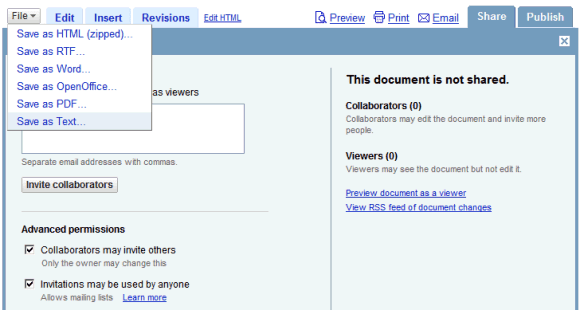
There's a new file format for exporting documents: plain text, especially useful if you use Google Docs to edit code collaboratively.

For Hebrew and Arabic documents and spreadsheets, you can make the page text align right-to-left in the settings.

May 3, 2007

Upcoming Gmail Features

Gmail's translation messages include a lot of references to features that were tested and might be released to the public. Among them:

* Skip spam classifier as an action for a filter.

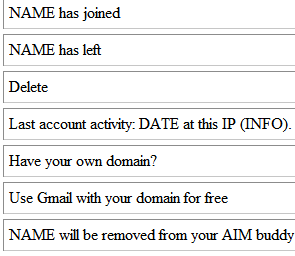
* Information about your login: "This account is open in N other locations", "Last account activity".

* Attach inline images.

* View attached images as a slideshow.

* Multi-user conversations in Gmail Chat.

* Integration with AIM in Gmail Chat.


{ Via Google Blogoscoped. }

Monitor Network Connections

URL Snooper is a free Windows software that lets you monitor your network connections and see the addresses of all the files that are downloaded to your computer and all the addresses from HTML files.

The program was created to identify the URLs of audio/video streams. "Many links to streaming audio and video that you come across on the web are hidden behind JavaScript or ActiveX scripts. Because of this, it is sometimes very difficult to figure out the actual URLs that correspond to the streams being played."

But the software is also useful if you want to see the files downloaded by a program you've just installed. Or if you're wondering why Google Desktop needs an Internet connection. You can see in the screenshot above that Google Desktop connects to google.com to read a list of localized domains, the files for the Safe Browsing feature and to download information necessary for the gadgets (weather, news, etc.).

Better Notifications in Google Calendar

The beautiful Google Calendar has a better way of managing reminders. Now you can set reminders for individual events, even if they aren't on your primary calendar.

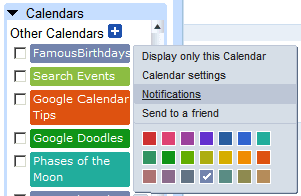
For each calendar, you can set what notifications you want: pop-up window inside Google Calendar, email, SMS, or a combination of all of these. Just click on the arrow next to each calendar from the left sidebar and select "Notifications", then add up to 5 event reminders. In order to receive SMS messages, you need verify your phone number first.


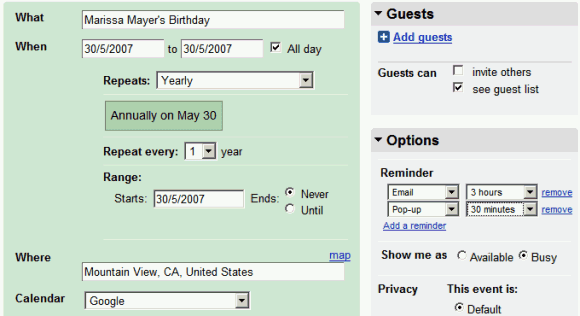
But if you have special events that require a different kind of reminder, you can set it when you create an event in the Options section.

Yahoo's Web Messenger

In March, Google introduced an online version of Google Talk that extends the limited features previously available in Gmail. Yahoo didn't want to give yet another competitive advantage to Google, so they integrated the IM into Yahoo Mail and now offer a standalone version of Yahoo Messenger for the web.


Like Google Talk gadget, it's built in Flash, each conversation opens in a new tab inside the same window, you can find a contact and see his status. Yahoo's web messenger saves all your conversations and makes the history searchable from the same interface. Google Talk saves your conversations from any client, but the history is only available in Gmail.

While Google Talk's gadget is compact and can live inside your personalized homepage, in a new window or in your browser's sidebar, the new Yahoo Messenger for the web adopts the Meebo style of occupying and entire page. If you don't trust third-party clients like Meebo and most of your friends use Yahoo Messenger or Windows Live Messenger, the new interface can be useful when the desktop client is not installed or is blocked.

May 2, 2007

Yahoo Lets You Delimit Unimportant Content From a Page

I wrote last year a post about content separation that suggested a way to separate the main content of a page from other content that's not very interesting. Most of the elements of a template (navigation, footer etc.) could confuse search engines into thinking a page talks about something else than it does. As a result, a page could end up ranking well for unrelated queries and not so well for the right queries.

As a solution for this problem, Yahoo introduces a 'robots-nocontent' class that can be added to any HTML tag.

"This tag is really about our crawler focusing on the main content of your page and targeting the right pages on your site for specific search queries. Since a particular source is limited to the number of times it appears in the top ten, it's important that the proper matching and targeting occur in order to increase both the traffic as well as the conversion on your site. It also improves the abstracts for your pages in results by omitting unrelated text from search result summaries.

To do this, webmasters can now mark parts of a page with a 'robots-nocontent' tag which will indicate to our crawler what parts of a page are unrelated to the main content and are only useful for visitors. We won't use the terms contained in these special tagged sections as information for finding the page or for the abstract in the search results."

While this could be useful to reduce the importance of unrelated parts of your site (like AdSense's section targeting), I can't stop wondering if this isn't the search engine's job. For example, Google can detect the navigation links from a page (you can notice this if you use the mobile version), but I don't think it minimizes the importance of the keywords used in that area.

May 1, 2007

Export All Your Documents from Google Docs

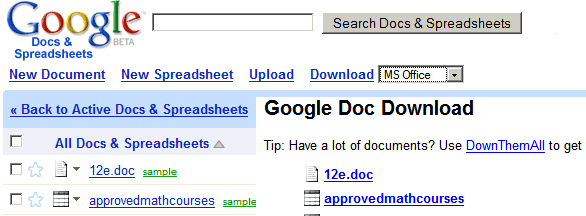
Google Docs & Spreadsheets doesn't provide you a way to export all your files at once. But if you use Firefox, there's a Greasemonkey script that creates a page with links to downloadable versions of your documents and spreadsheets.

You need two extensions: Greasemonkey and DownThemAll, probably the best download manager for Firefox (or other extension that downloads all the files linked from a page). After installing the extensions and restarting the browser, add this script and go to Google Docs. You'll see a new link at the top of the page: Download and a drop-down from which you can choose the format for the exported files. Then right-click and select DownThemAll, check "All files", choose the output folder and click on "Start". If some of the files fail to download, select them and click "Resume" in the download window.


Related:
Batch upload files to Google Docs

{ Via Blogoscoped Forum }

Who's Watching This YouTube Video?


YouTube has a cool new feature in their labs. It's called Active Sharing and it lets you see other users that have enabled the feature and watch the same video as you. If you click on the username, you can see the profile and the last six videos they watched. This can be deactivated at any time, but it's pretty useful if you want to discover people who collect cool videos and subscribe to their channels.

In case it crossed your mind to use Active Sharing to track the videos watched by someone, YouTube says you can't. "YouTube respects your privacy. This information only shows to other YouTube users for 30 minutes, so get busy and show off your good taste!"