An unofficial blog that watches Google's attempts to move your operating system online since 2005. Not affiliated with Google.

Send your tips to gostips@gmail.com.

September 4, 2006

Gmail Keyboard Shortcuts (Printable Version)

If you receive a lot of mail, you'll be more productive in Gmail if you use keyboard shortcuts. A list of the shortcuts is available from Google, but Evan Williams has reformatted the list so it's easier to print it in one page. Don't forget to enable "keyboard shortcuts" in Gmail's settings.

Gmail shortcuts, printable version

Related:
Compose messages in Gmail efficiently
Fast ways to check your Gmail account

Fake Pictures Generator


This site lets you create your own concert tickets, vinyl records and bubble quotes from celebrities. You can write your wise thoughts and choose from a variety of templates. Then you download the pictures and send them to all your co-workers. I'm sure you'll find people who think your generated pictures are funny.

September 3, 2006

Personalized Start Page For Organizations


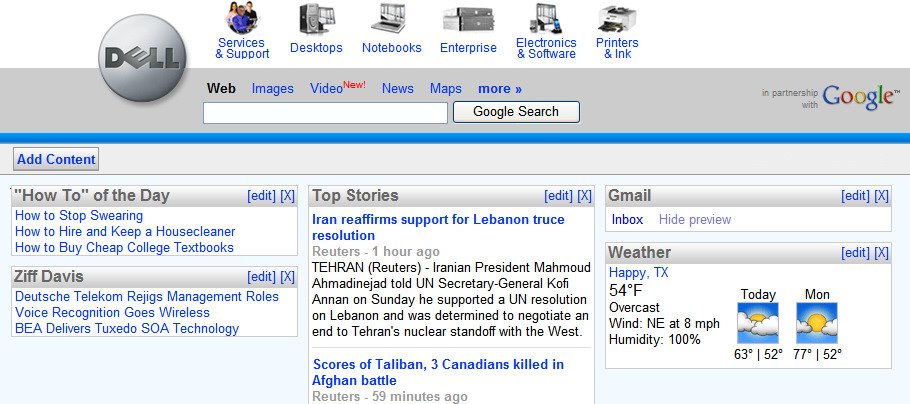
I've always liked one thing about Netvibes: you can create more than one personalized page and share it with other people. Google Personalized Homepage doesn't allow you to do that yet, but Google has teamed up with companies like Dell to provide co-branded start pages.

It seems that you don't have to be a big partner with Google to create a shared personalized page. Google will add to its newly-launched corporate package a personalized start page.

"The personalized start page is a syndicated version of the Google personalized homepage, allowing you to set up dynamic homepages for your users that bring together your content, Google services, and the best of the web.

The personalized start page uses the same technology as the Google's personalized homepage, but lets you create a customized version of the page that is tailored to your users. Combine your own content with additional external content and modules of your choice, and tailor the look and feel of the page with different logos, colors, and fonts. End users of the page still have the ability to incorporate any content from the web, or any Google Gadget, enabling them a degree of customization over the content of the page."

What's interesting is that administrators can add AdSense ads to the page. The personalized start pages will have this address: http://partnerpage.google.com/ig/p/your_domain_name . More at Google's help page, which explains that only selected users can have this feature for the moment.

The start page could be the one-stop place for all the members of an organization: it will mix personal information (mail, news) with corporate information (news, resources) and Google search. A really useful fusion.

{ Via Blogoscoped. }

Google Turns Over Data About orkut Users

Google is about to do a small evil for a greater good. Google has agreed to turn over data to Brazilan Government about some orkut users "that encourage racism, pedophilia and homophobia". This way, they comply with a Brazilian court order.

Google says the differences between this case and the request from the Department of Justice are the scale and the purpose.

It should be noted that US Government wanted that information "to make its defense of the Child Online Protection Act, a federal law designed to keep children from sexually explicit content on the Internet". At least, that's what they said.

And unlike DoJ's request for anonymous data, Brazilian Government wants specific information: "The Brazilian authorities are particularly interested in Internet protocol addresses with time and date stamps that can help trace a specific user. Registration information Google could provide includes names and e-mail addresses."

I don't defend the criminals, but Google should remember there's a thin line between being compliant to Government's request and breaching user's privacy. When Google has strong profiles for its users, I know some people interested to mine that information.

September 2, 2006

How Google Image Search Might Look

Google started to use a game similar to The ESP Game to improve its image search engine. The addictive tool lets people contribute with valuable information and tag the millions of images from Google's index.

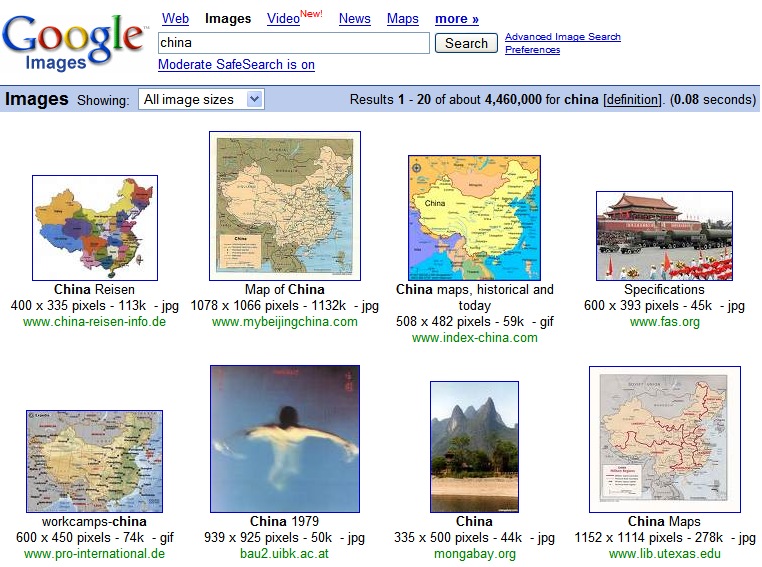
So how will Google Image Search look if Google uses the keywords obtained from the game? Here's ESP Image Search, a search engine based on the data from The ESP Game. Unfortunately, this search engine has a small index (around 30,000 images).

So, let's compare.

Image search for "China" on Google:


Image search for "China" on ESP:


The search engines have different sets of pictures and ESP shows the results randomly. However, it has better results.

Open Source Windows-Like Operating System


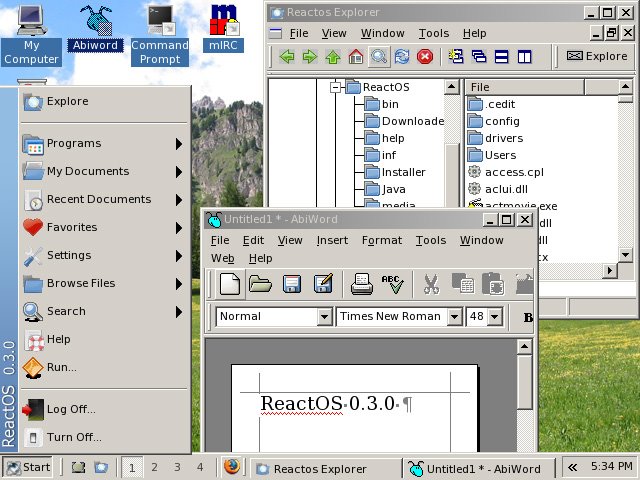
Last month, the third major version of an operating system was launched. This version added the ability to connect to a network. The operating system, whose name is ReactOS, has been trying for 10 years to become the first Windows-like OS that's also free. ReactOS wants to become binary-compatible with Microsoft Windows applications and drivers.

Although it's still in alpha, the operating system runs many applications (mostly using Wine), including Notepad, Firefox, Opera, mIRC, AbiWord, Explorer-like file manager, and even games like Quake or Unreal Tournament.

The GUI is similar to the one from Windows 2000 and you can use something similar to Windows command-line.

The OS is more like a proof-of-concept now, but you can try it for yourself to see how good it is. I plan to burn a LiveCD to test it, as it's not a good idea to install an alpha operating system.

More screenshots | Flash demo | Review

{ Via Digg. }

On Bookmarks

Wikipedia says: "Bookmarks are pointers — primarily to URLs — built-in to most Internet web browsers. The primary purpose of bookmarks is to easily catalog and access web pages that the web browser user has visited or plans to visit, without having to remember the page URLs or rely on other computer programs."

Many, many years ago, there was a single way you could bookmark a page: using the browser's Bookmarks/Favorites menu. But this option wasn't so good. What if you use more than one browser? What if you use more than one computer? What if you have too many bookmarks? Then you have to import/export them or find a software to do that for you.

Now we have online solutions like del.icio.us or Google Bookmarks. del.icio.us offers you public bookmarks (by default), while Google has only private bookmarks. I think Google is on the right path as bookmarks should be private and searchable. Unlike del.icio.us, where you can only search the descriptions, Google Bookmarks lets you search the page content. But no solution is good enough.

(1) Bookmarks shouldn't need tags or folders

Why should I tag a page that has a title, plenty of content and links from other pages with content? There's enough information for the page.

(2) Bookmarks should be integrated into the browser

The same way you can subscribe to feeds in Firefox 2.0, you should be able to bookmark pages from the Bookmark menu. You wouldn't need extensions, bookmarklets, toolbars and links in blogs.

(3) Bookmarks should be synchronized

You should save a bookmark in your server of choice and your browser should save a copy locally. Then, from time to time, the bookmarks should be synchronized. This way, it would be easy to change your provider and you'd have more control over your bookmarks.

(4) Bookmarks should be invisible

I don't want to see a huge list of bookmarks in my browser. In fact, all I want to see is a search box, so I can search bookmarks using my online provider.

(5) Bookmarks should not only be web pages

You should be able to bookmark only some content from a page and annotate it.

(6) Bookmarks should be cached

Sometimes web pages disappear or are radically modified. A bookmark service should cache at least one version of the web page.

(7) Bookmarks should be easy to create

All I want is to click a button, the same way you do now in Google Toolbar, but I want to do the same way in any browser, on any platform, for any provider.

(8) Bookmarks should be searchable

I want my own search engine, that searches only my bookmarks. Google already does that.

(9) Bookmarks should be private by default

Sites could use aggregated information about bookmarks, but they shouldn't make bookmarks public by default.

(10) Bookmarks should be shared through lists

If I want to share some of my bookmarks, I could create a list using search. The list could be public or password-protected.

The closest to these simple rules is Google Bookmarks, who already does (7)-(9). The rest of my wishes are still far from being implemented by a single social bookmarking system or browser.

Google Bookmarks can be accessed:
* in Internet Explorer, using Google Toolbar
* in Firefox, using GMarks, a 3rd party extension
* with a bookmarklet, available at the bottom of this page.
September 1, 2006

Play Google Video Files In Windows Media Player

I'll tell you a secret: what I like about this blog is that I can say stupid things, or small parts from the truth, and then other people may tell the truth or share the whole picture. And it's not that I intentionally say stupid things or parts of the truth.

When I wrote Download Google Videos as AVI, I heard that Linux users had a direct link to AVI files in Google Video. Then I looked in the code from video.google.com and discovered that Google hides the link from Windows users, so they have to download Google Video Player. I really like bookmarklets, so I made a simple one to launch the download of the AVI file. And it seemed OK. But people started to say they can't play the video. Then I realized that the video works only in Media Player Classic, MPlayer, but not in Windows Media Player. The real problem was that Google adds a small header in the file, and most players (including WMP) don't like that.

Then I found (in the comments of the post) a really nice site that has a lot of tips about downloading videos from Google Video, YouTube and other video sharing sites. It even has a super-bookmarklet that works with all these sites. There are also utilities that remove Google's header and transform the video into a regular AVI file. My favorite converter is GVI2AVI, a small portable software (44k) that requires the .NET Framework.

What I wanted to say in this post is that you can make a small step and then discover that others have already discovered the whole truth. But that's OK, everybody's gotta learn sometime.

The Paper About Bigtable

The paper about Bigtable, a new kind of distributed database and one of the most interesting Google innovations (next to Google File System and MapReduce), is available:

"Bigtable is a distributed storage system for managing structured data that is designed to scale to a very large size: petabytes of data across thousands of commodity servers. Many projects at Google store data in Bigtable, including web indexing, Google Earth, and Google Finance. These applications place very different demands on Bigtable, both in terms of data size (from URLs to web pages to satellite imagery) and latency requirements (from backend bulk processing to real-time data serving). Despite these varied demands, Bigtable has successfully provided a flexible, high-performance solution for all of these Google products. In this paper we describe the simple data model provided by Bigtable, which gives clients dynamic control over data layout and format, and we describe the design and implementation of Bigtable."

BigTable is used by many Google services, including Google Analytics, Google Finance, Orkut, Personalized Search, Writely, and Google Earth.

Google Image Labeler

Update (2013): the site is no longer available.


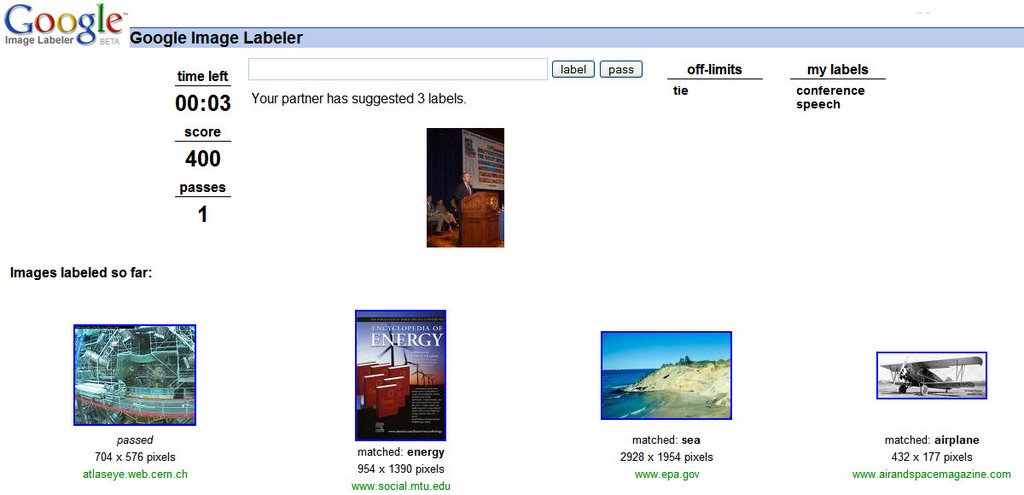
Google Image Labeler is a place where you can help Google improve Google Image Search by tagging images.

It's similar to what you do in Google Video. But Google transformed this boring activity into a nice interactive game. Everytime you login, Google finds you a partner and shows you the same images for 90 seconds. The first label found by both of you is considered a good answer and brings you 100 points (while two people can both fail in finding a good label, the probability is much smaller than for one person). After the time expires, you can see where the images came from and what were your partner's labels. And then you can start again, as the game is addictive.

The same images will be shown to other people, so, in the end, the images will keep only the best labels. This way, when you search for "car", you'll only find pictures of cars. I wonder if Google intends to use the labels directly or it's just a test for their recently acquired object recognition system.

A similar game is The ESP Game and this was the inspiration for Google Image Labeler. Here are the rules of the ESP Game:

* two-player online game
* partners don't know each other
* partners can't communicate
* the goal: type the same word
* only thing in common: an image