An unofficial blog that watches Google's attempts to move your operating system online since 2005. Not affiliated with Google.

Send your tips to gostips@gmail.com.

June 15, 2007

Developing Google Docs & Spreadsheets

Jonathan Rochelle, product manager at Google Docs & Spreadsheets, gave a presentation about Google's online office suite at FOWA 07, in February.

The spreadsheet product came from 2Web Technologies/XL2Web, while the other half is the result of acquiring Upstartle/Writely. In October 2006, the two products merged and in February Google Docs & Spreadsheets was already available in 14 languages. Mr. Rochelle mentioned that they opted for this boring name to make the features transparent to the user even before using the application.

The product's main goals were:

* to have a familiar interface

* to be accessible from anywhere

* to add real-time collaboration

* to create communities around documents

* to let you publish documents on your site

Google Docs only took off after they added the new interface which was easier to use. They also had to choose between "rich conflict resolution or simple 'trust me' collaboration. Professional users need rich controls but most people didn't complain about the 'trust me' version." One of the most important thing they focused on was the performance: they even removed unused features to improve the speed (for example, a way to pan the spreadsheet like a map).

Even if Google plans to add more advanced features, some of them could be implemented by third-parties using an API.

The full presentation is available as an MP3 (38 MB) or using Gmail's MP3 player:

June 14, 2007

Comment Spam in Blogger

"Hi, Added a new value add to my blog this weekend - a news widget from www.widgetmate.com. I always wanted to show latest news for my keywords in my sidebar. It was very easy with this widget. Just a small copy paste and it was done. Great indeed."

Blogger doesn't offer an option to detect spam comments. The only options you have are to add a captcha to prevent automated spam or to moderate the comments, but that takes away from the value of an instant feedback. Even if Blogger adds rel=nofollow to all the links from comments and you don't improve their ranking in the search engines, "bloggers" like Addison post the same spam comment every 5 minutes to promote some mediocre widget site. Because Addison posts the comments manually, he can enter the captcha correctly.

But Blogger could at least check if similar comments were posted to a single blog multiple times. Or use the Akismet model.

It's always surprising to see how a company that actively fights against web spam is defeated by some comment spammers that use cheap methods to promote their latest widgets.


YouTube Redesigns and Moves to Google Accounts

After updating their embeddable player, YouTube experiments with a new layout for the site. The new design places the search box in the center, moves the metadata below the video, makes it easier to rate the video and to find other related videos. There's also an option to embed a video using the old player.

To get the new interface, add &v3 at the end of a YouTube URL, like for this video.


YouTube also added to the homepage a list of videos that are being watched right now using active sharing, cleaned their search results and included a new option to view the results as thumnbnails.

But more importantly, you can now use your Google account to login to YouTube. You can link an existing YouTube account to a Google account or create a new one, but you'll still be able to use your YouTube credentials, so this is more like a temporary solution.


The login page proudly lists YouTube's features:
  • Upload, tag and share your videos worldwide
  • Browse millions of original videos uploaded by community members
  • Find, join and create video groups to connect with people with similar interests
  • Customize your experience with playlists and subscriptions
  • Integrate YouTube with your website using video embeds or APIs

June 13, 2007

Blogger Adds Video Uploading

Blogger has a place where you can test new experimental features: it's called Blogger in Draft and it's available at draft.blogger.com. Everything will look the same as the normal Blogger, but you may discover new features or new interfaces that aren't yet ready to be released to the general public. There's even a new blog that promises to keep us up-to-date with the new functionalities. "Features on Blogger in draft may be updated, changed, re-imagined, transmogrified, or removed at any time. Draft gives us the freedom to see what works and what doesn't before we turn a feature on for everyone, so expect us to make changes — hopefully you'll think they're for the better!"

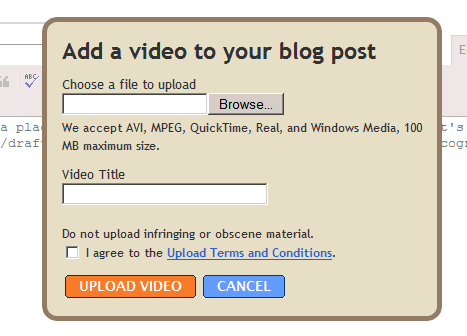
The first feature added to Blogger's labs is video uploading: you're now able to upload videos directly from Blogger's editor. After you click on the video icon, you only need to select a video from your computer and to enter a title.


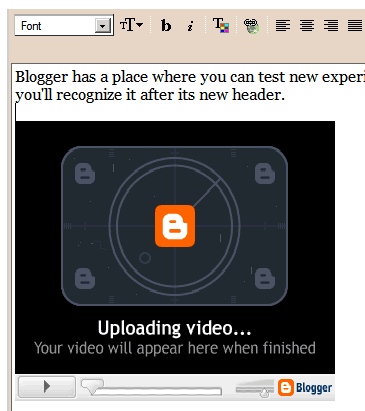
The video will be uploaded to Google, but until it's ready you'll see this nice placeholder:


You can continue to edit the post during the upload, but you can't publish it until the upload finishes. The video can be aligned and resized in the rich-text mode and that's a good idea since the initial size is very small.


Google hides the details of the implementation and includes this obscure code in your post that depends on some JavaScript to actually work:

<object id="BLOG_video-b1ce175e95d1aa16" class="BLOG_video_class" contentid="b1ce175e95d1aa16" height="255" width="291"></object>

The videos don't seem to be uploaded to Picasa Web Albums and they're not available at Google Video either, so it's unclear how you can reuse them or share them. Blogger mentions that "your videos are kept private and will not be included in Google Video search."

Update (August 24): the feature is now available at Blogger's main site.

Google Frames a Video Search Engine

Google Video, now a video search engine, shows a frame similar to the one from Image Search when you click on a search result. The frame lets you rate the video, share it, and watch related videos. You can also watch the previous or the next search result by clicking on the arrows and perform a new search. If you don't like losing a big part of your screen with redundant features, there's an option to collapse the top frame.

The frame appears for videos hosted at Google Video, for YouTube videos and for other third-party sites. It's interesting that Metacafe uses JavaScript to break the frames, so you'll see a redirect going on after clicking on a search result.

Google Video indexes videos from tens of video sites, including Metacafe, iFilm, Grouper, Yahoo Video, MySpace, Break.com, Daily Motion, Vimeo, Veoh, AOL Video, Jumpcut, Revver, Guba, BBC, but YouTube dominates the search results. Google Video shows previews for videos hosted by Google's sites (YouTube and Google Video) and thumnbnails for Metacafe, Break.com and Veoh videos. With around 60 million videos in its index, Google Video says it's "the most comprehensive [video search engine] on the Web, containing millions of videos indexed and available for viewing. Using Google Video, you can search for and watch an ever-growing collection of TV shows, movie clips, music videos, documentaries, personal productions and more from all over the Web."

Site
Number of videos (estimation)
YouTube
42.5 million
Yahoo Video
3 million
Google Video
2.3 million
My Space
2 million

All in all, Google Video wants to keep its visibility and to compensate for the lack of information about some of the videos, but ends up duplicating features that are already available at most video sites and cluttering the page. It's also much difficult to find the actual link to the original site. Of course, the related videos have a wider scope, while the "email this video" feature uses your Gmail address book.


{ Thank you, Nimish and Will. }

Google Analytics Restores Missing Features

Google Analytics polished its offering by adding some small new features. Now you can actually click on the external pages from the reports, so you don't have to build the URLs from scratches.


The same reports let you see up to 500 rows, like in the previous version of Google Analytics, while the reports related to visitors restored the per-hour view.

Other updates include:
* It's now easier to add an AdWords account to an existing Google Analytics account.

* Bounce rates measurements have had their colors changed for visual consistency. A decrease in bounce rate is now colored green to match other positive changes, while an increase in bounce rate is colored red like other negative changes.

* Cross-segmenting by Network Location has been added to the standard list of segmentation options throughout the interface.

The new interface lets you see more information at a glance, but also drill down more effectively in the reports. It will be interesting to see if Google decides to release a new version targeted to blogs (that expands Measure Map and adds FeedBurner reports for feeds) or Google Analytics will integrate everything in a single package.

Super-Powerful Custom Search Engines

Google's custom search engines have received a huge upgrade. Now when you add a site to your search engine, you can also include all the pages linked from that site. So even if you use the custom search engine only for a single site, you can transform it into a whole ecosystem of pages relevant to your site.

All you have to do is choose the option to "dynamically extract links from this page and add them to my search engine" for your site. You have three options: include only the individual pages linked from your site, include the subdomains or the entire sites, even if you only link to a page.


If you don't have this feature you can test it at this page or in this blog's search box.


A search for "Safari" returns the homepage of Apple's browser and a site that offers a way to preview a site in Safari before my post about Safari and that's a fair enough. That post linked to both sites that are ranked higher.


The feature has already been available in Lijit, a site that let you "easily create your own search engine, which searches your blog, blogroll, bookmarks, photos, and more", but now it's a simple option in Google Co-op. Here are the results for "Safari" in a custom search engine built using Lijit.

You can use this for feeds, directories or for sites that collect a lot of interesting links. Bloggers could dig deeper in their archives and rediscover useful links, while readers have more comprehensive search results.

An important drawback is that if you enter the homepage of a site, Google will retrieve the links only from that page, even if it will continue to monitor it for new links. Also the search seems to be somewhat slower and the results may appear diluted.

But, as the Custom Search blog says, lazy people can rejoice. "If you have a blog or a directory-like site and don't feel like listing all of the URLs you want to search across, you can leave the work to us. With this new feature we'll automatically generate and update your CSE for you."

June 12, 2007

Unlimited Number of Tabs in iGoogle


Google's personalized homepage* removed the strange limit that let you add only six tabs. The performance doesn't decrease if you add too many tabs because each time you click on a tab it's like opening a new web page. By default, Google loads the most popular gadgets related to the title of a tab, so you don't have to browse the directory to add new feeds and gadgets. A cool way to find new gadgets and to preview them is the Gadget Preview Browser.

Now when you try to add a gadget from outside, there's a new page that offers related gadgets and an option to "see this gadget when you visit Google.com". I wonder what that means.


* When iGoogle was called "Google Personalized Homepage", I wanted a shorter name. Now iGoogle sounds too flaccid to be taken seriously.

RealPlayer 11 Lets You Download Videos from the Web

The much-hated RealPlayer will get an upgrade that adds an easy way to download videos from the web, a slicker interface and a friendlier relationship with your computer. "The new RealPlayer gives consumers more control of Internet video than was ever possible before. By floating a download this video button next to video seen on thousands of Web sites, RealPlayer makes it one-click simple," said Rob Glaser, chairman and CEO of Real in a press release.


The feature works for video streams and for most video formats available online (Flash, Windows Media, QuickTime, and Real), including those hosted by video sharing sites like YouTube. The same YouTube whose terms clearly state that "you will not copy or distribute any part of the Website in any medium without YouTube's prior written authorization". The same YouTube that sent a Cease & Desist letter to TechCrunch for hosting a tool that downloads videos from YouTube.

In the meantime, Real Player is a part of Google Pack and Real has some distribution deals with Google. It will be interesting to see if Google/YouTube tolerates this. I know there are many sites that let you download FLV videos from YouTube and even extensions that integrate with those sites, but RealPlayer will definitely be more visible.

Although the application will be officially released at the end of the month, Cybernet News managed to find it at this address [13.3 MB, Windows].

Initiative for Energy-Efficient Computers

Intel and Google announced a partnership with 25 companies and organizations: Climate Savers Computing Initiative. "The goal of the new broad-based environmental effort is to save energy and reduce greenhouse gas emissions by setting aggressive new targets for energy-efficient computers and components, and promoting the adoption of energy-efficient computers and power management tools worldwide."

Urs Hölzle from Google mentioned that a desktop PC wastes half of its power, a server wastes one-third of its power and 90% of the computers don't use power management settings.


The group hopes to improve the energy efficiency by 50% until 2010 and to reduce the CO2 emissions from computers by 54 million tons per year (equivalent to the removal of 11 million autos or planting 65,000 km2 of trees).


The initiative will try to improve the Energy Star requirements. "Our Initiative starts with the 2007 Energy Star requirements for desktops, laptops and workstation computers—including monitors—and gradually increases the efficiency requirements over the next four years. The Initiative's standard for these machines, which takes effect in July 2007, requires power supplies to be at least 80% efficient for most of their load range. It also puts limits on the energy used by devices when inactive, and requires systems to be shipped with power-management features enabled."

An energy-efficient computers will cost $20-$30 more, but the energy savings will offset the cost in the first two years. As more computers will be sold, they'll become a standard and you won't see any premium price for them. So the next time you buy a computer, make sure it has the Energy Star logo or other distinctive mark that identifies energy-efficient equipment.