An unofficial blog that watches Google's attempts to move your operating system online since 2005. Not affiliated with Google.

Send your tips to gostips@gmail.com.

August 25, 2007

Google Apps, Not Yet a Mature Enterprise Solution

An interesting report from Burton Group titled "Google Apps in the Enterprise: A Promotion-Enhancing or Career-Limiting Move for Enterprise Architects?" (it's available as a PDF, but requires free registration) analyzes if the business edition of Google Apps is a good solution for the corporate environment.

The report starts with a short description of Google's offering: "Google Apps Premier Edition (GAPE) is a SaaS-based solution; a member of the Google Apps family; a collection of applications, application programming interfaces (APIs), third-party applications, and support; and supplied by a company where historically selling to the enterprise has been a corporate sideline." Google doesn't make too much money from enterprise products and it tries to adapt consumer-oriented applications to the corporate needs. "Only if and when the enterprise division stands architecturally on its own will Google be able to compete head-to-head with competitors who have focused on the enterprise from the beginning," suggests the report.

Google Apps is presented as a "lite" replacement for Microsoft Office and a basic option for an enterprise content management system or a collaboration suite. Google Apps can't address the needs of Microsoft Office power users, doesn't offer tools for document archiving, records management, stats, content policies. It also lacks collaboration tools like video chat, web conferencing, workspaces for collaboration, wikis, forums, although some of these will be added in the near future.

Google "has a history of releasing incomplete products, calling them beta software, and issuing updates on a known only to Google schedule. Furthermore, some companies are leery of entrusting their corporate documents to a company that makes its living from analyzing content and displaying it to the world. To these companies, keeping information secure seems at odds with Google's emphasis on information sharing."

Here are the product strengths, according to the report:
* Don't need to pay for unnecessary power user licenses
* No software to install, and no continual updates
* Minimal, if any, training required
* Relatively easy to include workers outside the enterprise
* Online documents are not scattered on C drives or fileshares
* Integration of past application silos

... and here are the weaknesses:
* Power users and sophisticated documents are not supported
* Records management is difficult and requires extra work
* 99.9% uptime guarantee is for Gmail only
* Google is not liable for lost data, profits, or revenue
* Live telephone support is 17/5
* Difficult to plan for product capabilities and rollouts

To be fair, the text from the service agreement is very similar to Microsoft Office's terms: "In no event will Google or its licensors be liable for any indirect, special, incidental, consequential, exemplary or punitive damages, including but not limited to damages for lost data, lost profits, lost revenue or costs of procurement of substitute goods or services, however caused and under any theory of liability."

The conclusion is that Google Apps is not yet a mature solution and companies should wait until Google or other competing software-as-a-service suites become more powerful:
Google has caught the attention of enterprises with its inexpensive Google Apps Premier Edition (GAPE) product: available at $50 per user per year. However, the seductive price can spell trouble for enterprise architects and their companies if they don't do their homework: the solution's rudimentary feature set means that enterprises need to pick carefully and implement slowly.

While Google's entrance is adding momentum to using software as a service (SaaS) for communication, collaboration, and content management, it's unclear at this point whether Google will be able to capitalize on the trends that it's accelerating.
August 24, 2007

Explore the Sky in Google Earth

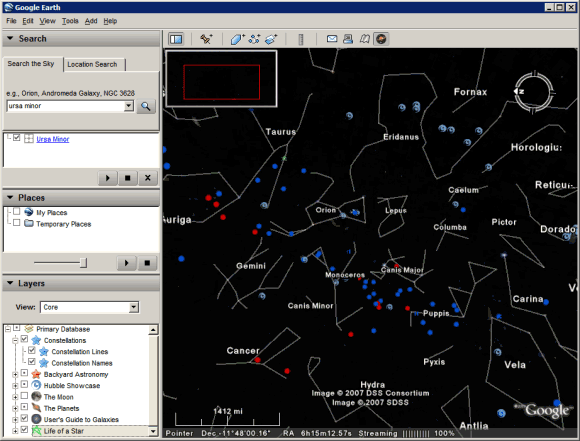
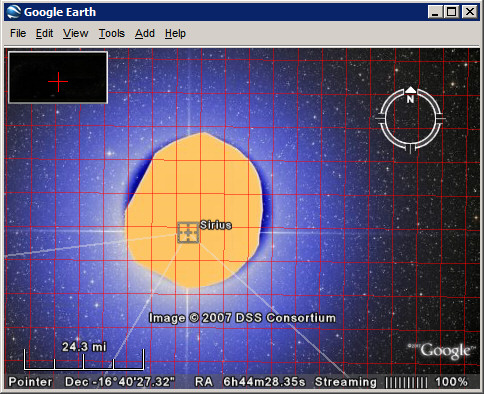
Google Earth goes beyond its initial purpose and has a new feature that lets you explore the sky. The latest version (Google Earth 4.2) brings what could've been a separate program for rendering the sky, like Stellarium.

After launching the application, click on the black rounded icon from the toolbar and switch to the sky mode. Google Earth shows the sky from the current location and becomes a virtual telescope for amateur stargazers.

"This easy-to-use tool enables all Earth users to view and navigate through 100 million individual stars and 200 million galaxies. High resolution imagery and informative overlays create a unique playground for visualizing and learning about space," explains the press release.

The layers include a lot of interesting information about stars, constellations, galaxies, images from the Hubble Space Telescope.


"Never before has a roadmap of the entire sky been made so readily available. Anyone interested in exploring the wonders of our universe can quickly see where the stunning objects photographed by Hubble actually dwell in the heavens. Sky in Google Earth will foster and initiate new understanding of the universe by bringing it to everyone's home computer," said Dr. Carol Christian from the Space Telescope Science Institute.

Add Google Maps to Your Site

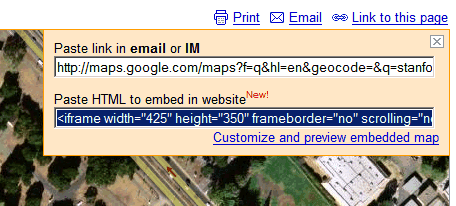
As promised last week, Google Maps lets you embed interactive maps and other geographical content without using the API. You just go to Google Maps, find the desired location, click on "Link to this page" and copy the code from the second box. The only customization option lets you change the size of your map and preview it.


What you can embed: maps (normal view, satellite, hybrid mode), local search results, driving directions and personalized maps. You can't embed: street view imagery, information about traffic and mapplets.

This feature is useful if you want to place a map with driving directions next to the address of your business or to showcase some interesting places using a KML file. For example, the map below shows the most important colleges and universities from the US. If you click on the placemark, you can see the name of the institution. The map was generated from a KML file found using Google Maps.

August 23, 2007

New orkut Interface

orkut's blog promises a new interface for Google's ugly social network. "The one comment we always hear is how orkut's simplicity keeps long-time users coming back and new people signing up. So as we work away planning improvements to the site, we always keep this in mind."

orkut has recently changed the homepage and will launch a revamped interface in the weeks to come. "The change isn't live yet, but starting soon, we will start rolling-out the new look. To start, we will roll it out to a small group of users randomly selected, and will continue to do so until everyone is on the new site."

If you don't see the new interface yet, here's how it looks like: colors are warmer, orkut has rounded corners, the new icons are lovely and there are even touches of AJAX. The conclusion: orkut is not ugly anymore.


YouTube Experiments with Video Ads


It was obvious for everyone that Google payed $1.65 billion for YouTube to gain access to a great platform for testing and distributing video ads. The problem is that many YouTube users hate ads and if they had to watch a 15 second commercial before every video, they'd leave YouTube for another video site.

Google's solution, very similar to VideoEgg's ticker ads, is to overlay a small ad at the bottom of a video for about 10 seconds. If you click on the ad, a new video will open in the same player and show you more information about the offer. Once the video ad ends, you can continue to watch your video. The beauty is you can simply ignore the ad, although it takes some time to get used to the small animation.

A comment from YouTube's blog brings an interesting point:
I have a problem with the in video ads for one reason, and that is that they would disrupt and obstruct content. As an artist who sometimes works with digital video, I realize that the choices made in framing a shot are very important. Everything in the frame at any given moment during a video is important to that video's composition and appeal. For this reason I feel that InVideo ads would be a disruptive and negative addition to the Youtube experience. I would suggest instead that adds could be placed at the end of the video, instead of the rolling related video reels.

The ads are still an experiment and won't be added to user-generated videos.

"For now, Google will place the ads only on video clips of its content partners — the more than 1,000 small and large media companies that have licensed their videos to YouTube. By doing so, YouTube will avoid the potential liability of having ads appear on copyrighted clips it is not authorized to display. And it will also prevent ads from playing on clips generated by users whose message may not be to the liking of advertisers. The revenue from the ads will be split between the media partner and YouTube. Ms. Naughton said Google would charge advertisers $20 for every 1,000 times the ads were displayed. Google said the ads would begin appearing today throughout the site. Ms. Naughton also said advertisers would be able to take aim at specific channels and genres, as well as demographic profiles, geography and hour of the day," reports The New York Times.

You might be able to spot the overlay ads in this video. Here's a short demo from Reuters:


The ads were also spotted last month:


YouTube also added new community features: now you can display on your profile page the latest videos you've rated and the comments have a Digg flavor: you can rate them and see only the top-rated comments.

Google News Shows Videos

Google News becomes more interactive by adding video content from important news sources like: CBS News, Reuters, BBC News, but also from smaller sources. If there's a video related to a story, you'll see a link that lets you play the video without leaving the page. All the videos are hosted by YouTube and Google's explanation is that "it can often be difficult to play videos on the Web due to a wide variety of video players and downloads required," while YouTube videos are more accessible.

Videos are treated the same way as articles, even if they have less information readily-available. "We crawl any information included with each video, and then group and rank each of them as we rank an article."


After months without any new feature, Google News had many small upgrades this year: an image version, comments from people involved in a story, information from Google Finance that will make Google News more useful.

August 16, 2007

Customer Satisfaction and the Swiss Army Knife

A lot of blogs and newspapers discuss a rather boring news: "for the first time, Google has lost its crown to Yahoo as the highest-rated search and portal site in a key customer satisfaction survey", namely ACSI. The scores are so close that it's difficult to draw some conclusions (Yahoo: 79, Google: 78, MSN: 75, Ask.com: 75), but Google is the only one that lost some points.

So why aren't customers satisfied with Google? "The average consumer that goes to Google today doesn't see anything different than from three years ago," thinks Larry Freed, president of Foresee Results, and he's right. Google's sparse homepage continues to stand out from the rest of the crowd and it has a lot of admirers: it loads fast, it shows exactly what you want (a search box) and it's not intimidating.

But Google users have many opportunities to find out about Google products: from the new menu bar to the OneBox results, from the extended snippets to Google Toolbar, from the personalized homepage to the impressive press coverage Google gets. For example, you can discover Google Docs in many ways: you may see a link next to a Gmail attachment, receive an invitation to collaborate on a document, click on the link from Google's homepage or find an option in Google Toolbar. People should discover a product naturally.

Google's main problem is to make people realize that it's more than a search engine and that could be solved by packaging all its non-search services in Google Apps, integrating them and distributing them as a suite of online communication tools.

"Google falls by 4% from a year ago to a score of 78. Its year-to-date stock returns have been about market average - a far cry from the explosive growth after going public in 2004. Google also missed its most recent earnings forecast. For a company that has introduced so many new products and made so many changes, it may be surprising that its homepage has changed so little. It is almost the same as it was in the 1990s. Some users say it looks stale compared to Ask.com, which has a very different display of search results," says Professor Claes Fornell from the University of Michigan.

And here's a nice quote from a 2002 interview with Google's Marissa Mayer:
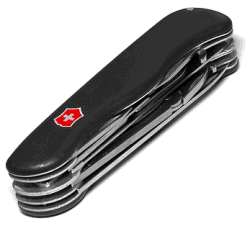
I think Google should be like a Swiss Army knife: clean, simple, the tool you want to take everywhere. When you need a certain tool, you can pull these lovely doodads out of it and get what you want. So on Google, rather than showing you upfront that we can do all these things, we give you tips to encourage you to do things these ways. We get you to put your query in the search field, rather than have all these links up front. That's worked well for us. Like when you see a knife with all 681 functions opened up, you're terrified. That's how other sites are - you're scared to use them. Google has that same level of complexity, but we have a simple and functional interface on it, like the Swiss Army knife closed.

Google's difficult task is to make people aware of the tools that are available in the Swiss Army Knife.

{ The image, which shows a Victorinox Swiss Army Knife, is licensed as Creative Commons by Martin. }

August 15, 2007

Dancing Around the World

Where the hell is Matt? The truth is that Matt is everywhere he wants to be. "For the past few years, video game designer Matt Harding has pursued an unlikely avocation as a worldwide wanderer. His videos of himself dancing (rather badly) at various exotic locales turned into the "Where the Hell Is Matt?" website and a hit video series on YouTube."

Here's his most popular video, from 2006:


... and a very interesting interview with Matt, in which he explains why he chose to travel around the world instead of spending 12 hours a day designing video games:


You can see the places he visited on a Google Map or in Google Earth and find more about him at WhereTheHellIsMatt.com.

Gmail, the Top Web Mail Service with the Least Amount of Free Storage

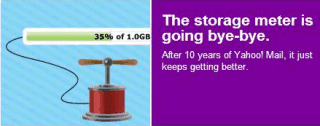
Now that Microsoft upgraded its horrifically-named Windows Live Hotmail from 2GB of storage to 5GB, Gmail is officially the major webmail service with the least amount of free storage. Here's a comparison between the top 4 mail services (*the green text reflects the storage for premium accounts that typically cost $20 a year).


Yahoo Mail
Windows Live Hotmail
AOL Mail
Gmail
Storage
"unlimited"
5GB (10GB)*
"unlimited"
2.8GB+ (8.8GB+)*
Maximum attachment size
10MB (20MB)*
10MB (20MB)*
16MB
20MB

Three years ago, when Gmail was launched, it offered 250 times more storage than Yahoo Mail and 500 times more storage than Hotmail.

"Google believes people should be able to hold onto their mail forever. That's why Gmail comes with 1,000 megabytes (1 gigabyte) of free storage – more than 100 times what most other free webmail services offer." (from the press release)

The competing services quickly adjusted and increased their offerings. At that time, Gmail was invite-only so it couldn't capture too many users. Gmail started to be available to everyone in February, when Yahoo Mail and Hotmail already had many of Gmail features.

While Gmail still has unique features (conversations, labels, POP3, mail fetcher, unobtrusive ads, advanced search, attachment preview), it's difficult to understand why Google intentionally lost the battle of mail storage, after starting it three years ago. Maybe 2.8 GB is enough for most people or maybe the storage space isn't a distinctive feature anymore.

In a Wall Street Journal article about Yahoo's "unlimited" storage, "one Yahoo executive conceded that a main reason for the move to no limits was to eliminate the perception that Gmail still offered more storage, even though Yahoo had long since caught up."


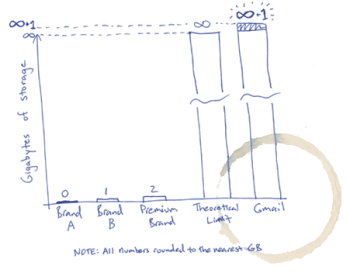
So all these announcements about "unlimited" storage are just some marketing schemes (there's no such thing as unlimited storage). As very few people use more than 1 GB of mail storage, any webmail provider could easily replace 1 GB or 2 GB with infinite storage. But Google decided to stop playing this game and to let others implement the "Infinity+1 storage plan" (explanation: Gmail's homepage on April 1st, 2005).

August 14, 2007

The Building Blocks of Google Browser

Google doesn't intend to develop a browser: they'll just integrate the most important features of a browser in Google Toolbar, which is already available for Internet Explorer and Firefox. Instead of marketing a new browser, Google only has to make deals with hardware and software companies like Dell, Sun, Adobe and bundle its small plug-in. While Google Toolbar's most important role is to make it easier to search using Google and to increase user's loyalty, it's also a simple way to promote new products and to facilitate the transition to storing data online.

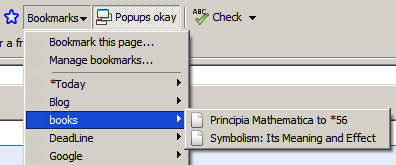
Bookmarks - if you store your bookmarks online, they're fully searchable and available from any computer connected to the Internet. That's the idea behind Google Bookmarks.


History - your browser keeps the pages you visit for a small number of days and you can only search their titles. Google Web History stores all your Google searches and all the pages you visit from any computer. You get personalized search results, recommendations and a searchable database of your online activity.

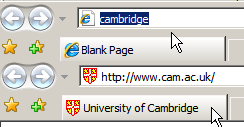
Address bar - you no longer have to remember URLs. Browse by Name lets you enter the name of a company, an organization, a product or a service and go straight to its homepage. If the query is not navigational (there's no perfect answer), Google will send you to the search results page. Some people say this is an even better idea than AOL keywords.


Cookies, passwords - in addition to sessions, bookmarks and local history. This isn't yet a Google Toolbar feature, but Google Browser Sync could be integrated in the next versions. Google Browser Sync is a Firefox extension that synchronizes your browser settings across your computers and makes the transition between two computers seamless.

Opening files - if you have Microsoft Office, Adobe Reader, you can read documents from your browser. Google Toolbar for Firefox has a feature that lets you open documents and spreadsheets in Google Docs.


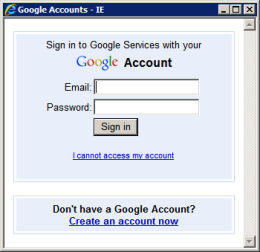
Any browser could be a Google Browser if you would just log in to your Google Account and all your settings would follow you: your bookmarks, the most recent visited pages, the passwords for all the other accounts, your plug-ins and their settings. And as more and more web applications become decent replacements for software, Google Browser slowly morphs into a web desktop - let's call it Google Operating System.