An unofficial blog that watches Google's attempts to move your operating system online since 2005. Not affiliated with Google.

Send your tips to gostips@gmail.com.

April 14, 2009

Translate Google Groups Threads

Google Groups added an option to translate the messages from a thread. The new feature uses Google Translate API, so it doesn't involve reloading the page.


The translation API is being used by many Google services and other sites. Here's a list of my favorite applications:

8. Picasa Web Albums translates comments automatically.

7. Google Maps reviews can be translated to find some information about businesses from other countries.

6. Translate YouTube's search results by clicking on a checkbox at the top of the page.

5. Twitter's search results can be translated into English and you can filter the results by language.

4. Google Reader translates entire feeds if you enable an option from the feed settings menu.

3. Translate the captions of a YouTube video.

2. Hab.la translates IM conversations. "Say someone visits your site and greets you in a foreign language. As soon as a particular language can be detected, seamless translation between your chosen language (English in our case) and that of your website visitor begins."

1. Real-time translation in an experimental version of Google Toolbar.

{ Thanks, z x. }

April 13, 2009

YouTube Korea Respects Privacy


YouTube's Korean site no longer allows users to create accounts, upload videos and post comments, after a local law started to require popular web sites to ask for the real names of their users.

"In a surprise decision Thursday, Google blocked South Korean users from uploading videos and posting comments on YouTube's Korean-language site in order to avoid government requirements for the real-name registration of users. Korean Internet users now have to submit their resident registration codes, the Korean equivalent of social security numbers, and names, before posting files or commenting on Web sites with more than 100,000 daily visitors, including YouTube. The new rules kicked in April 1, but Google had been refusing to enforce real-name verification for YouTube users, reluctant to bend its rules only for Korea," reports KoreaTimes.

Apparently, one of the reasons for enforcing this law was to discourage the anonymous comments that make personal attacks to public figures. "The purpose of this mandate could be pretty noble - to discourage those dangerous evil trollings. But what if the government starts to use this feature to hunt down whoever makes anti-government-ish comments (whose definition can sometimes be blurry)? Or use this mandate as a way to deter people from making any criticism on the current government," asks Web 2.0 Asia.

YouTube suggests users that want to upload videos and post comments to change their country setting.

"Google Korea has ... always (taken) the stance that Google respects local law/regulation but at the same time we continue trying to promote freedom of speech on the Internet," Google spokeswoman Lois Kim said last month. Of course, it's easier for Google to protect the freedom of speech in Korea, where its services aren't very popular, than in countries like China or Germany.

Further reading:
Google Korea's blog post
YouTube Korea's blog post

{ via Blogoscoped Forum }

April 12, 2009

Google Update, Open Sourced

It doesn't have an interface, it's always running in the background, ready to silently update your Google software: Google Update is the service that makes Google's desktop applications behave more like the constantly updated web applications. Unfortunately, the service has many bugs, it can't be disabled unless you uninstall all the applications that use it and there are some privacy issues:

"When GoogleUpdate communicates with Google servers, it sends IDs of GoogleUpdate-managed applications on your computer and general usage information for these applications. GoogleUpdate also uses its own, randomly-generated unique ID number to accurately count total users. This information includes version numbers, languages, operating system, and other install or update-related details, such as whether or not the applications have been run."

Some people are concerned that Google collects even more information. To show that these worries are misguided, Google decided to open source the updater, code-named Omaha.
Since Google Update is always running on your system, there's no simple way to stop it, and since it's a fundamental part of the Google software that needs it, it's not explicitly installed. Some users can be surprised to find this program running, and at Google, we don't like disappointing our users. We've been working hard to address these concerns, and releasing the source code for Omaha is our attempt to make the purpose of Google Update totally transparent. Obviously, we understand that not everyone is both willing and able to read through our code, but we hope that those of you who do will confirm for the rest that Google Update's functionality serves well to keep your software up to date.

A software that's always up-to-date prevents malware from exploiting the already solved security issues, makes it easier to report bugs and it's constantly improving, but Google should provide an interface that lets you control how often the service checks for updates and even disable it. Some power users think that the always-running updater is "a violation of my control as a user, a potential security threat, and an unwanted burden on my system and network resources, which are already stretched."

Google Chrome and the Original Google

There are many interesting questions in the Chrome help forum, but some of the requests are quite unusual. Here are some strange questions from users who can't distinguish a browser from a search engine or a mail client.

"I want the old Google search engine, not Google Chrome. How do I go back to regular old Google? I want to change my default search engine from Chrome to Google. The tools don't help me," asks Orville.

"If I change from Outlook Express to Chrome browser does my E Mail address have to be changed to a G Mail address?" wants to know Haljoan.

"I don't like the design of the Google Chrome.page. All of the toolbars I'm familiar with are missing, and I don't even know how i got it. If I uninstall it, will I be able to get just plain Google?" wonders Stellar.

"Should I remove my original Google now that I have installed Google Chrome?" That's a very difficult question and I don't think that Chrome's developers anticipated how difficult is to launch an alternative browser. Maybe Google should first explain users what's a browser.

"The biggest challenge all [browsers] face is that most people don't even know what a browser is or that there's choice," told Wired.com Brian Rakowski, director of product management at Google.

April 10, 2009

Add Photos to Gmail Messages

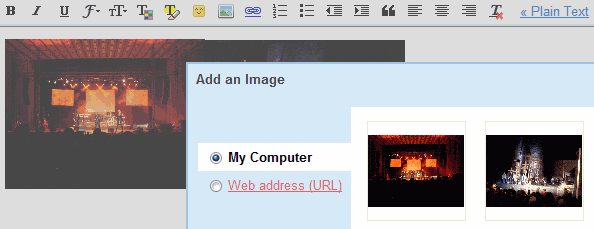
Gmail's rich-text editor has never been very powerful, especially if you look at other web applications like Google Docs or Zoho. An important missing feature is inserting images in a message: you can attach photos, but they're usually displayed at the bottom of the message and not all mail clients show thumbnails. One workaround was to upload the images to a website, open it in a different window and then drag it to Gmail's editor.

Now you no longer have to do this since Gmail added inserting images as a Labs feature. After enabling the feature, you'll notice a new photo icon when you compose a message using the rich editor. You can insert images from your computer and images published online, by typing their addresses. Unfortunately, Gmail doesn't use the new Flash uploader, so you can't select more than one photo at a time.

"Keep in mind that Gmail doesn't show URL-based images in messages by default to protect you from spammers, so if you're sending mail to other Gmail users, they'll still have to click Display images below or Always display images from ... to see images you embed," mentions the Gmail blog.


To enable the new feature, go to Gmail Labs, search for "inserting images", select the "Enable" radio button and don't forget to click on "Save changes".

Tip: if the uploaded image is too large, click on it and choose from the available sizes (small, medium, large) or resize the image by dragging one of the corners.

{ Thanks, Niranjan. }

April 9, 2009

Google Enhances the Snippets for Review Sites

Google started to show additional information for web pages that include reviews: their date and the rating. For now, this is still an experiment and you may not see the change in Google's search results.

Last year, Google enhanced the snippets for discussion boards and scientific papers, while extracting the published date from many web pages. Google is able to recognize the structure of a forum thread, find the number of posts and the date of the last post, detect the author of a scientific paper and extract the ratings from all kinds of web pages.

It's amazing to see how many useful details can be obtain from unstructured web pages without requiring a special markup.

Find the Sender's Local Time in Gmail

Gmail Labs added a very useful feature for those who receive messages from all over the world. "Sender Time Zone" shows a green phone icon if it's appropriate to call the sender and a red phone icon if it's not a good time for calling (the icon is actually an Unicode character). Click on "show details" and you'll also see the local time of the sender.

"Message headers always include the time sent and often include time zone info too. We use that information to show you these icons. If the time zone isn't included for a given message, this Labs feature won't display anything," explains Gmail's blog. Google saves your timezone in your Google Account and it can be changed from this page.


You can also use Google search to find the time in a certain location.

The PDF Printer from Google Docs

If you open the document properties dialog for a PDF produced by Google Docs you'll notice that Google uses Prince 7.0 alpha 16 to convert files to PDF. It seems that Google has an unreleased alpha version of the software, so that might explain some of the errors.


According to the software's website, "Prince is a computer program that converts XML and HTML into PDF documents. Prince can read many XML formats, including XHTML and SVG. Prince formats documents according to style sheets written in CSS."

Prince is available for free if you want to use it on a single computer, but the server license costs $3800. "Prince is an ideal printing component for server-based software such as web applications and database systems. Using Prince, data in XML can easily be converted to PDF documents that can be printed, archived or downloaded over the web," which is exactly the way it's used in Google Docs.

HÃ¥kon Wium Lie and Michael Day gave a talk at Google in November 2007 about the software.

{ Thanks, David. }

April 8, 2009

Google, a Non-Profit Organization?

"PSAs are non-profit organization ads that are served to pages when targeted ads are unavailable, or when Google is unable to gather content from the page. Publishers do not receive earnings for clicks made on PSAs," mentions a page from Google AdSense's help center.

I noticed a Google ad from a Romanian site that promoted Google search. The ad linked to the Google search results for a historical question regarding the Romanian Independence War, but it was labeled as "Public Service Ad". Since when is Google a non-profit organization?


It's not the first time when Google uses public service ads to promote its own services. Last year, Google promoted a special page about the US elections using public service ads.

According to Wikipedia, "public service advertising is the use of commercial advertising techniques for non-commercial purposes. (...) Such advertising is generally produced and distributed on a cooperative basis by governmental agencies or nonprofit organizations acting in concert with private advertising and mass media companies. In most cases, the nonprofit provides the programming that is to be advertised, while the participating advertising agency and media companies provide creative services, media planning, and dissemination services on a pro bono basis."

{ Thanks, Philipp. }

Google Image Search Color Filter

The option that lets you filter images by the predominant color has been added to Google Image Search's interface. Just click on "All colors" above the search results and you can choose one of the 12 available colors.

Until the new feature propagates to all Google data centers, you can still use the image filter manually and even select two predominant colors.


Google Image Search has previously added filters for photos, images that contain faces, clip arts, line drawings and I expect to see even more options that rely on image analysis. The Neven Vision acquisition will certainly bring some interesting visible results. "Neven Vision comes to Google with deep technology and expertise around automatically extracting information from a photo. It could be as simple as detecting whether or not a photo contains a person, or, one day, as complex as recognizing people, places, and objects."

{ Thanks, Chris. }