An unofficial blog that watches Google's attempts to move your operating system online since 2005. Not affiliated with Google.

Send your tips to gostips@gmail.com.

June 9, 2009

Google Translator Toolkit

Google Translator Toolkit is a new service that lets you translate documents by editing the translations automatically generated by Google. "Google Translator Toolkit allows human translators to work faster and more accurately, aided by technologies like Google Translate."

You can translate documents stored on your computer, web pages, Wikipedia articles and Knol articles. After importing a document, Google generates the translation, displaying it next to the original text. You can select a sentence from the original document and Google lets you edit the translation.


Google Translator Toolkit includes the collaborative features from Google Docs: you can invite other people to edit or view your translations, but the application doesn't display the collaborators that are currently editing a document.


An interesting feature is the "translation memory", a database of already-existing translations. "As you translate new sentences, we automatically search all available translation memories for previous translations similar to your new sentence. If such sentences exist, we rank and then show them to you. Comparing your translation to previous human translations improves consistency and saves you time: you can reuse previous translations or adjust them to create new, more contextually appropriate translations."

Google's service will make it easier to translate documents online, but it's also a great way to improve the quality of the machine translation service.

{ via Blogoscoped Forum }

June 7, 2009

Google Video Adds Search Options

Google Video exposes some advanced search options directly on the search results pages: click on "show options" and you can choose between three layouts (TV view, list view, grid view), pick a duration interval, sort the results by date or view only the high-quality videos.


Google has recently added a similar feature for web search results and, even though it should make the advanced search options more visible, most users will never click on "show options" to find them.

June 5, 2009

Google Chrome for Mac and Linux, Dev Preview

In the past 9 months, Google Chrome's developers have been hard at work to post the Windows version of the browser to Mac and Linux. Even if the Mac and Linux versions aren't ready for the general public, Google decided to release a developer preview for those who want to use an early version of the browser.

"In order to get more feedback from developers, we have early developer channel versions of Google Chrome for Mac OS X and Linux, but whatever you do, please DON'T DOWNLOAD THEM! Unless of course you are a developer or take great pleasure in incomplete, unpredictable, and potentially crashing software. How incomplete? So incomplete that, among other things , you won't yet be able to view YouTube videos, change your privacy settings, set your default search provider, or even print," explains the Chromium blog.

The Mac version requires Intel CPU and Mac OS X 10.5.6, while the Linux version requires Intel Pentium 4 / Athlon 64 or later CPU, and Ubuntu 8.04 or Debian 5 or later.

I installed Google Chrome 3.0.183.1 in Ubuntu 8.10 and the process was painless. Most web pages are rendered properly, with the notable exception of the pages that require Flash or Google Gears. The settings dialog lacks many of the options that are available in the Windows version, the bookmark manager doesn't work, you can't change the default search engine, but these are just missing features that will be added in the near future.

Google Chrome for Mac:


Google Chrome in Ubuntu 8.10 (initial warnings):


June 4, 2009

Enhanced Zooming in Google Street View

Google Maps added a new way to zoom in the street view imagery: by double-clicking on the object you want to see clearer.

"We have been able to accomplish this by making a compact representation of the building facade and road geometry for all the Street View panoramas using laser point clouds and differences between consecutive pictures. As you move your mouse within Street View, you'll notice that the cursor now has lightly-shaded geometry attached to it - it will show an oval when your mouse is following a road and a rectangle when moving across the facades of buildings," explains Google. The cursor geometry is called "pancake" and it's a shortcut for the best image that shows the object you've selected.


While the new feature is moderately useful, it's very annoying when panning the image. You're almost afraid to click on the image because the zooming icon suggests that you are about to zoom in. I'll use the keyboard shortcuts to navigate through Street View from now on: up/down/left/right arrows, Page Up, Page Down, +/- for zooming.

June 3, 2009

Google Squared Adds Structure to Unstructured Data

Google Squared, the service that automatically generates lists of entities and associated attributes, is now live. "Google Squared is a new way of organizing information on the Web to make it more useful and structured," explains Google.

For example, if you search for [African countries], Google Squared generates a list of countries, then it finds attributes that should be appropriate when you describe a country (capital, currency, image/map) and it tries to find values for the attributes. Google Squared shows only the first 7 results, but you can always add new results and even new attributes. Clicking on the first blank column, Google Squared suggests 5 new columns: area, religion, language, GDP and Internet users.


A search for [endangered species] returns relevant search results, although Wikipedia has a more comprehensive list.


Google Squared is good at finding palindromes from a lot of sources:


Google Squared's results aren't always great: if you search for [Motown], Google finds relevant artists like Diana Ross or Marvin Gaye, but it mixes them with songs like "Got to be there".


If you find mistakes, Google Squared lets you remove rows, columns, select alternative values for attributes and save the customized square online so you can share it with other people.

The service seems to be a clever combination between Google Sets, which creates sets of items from a few examples, and Google Q&A, which extracts facts from the web (an example: [Britney Spears' mother]). In fact, you can even start with an empty square and dynamically add items and attributes.

Test Your Site in Different Browsers Using Adobe BrowserLab

If you create a web site, a difficult task is to test if it looks properly in most of the browsers and the operating systems that your users are likely to use. Unfortunately, this requires that you install multiple operating systems, buy more than one computer or use virtual machines.

An easier way to test your site is to use online services like BrowserShots, which generates screenshots for a web page in more than 80 versions of the most common browsers used in Windows, Linux, BSD and Mac. The process takes time and you may have to wait up to an hour to see the screenshots.

Adobe BrowserLab is a recently-launched service that has the advantage of generating screenshots almost instantaneously, but the number of browsers that are tested is smaller: Firefox 2.0 (XP, OS X), Firefox 3.0 (XP, OS X), IE6 (XP), IE7 (XP), Safari 3.0 (OS X). The service has an interesting "Onion Skin View", which superimposes one screenshot over another to see the differences between the different renderings. BrowserLab is integrated with Dreamweaver CS4, but you don't need to buy the software to use the online service.

"Cross-browser testing has been one of the biggest challenges for Web designers because it is such an arduous and time-intensive task. Now with Adobe BrowserLab, designers have a simple solution that enables comprehensive browser compatibility testing in just a matter of minutes," says Adobe's Lea Hickman. The bad news is that the service is free for a limited time.

June 2, 2009

YouTube for Large Screens

YouTube's special interface for large screens, available at youtube.com/xl, has been updated to include bigger buttons and navigation controls. Now you don't have to worry about picking the next video to play: YouTube automatically plays all the videos from a list.

"Last January we introduced a video website especially for people who wanted to access YouTube videos through their Sony PS3 and Nintendo Wii game consoles. You could say we've now "expanded" on that. Just as there's a YouTube browser for mobile devices, the new YouTube XL is optimized for watching YouTube videos on any large screen," mentions the YouTube blog.


The XL interface is less cluttered, easier to use, but it lacks some of the features that are available in the standard version of YouTube: rating videos, posting comments.

In other related news, YouTube's player no longer displays the navigation controls in the full-screen mode when you don't move your mouse.

Google's "We're Sorry" Error Page

Sometimes when you search using Google, you get a strange error message titled "We're sorry" that temporarily restricts your access to Google. In some cases, Google shows a CAPTCHA that should confirm you are human, but that doesn't happen all the time.
"We're sorry... but your query looks similar to automated requests from a computer virus or spyware application. To protect our users, we can't process your request right now.

We'll restore your access as quickly as possible, so try again soon. In the meantime, if you suspect that your computer or network has been infected, you might want to run a virus checker or spyware remover to make sure that your systems are free of viruses and other spurious software."

According to the help center, the error message is displayed "when Google detects that a computer on your network is sending automated traffic to Google." Maybe you use an application that monitors the ranking of a site in Google's search results, maybe a Firefox extension sends automated requests to Google every 5 seconds or a different computer that shares your IP is part of a botnet.

Google suggests to use an anti-malware application and to contact your network administrator if you still can't use Google. This is the perfect opportunity to try other search engines (Yahoo, Bing), but I noticed that you can circumvent Google's security filters by using a different Google domain: instead of searching from www.google.com, use www.google.co.uk, www.google.com.au or another international domain.

June 1, 2009

Google Notebook's Extension URL

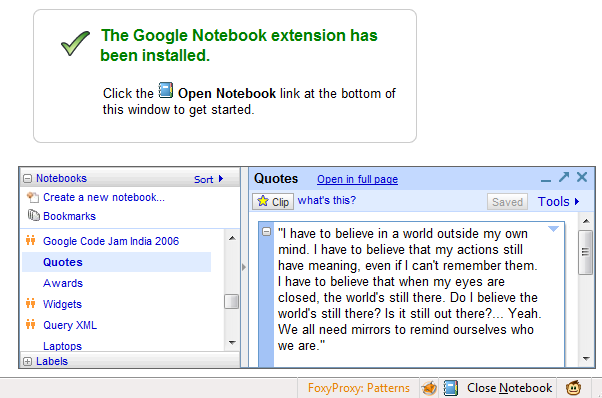
Now that Google Notebook is no longer actively developed, Google decided to hide the link to the Firefox extension and to remove the Notebook support from Google Toolbar. It's probably a wise decision, since new users can't sign up for Google Notebook and Google won't be able to make sure that the add-ons will be compatible with the future versions of Firefox and Internet Explorer.

The only alternative to the Notebook add-ons is a bookmarklet, but it's too basic and the confirmation message is annoying. Google Notebook's integration with the browser is what made the service very powerful: you could copy the text from a web page in a notebook with one click.

I don't know for how long you'll still be able to download the Firefox extension from Google, but here's the download link:

http://dl.google.com/firefox/google-notebook.xpi


If you use a beta version of Firefox 3.5, here's a way to install the extension:

* save the extension to your computer: right-click and select "save link as".
* download 7-zip, an excellent open-source software for archiving files, and install it.
* right-click on the extension (google-notebook.xpi), click on "7-zip" and then on "open archive". Right-click on "install.rdf", select "Edit" and replace "3.0.*" with "4.0.*". Save the file, close Notepad and update the archive.
* now you can drag the .xpi file to your browser and install the extension.

Internet Explorer users that want to download the Google Notebook add-on can try this link:

http://dl.google.com/notebook/GoogleNotebookSetup.exe

Upload .docx Files to Google Docs

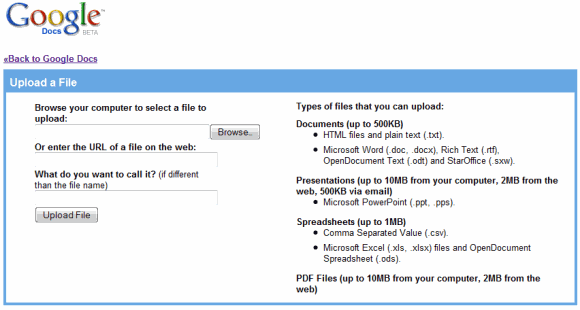
If you use Microsoft Office 2007 and save all the documents in the software's native formats, you've been wondering why it's not possible to upload .docx files in Google Docs. Of course, you could save the files in the format used in the previous versions of Microsoft Office, but things should be easier.

Now that the Office Open XML format is an international standard and it's supported by popular software like OpenOffice, Google decided to implement importing Microsoft Office 2007 files. In March, Google Spreadsheets added support for .xlsx files and now you can import .docx documents.


"To import a .docx or .xlsx file, simply click the "Upload" button in your Docs List menu, select your file, and voila! We'll upload and convert your document for use in Google Docs. This is a another great benefit of Google Docs - you don't have to worry about what format the file is in. Just upload it and we'll figure it out for you," mentions Google Docs blog.

Even if you don't have to worry about formats, you still need to take into account that not all the features available in Microsoft Office are included in Google Docs, so it's not a good idea to delete the original file from your computer.