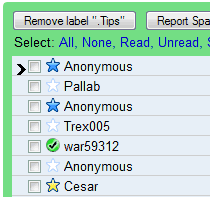
After enabling Superstars in Gmail Labs and clicking on "Save changes", go to the settings and select the icons you want to use. The exclamation mark is useful to flag important messages, quotes could show that a message needs a reply, while the info icon could be used for messages that contain valuable information.
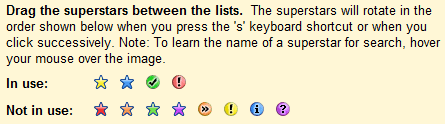
To star messages faster, enable keyboard shortcuts in the settings. "The superstars will rotate when you press the 's' keyboard shortcut or when you click successively," explains Google. "Rotating through the superstars only works when you click (or hit 's') successively. If you pause for a second, then the next click will turn off the superstar. It's designed this way so that if you never click successively, then you'll just get the original on/off toggle behavior."
If you want to find the messages that have a certain kind of star, use one of the following queries:
has:yellow-star (or l:^ss_sy)
has:blue-star (or l:^ss_sb)
has:red-star (or l:^ss_sr)
has:orange-star (or l:^ss_so)
has:green-star (or l:^ss_sg)
has:purple-star (or l:^ss_sp)
has:red-bang (or l:^ss_cr)
has:yellow-bang (or l:^ss_cy)
has:blue-info (or l:^ss_cb)
has:orange-guillemet (or l:^ss_co)
has:green-check (or l:^ss_cg)
has:purple-question (or l:^ss_cp)
You can enable the Quick Links labs feature to save some of these queries so that they are always accessible with a single click. Just search for has:blue-star or any other value and click on "Add Quick Link".

Since stars are just labels, it would be neat if Gmail would automatically a label view for each kind of star as it does with the standard star. This would make a nice little Greasemonkey script.
ReplyDeleteIt would also be very handy to be able to apply a certain superstar in a filter. Then I wouldn't need that GTD-for-gmail Firefox addon!
ReplyDeleteThis is frankly a very stupid feature. At least, stars never worked for *me*. You just get irritated for a while and then you completely ignore the stars.
ReplyDeleteSrikanth
Sounds like a PEBKAC error.
DeleteYes, SuperStars are actually labels. I mentioned their label names in the post: ^ss_sy for yellow star, ^ss_sb for blue star etc. Gmail uses some other shortcuts that start with ^ for implicit labels: ^i for inbox, ^t for starred items.
ReplyDeleteThat means it's fairly easy to integrate SuperStars with filters, advanced search etc.
One thing Google overlooked was to carry these superstars over to gmail on blackberry. If I superstar my emails on my desktop version of gmail, all that gets displayed on blackberry is the yellow star.
ReplyDeleteThe yellow star is different than the "classic" star that was used before Superstars. Try these searches:
ReplyDeletelabel:starred ---> "classic" star (you should see all the starred messages)
has:yellow-star ---> yellow star
If you go to a Gmail interface that doesn't support Superstars (previous Gmail version, mobile Gmail, basic HTML view), the "classic" star will replace all Superstars visually, but you can still use the queries mentioned in the post to find yellow-starred messages or blue-starred messages. Superstars are just some new labels that can be added more intuitively.
When trying to create a filter to apply the label "^ss_cb", gmail whines at me that '^' is not a valid char.
ReplyDelete/cry
You can't use these labels in filters because Google didn't add them in the list of existing labels. In Gmail, "inbox", "spam", "trash", "star", superstars are built-in labels. That means they are created and managed by Gmail.
ReplyDeleteSo that means they still can't work with filters... bah! Damn that beta software! *snicker*
ReplyDelete@ionut: Actually, "label:starred" will show not only the "classic star", but also *every* star.
ReplyDeleteTo get the classic star only, you have to do something like this as a quicklink:
is:starred -has:orange-guillemet -has:red-star -has:green-star -has:purple-question
(assuming in this case that the stars you've enabled are the guillemet, red star, green star, and purple question)
I'm having the same issue as Atul, re the blackberry. So I created a quick link as above to show all stars that are "classic star", i.e. messages I've starred on my blackberry. I call this quicklink "Unsorted Mobile", then when I get to a computer I go through this list and re-assign superstars to this.
The unfortunate thing is that, as Atul was pointing out, when I'm using the Blackberry (or any GMail Mobile, I believe), the lack of QuickLinks *and* Superstars means that I can't differentiate between, say, Red and Green stars.
@Gil:
ReplyDelete<< Actually, "label:starred" will show not only the "classic star", but also *every* star. >>
That's what I said. If you use Superstars, every message you star will be labeled as "starred" and will get an additional label (for example: ^ss_sb for blue star).
@Ionut: Touche.
ReplyDeleteAwesome! Should be a nice addition.
ReplyDeleteMy problem is that I can't go back and star things with special stars after the fact. ie. I can't do a search for certain messages, then check the ones in the search that I want to add a superstar to, and then label with superstar en masse. This renders the feature unusable for me, since I would want to go back through archived messages to superstar them. It is tedious to do such a thing one message at a time.
ReplyDeleteSuperstars is just a label in Gmail Labs that remind us to exclamation mark useful and important messages
ReplyDeleteThis is fantastically stupid. Stars are just labels, so why not just use labels with different colors for them to make 'em stand out? Duh! How 'bout instead of wasting time on dumbass features like this, you start working towards bringing tools like Reader and Picasa to those of us with Domain Apps accounts?
ReplyDeletethanks for this
ReplyDelete@Anonymous: "This is fantastically stupid. Stars are just labels..."
ReplyDeleteI have to say that, initially, I thought the Gmail stars and then the superstars features were trivial, but now I'm not so sure. If this carries on, then Gmail features may start to enable people to do some of the things that were previously only possible with Lotus Agenda.
Now *that* would be mindblowing!
stars are labels that don't clutter up the labels list. That is useful to me. I would use lots more labels if it didn't make the labels list unmanageable. Maybe I should use quicksearch for what I used to use labels for, then I can have lots of invisible labels.
ReplyDeleteThe coolest thing about this article for me was the mention of "Quick Links". Never used Google Labs settings before and didn't know about this feature, but it's something I've always wanted in Gmail. So thanks.
ReplyDeleteAlex,
ReplyDeleteHow do I enable Superstars and, implicitly, Google Labs, please?
I have a simple Gmail account.
Thank you,
Andrei
@Andrei:
ReplyDeleteMake sure you use a supported browser (IE6, IE7, Firefox 2, Firefox 3, Safari 3, Chrome, Opera 9.5). You should see a link to the "Older version" and a green icon at the top of the page. Click on the green icon or go to this page, enable Superstars and click "Save changes".
@Alex
ReplyDeleteThank you so much for your fast reply. I wish it was that simple. It does not work, however. The "/labs" simply disappears. I know the little green "lab bottle" which should be between the email address and the Settings - am having it on my account. I'd love to make it work for my daughter's account... Have tried on IE7, IE6, Chrome, Opera 9.6.
Make sure you use the English(US) version. The language can be changed in the settings.
ReplyDeleteGreat support - thank you, Alex! It really was that simple ;)
ReplyDeleteAndrei
Nice, but there's a major weakness in that these different types of star aren't exposed through IMAP. That means that once you start using them you are locked into Gmail and can't migrate elsewhere without losing your stars.
ReplyDeleteSince stars are just labels, why can't they be shown as folders in IMAP just like other labels?
As far as i can see, you cannot use superstars with filters. This to me severely limits there usefulness.
ReplyDeletefor some reason when I do a search using the above commands, it does not pull up emails form more than a month ago.
ReplyDeleteI suspect that this is because technically that would also be a year ago,
and so it does not pull up something from a year ago.
were this the case, it is a rather silly feature, as it stops me from seeing all the emails from a certain topic, which is the whole point of the feature.
Can some one please help me out with this?
Thank You in advance.
This might be too much to ask, but is there a way to create our own icons to use in superstars? I would love to make a little cigar icon.
ReplyDeleteThis comment has been removed by the author.
ReplyDeleteI use a lot of superstars and lots of labels, in fact every email has at least one label if not a few and the important ones have a star for a limited time. I use the superstars to make the important emails stand out. If I have more than say 10 that need a specific mark, I give it a label instead of a star which makes searching for that topic faster. I use the stars for things that I need to get back to or things that have a deadline. After the deadline, I remove the stars, but the label I assigned is already in place for me to archive.
ReplyDeleteYes it is good if we can add the superstar with label view
ReplyDeleteCan't drag stars from "Not in use" to "In use" in the Settings. Does it the problem for anyone or just me? Tried a couple of browsers (IE7, Chrome, FireFox)... no luck
ReplyDeleteI'm also having an issue with dragging stars from "Not in use" to "In use"- seems recently broken?
ReplyDeleteBTW- I love superstars! I use labels for catergorizing subject and superstars are for catergorizing priority or action required. Thanks for this feature!
I just enabled Superstar and I can't figure out how to mark an email with it or put certain superstars under "Not in use" and "in use"
ReplyDeleteI agree what Shevchick said "Can't drag stars from "Not in use" to "In use" in the Settings." no luck
ReplyDeleteI'm having the problem dragging stars from "not in use" to "in use" as well. Is there any way we can notify someone?? I know this used to work!!
ReplyDeleteSure would be nice to be able to set up a filter and ALSO be able to pick the superstar to use rather than just the Blahhhhhh yellow star.
ReplyDeletehi,
ReplyDeletei happened to create a silver star too, i use the minimalist theme and i noticed when i open my inbox from internet explorer and i mark some mails with a star after that on my google chrome's and on other browsers' windows it will be seen as a silver star. peculiar, isn't it?
It would be AWESOME if you could assign certain superstars to filters !!!, example filter: if sender contains XXXXXX@gmail.com and or contains the words YYYYYY in the body, mark with superstar ( explamation point), then have the ability to sort by superstars !! that would be the most awesome addition to gmail ! everyone please request this feature. Im not sure how hard it is to implement on the programming level, but I sure would love it and recomend GMAIL to more people if it was there.
ReplyDeletethank you awesome Gmail team
I would go along with the recent request of David about being able to use filters with superstars. I could definitely see a lot of benefits for both myself and others.
ReplyDeleteLove it when people get all angry.
ReplyDeleteI installed the quick links lab feature and set it up with my different stars as quick links.
Everything works great!
Thanks Google labs!
I second David. That would be a wonderful addition. Or it could even be something like the list of smileys/emoticons. Just click to select one of them superstars, select all messages that need that star or use the 'drag' feature. Please, please, gmail team!
ReplyDeleteYou can import a modified mailfilters.xml with such a filter. But gmail does not use that one... :-(
ReplyDeleteVery good, works really well!
ReplyDeleteThe searching for previous yellow-star failed miserably, no matter what term I searched for i.e Has:yellow-star
The answer was to move the mouse pointer over the original classic yellow stars and either click mouse-cycle or S key the star until the icon turned back to a yellow-star.
This has now enabled me to search using the has:yellow-star function.
Johnny P
I could really use a superstar with a dollar sign on it. Thank you.
ReplyDeleteVery useful post and tool. I was looking for a way to view various combinations of stars in quick views. I.E. To get red and yellow bangs:
ReplyDeletehas:red-bang OR has:yellow-bang
Dear Developer,
ReplyDeletePlease make it work with filters to be actually valuable - else in the current form, it remains exceedingly insipid. [there are other words used above that can capture the overall sentiment]
One can't fathom why would anyone use this feature; but again there are amazingly awful things out there, that cost money; while this one is free.
If one has too much indie time, one could develop a starring mechanism for labeling comments, that gauge popularity. To start with, please star this post with white color and an invisible border.
I use mulitple inboxes and trying to set one up to find mails I have starred from mobile. I think it is Original Star but i can't get my query to work. is:starred has:red-bang works great for my "red-bang" inbox...
ReplyDeleteAny word on being able to apply a specific star to certain filters?
ReplyDelete@Srikanth S:
ReplyDeleteSimple stars have never worked for me, either, but superstars in conjunction with the Multiple Inboxes lab allow you to make a convenient to-do list. Just add label:starred as a second inbox, then choose a starring system that works for you.
@Anonymous 2008-07-15:
If you're using keyboard shortcuts, then stars are simpler than labels; just press 'S' repeatedly. Also, a to-do list would be more complicated to set up with labels. And you can star individual messages, whereas labels apply to the whole conversation.
Just what I was looking for. This has saved me lots of time. I agree with others, superstars are just much better than labels.
ReplyDeleteThanks for this post!
Guillemet? Seriously? I'm all for being technical and all, but how about "arrows"?
ReplyDeleteI would to have the ability to add a specific star when filtering messages. Rather than just "Add Star", be able to "Add Star: Blue" or "Add Star: Red Bang"
ReplyDeleteDoesn't work anymnore! When I use the Google Labs search, "Superstars" doesn't even hit.
ReplyDeleteWhat happened!
Where did the superstars disappear? I just realized the other day that they are not available any more
ReplyDeletePlease give me back my superstars!
Superstars are a standard Gmail feature now.
DeleteIs there any way to use stars (or other means) to add color to some of the received messages in the Inbox? Thus John Doe's name could be in green (but not the message itself) while Jane Doe's name could be in red. etc.
ReplyDeleteThis is doable in Incredimail but I don't know if Gmail supports it.
Bob Strobach
bmjstrobach@Gmail.com