When you open a window in incognito mode (Ctrl+Shift+N), your cookies from the standard session are no longer available and you can easily log in to a new Google account.
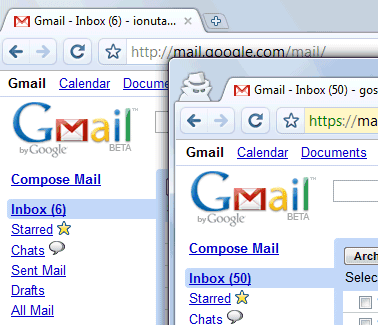
Chrome's help center has more details about this feature. "Webpages that you open and files downloaded while you are incognito won't be logged in your browsing and download histories; all new cookies are deleted after you close the incognito window. You can browse normally and in incognito mode at the same time by using separate windows." Michael Jeffrey explains that "incognito mode is a window-level mode - all pages viewed within this window are not persisted to the user's history, and incognito pages use a temporary cookie store that is blank at the start of the incognito session".
When you close the incognito window, all the cookies are deleted so you need to log in again the next time you browse in incognito mode. This trick can be used for any other services that allow multiple accounts, but you can only use two accounts at the same time: one in a standard window and the other one in incognito mode.

Excellent; I have most of my Googles in one account, but one key item is separate (Google wouldn't let me merge).
ReplyDeleteThis will really be useful, as it will be quicker and easier than opening Chrome and ff/IE at the same time.
You might also want to take a look at http://www.labnol.org/software/create-family-profiles-in-google-chrome/4394/ , which shows how to create separate profiles for Chrome, which you can use in parallel.
ReplyDeleteI wonder how to start chrome with incognito mode, because i think it would be more convenient for any temporary use.
ReplyDeleteI checked all the startup options in the chrome source code, but nothing related was found.
I used to open multiple Google accounts in Firefox window and IE view window before, so this is excellent, with both Firefox and Chrome we can have four Google accounts. Will be useful when we have to use Google App accounts along with regular Google accounts.
ReplyDeleteThis seems like it would also be useful when logging in on someone else's computer, so that neither person's cookies interfere with the other's.
ReplyDeleteChris: I think that is is possible to log to your google account and to any google app account simultaneously. I do it all the time.
ReplyDeleteGreat. Why not to include the "multi account association" feature in igoogle and gmail (like ms live.com does) ???
ReplyDeleteReally gr8 idea. I have 2 gmail accounts, which i used to open in 2 browsers. But now onwards I can open in Chrome. Google really knows about user wants and expectations. Also it is a good move by Google to avoid using of other browsers. :)
ReplyDeleteWhile using Chrome I found that a lot of sites sites don't work, due to missing plugins for the new platform. Sometimes just quitting the site is not an option so I created an easy way to open the page in your "old" browser. Just drag and drop the URL from the Chrome URL bar into the Mirror form and you can continue your Chrome browsing.
ReplyDeleteDownload: http://www.zonator.com/mirror.zip
Indeed. This is excellent. I had been so pissed with multiple account handling up until now. I often need to use several Google accounts on behalf of clients and switching between accounts always screwed with any other google services in use at same time
ReplyDeleteUnfortunatly Chrome's Incognito mode isn't really private. It keeps so-called "flash cookies" even after leaving the Incognito mode. So every website can still keep track on you using this technique. And other users of your computer can see which websites you have visited too.
ReplyDelete@ Anonymous
ReplyDeleteGoogle never say that , in private browsing , The Websites cann't control you , they have control over there users & what actually google chrome is going to delete is the login type of Cookies, that what i think
Happy Google Surfing
@Yash
ReplyDeleteIt seems you didn't understand what I mean with the so-called "flash cookies". It's the kind of resisting information Chrome wanted to eliminate using the incognito mode. But this goal Chrome has not yet reached. This piece of information is still available on your HD after leaving the incognito mode. Normal cookies are deleted but flash-cookies are still there.
I would like to know how to access these flash cookies. Where can i find these cookies? I know nothing about computers, so a very simplified explanation would be helpful.
ReplyDeleteGoogle chrome allows multiple gmail accounts in one page,its a reason than i generate separate session for each tab.
ReplyDeleteHope it will help us all
ReplyDeletethank you very much and Merry Christmas
ReplyDeleteawesome! For some reason this information was really hard to learn/query...
ReplyDeleteToo good... This is a very much needed stuff. Thanks Google.. Google rocks!
ReplyDeletei agree with above their should be a way in preferences to start up in Incognito mode also maybe different skins? maybe it will come later ( i would like a glossy black) lol
ReplyDeleteYou can start it up in incognito just add the switch -incognito to the exe.
ReplyDeleteMultiple incognito windows share the same cookie, so it is impossible to login in multiple google accounts in incognito mode at the same time :-(
ReplyDeleteI'd like to change on the Google Chrome Bar(supperior)to provide the MSN.es ...Would that be possible?
ReplyDeleteguillarn@hotmail.com
What if I want 3 or more sessions? Anyone know if there's a way to do this in chrome? I know firefox can.
ReplyDeleteWhat I do is I run Portable versions of Chrome + 1 normal chrome:
ReplyDelete1. Google Chrome 5 Portable from Portable Apps
2. Iron Browser (Chrome without Google)
3. And a local install of Google Chrome (normal install)
If I need to use a 4th account I use Chronium. Each one of these Chrome browsers uses a separate user data folder, thus you can have a different Google account logged in to each browser. Links to download them:
1. Chrome Portable: http://portableapps.com/apps/internet/google_chrome_portable#test
2. Iron Portable:
http://www.srware.net/downloads/IronPortable.zip
3. Google Chrome (normal install)
http://www.google.com/chrome
4. Chronium (Open community that made Chrome):
http://build.chromium.org/buildbot/snapshots/
this is retarded. why wouldn't they let you be able to go incognito in tab form? why have multiple windows? you might as well be running two separate browsers where you have to switch between windows if you want multiple gmail accounts open!
ReplyDeletethere needs to be a better solution for this. you should easily be able to be inside one window and manage multiple accounts from one window.
gmail manager tries to do this, but it doesn't work. it just serves a nice way to switch between accounts. but i want to be able to be accessing emails simultaneously in different accounts and not get booted when the other account activates in gmail manager.
how is there not a better way to do this? for once, internet explorer is actually more functional than firefox, chrome or safari. come on people. how is inprivate tabbed browsing possibly in the shittiest browser of all and none of its betters have that feature?
Awesome option i use to manage my accounts in different browsers. This is really excellent option thank Q google for providing this feature. Now by system gets bit faster.
ReplyDeleteNice option, but it's a bit buggy.
ReplyDeleteI noticed that IMAP access won't work with Multiple Accounts enabled.
Some people (like mysefl), use IMAP to sync messages accross diferent computers.
I feel this is kind of a work around. It would be better if we can have something similar to an incognito tab instead of a separate window.
ReplyDelete