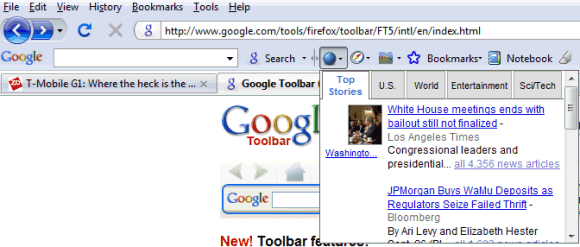
The Firefox version doesn't include all the features that are available in Google Toolbar 5 for IE: there's no find bar, pop-up blocker, Browse by Name because Firefox already has these features. Customizable layouts, highlighting search terms, Word Find and Google Docs integration are the four Firefox-only features.
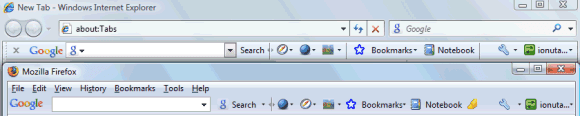
If you use Google Toolbar on multiple computers, enable synchronization to save AutoFill profiles, custom button and other settings to a Google account. Since bookmarks and notes are saved to the same Google account, you'll see the same Google Toolbar anywhere you go.
Google Toolbar 5 for Firefox - http://www.google.com/tools/firefox/toolbar/FT5/

Does it sync my bookmarks? If so, does it use my firefox3 bookmarking system or does it add it's own menu?
ReplyDeleteWhen you first install Google Toolbar, import the local bookmarks and then use the bookmarking option from Google Toolbar. Google Bookmarks and Firefox's bookmarking system are completely independent.
ReplyDeleteJohn Marshall's GMarks extension has a better integration with the browser, but it doesn't use Firefox's bookmarking system either.
I wonder when we're going to get Google Toolbar for Chrome? I can't believe they released it without...
ReplyDeleteSince there's no support for add-ons in this early version of Chrome, the only way to get Google Toolbar's features would be to actually integrate them in the browser. Chrome includes some features from Google Toolbar: suggestions, custom errors, Safe Browsing and the other less important features will be added in a future version or when Chrome becomes extensible.
ReplyDeleteWonder if this version of Google Toolbar is compatible with Firefox Portable? I have tried and don't seem to have any luck!
ReplyDeletePl help.
I guess Chrome will have all features built-in as its from Google...
ReplyDeleteIt will be great for Google loyalist (like me)...
As of now I am waiting for official Mac version first!
Finally, I have been waiting for it for so long.
ReplyDelete@Nik:
ReplyDeleteToolbar 5 works fine in Firefox 3.0.2 Portable.
ones the add-on feature of chrome is finished i don't think it will take long before google will make the toolbar available. i think it's a good thing google will make the toolbar as optional as in all the other browsers. it's good practice (like always from google).
ReplyDeleteGuess what: Starting today, you can download the latest version of Google Toolbar for Firefox, available in 29 languages. This new version is the first Toolbar launched out of our St. Petersburg, Russia office. It includes all the Toolbar features you know and love, such as Search, Bookmarks and Translate.
ReplyDelete---------------
Dolly
FSBO
Hello,
ReplyDeletewhen I downloaded the new toolbar buttons, there are no visible icons from actually websites, only cnn came up. The rest are blue circles.
Any clue why?
Lisa
Please enter and Macedonian language Thanks!
ReplyDeletethink that Turkish is an awful language, not used very often and therefore should be removed. Instead Zuidafrikaans should be added. Too many people speak that language and translation cannot be found in Google.
ReplyDeletei try and download google toolbar 5 and it says to download the newest version firefox....but i have already downloaded the newest version and still keeps telling me to do the same thing....HELP!
ReplyDeleteWhen I close & reopen Firefox, my Autofill profiles on the Google Toolbar are gone. What happens to them?
ReplyDeleteI have the latest versions of Firefox 3 and Google Toolbar 5. I've entered 3 profiles multiple times, closed Firefox and rebooted my pc and each time I come back, my Autofill profiles are gone again. I also use the PageRank tool and every time I reboot, the PageRank is gone again too and I have to manually add it back.
* 3 months ago
I do not know how it is difficult to insert and Macedonian language?
ReplyDeleteWith firefox 3.5 my toolbar disapear and i have to reinstall it
ReplyDeleteWhere is the orange subscribe button now?
ReplyDeleteBut I searched many times for google toolbar for firefox 5 but could not find.. plzz help
ReplyDeletei have just update my FF from 4 to 5 and i try to install Google toolbar in to FF5 and got error that G-Toolbar dose not support into FF5 what i have to do plz instruct me.. i m too much addicted to G-Toolbar !!! help me..
ReplyDeletehttps://addons.mozilla.org/en-US/firefox/addon/add-on-compatibility-reporter/
ReplyDeleteEzen a linken működni fog a google tool bar Firefox 5-n is!
Great, I installed Firefox 5 and just found out the Google toolbar is incompatible. *Facepalm*
ReplyDeletePLS provide us the google tool bar for FF 5. We need it, it's urgent, thanks.
ReplyDeleteI second motion the previous requests for a google toolbar for firefox 5.0
ReplyDeleteTo the anonymous person who said Turkish shouldn't be used because it's 'awful' and 'used infrequently'. Well I can tell you I've seen Turkish quite frequently and certainly more times than I've seen zuid afrikaans (I assume South Afrikaans since I googled and had to translate most of the pages it's used in). Oh, and Turkish might be 'awful' to you but to someone else it isn't so that can't be used in your argument..
ReplyDeleteAnyhow... thought this toolbar was going to be compatible with Firefox 5... darn it =[