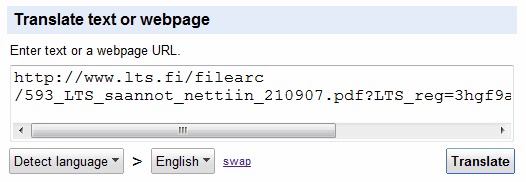
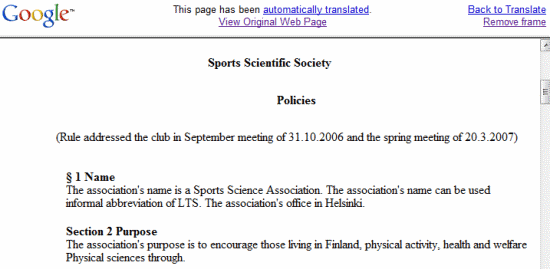
The nice thing is that Google converts the documents on the fly even if they haven't been indexed by Google. Just paste the address of a document in Google Translate's textarea and wait until the translation shows up. Unfortunately, the service is not well-suited for long documents: it only translated the first 9 pages of a PDF file.

Very userful feature :)
ReplyDeletegoogle function
ReplyDeleteGood job, I hope they also allow uploading of files to be translated.
ReplyDeleteI translated this 129 page document it translated all of it. http://www.cbs.state.or.us/external/osha/pdf/dictionary/spanish-english.pdf
ReplyDeletehttp://translate.google.com/translate?prev=hp&hl=en&u=http%3A%2F%2Fwww.cbs.state.or.us%2Fexternal%2Fosha%2Fpdf%2Fdictionary%2Fspanish-english.pdf&sl=es&tl=en&swap=1
recession or not google still seems to be pumping out some useful tools.
ReplyDeletevery useful!!
ReplyDeletenice
ReplyDeleteGood information.Now Goolge can translate Pdf documents.
ReplyDeletevery easy and accurate enoug, please try every one!!!
ReplyDeleteUnfortunately it does not translate large files! There is a limitation on the file, and it does not mention what that limitation is!
ReplyDeleteI get some unreadable translations with safari and firefox browsers, is this browser issue or?
ReplyDeleteBy unreadable I mean the text is not formatted properly and the words are one over other all over the translated document (pdf in my case)
amazing!!
ReplyDeleteOne of the best tools to convert PDF by far. More than 200 pages without problem.
ReplyDeletebut how to save the translation because every times i copy and paste the original text came along..huuh...help
ReplyDeleteHow are some people translating huge amounts of pages? I can't even get 10 pages to translate?
ReplyDeleteThanks
Is there an optional application to get larger files converted? I'd like to convert this file to english: http://www.jan-olof-lindqvist.se/files/DSC-HX5V_manual.pdf
ReplyDeleteAnyone successful with that?
well.. it might not be as good at it looks. PDF files are notoriously difficult to convert. Usually converters insert a line break at the end of each line. So if you look very cloesely, you might find that the context is lost at every line end and that the new line is treated as a new sentence.
ReplyDeleteThe Google Translate function for PDFs is just so unreliable. Most times I get an error message saying "document is too large to be translated please go back to any of the following pages".
ReplyDeleteI have a document translator that can convert PDF but its translation qualities are poor. GT is better.
very nice stuff
ReplyDeleteYep, it translates small files, however i am also getting error for a large file.
Could anyone please advice how can i translate an PDF document maintaining its formating and pictures in it?
I mean i would like it to be of same formating while text is just replaced...
Maybe it can be a plugin that is just installed in addition to PDF and works within it while viewing PDF???
Somebody, Please advice
Pour traduire un pdf de n'importe quelle langue, j'utilise. http://translate.google.com http://www.traductordeingles.info/fr.html
ReplyDeleteThere are also several PDF translators available. Best of those have a price but they are still affordable to most people. Those translators translate even large PDF files with just a few clicks. Just type PDF translator into Google to find any of those translation tools.
ReplyDeleteTo Alex: As far as I know for example Multilizer PDF Translator maintains the images and the layout of the original file into the translated file as well.
At first the function was a bit buggy (the text was all messed up for some pdf's), but it's great now.
ReplyDeleteIs the limit up to 4 pages still effective or it's increased?
Thanx, this work great on the fly for me.
ReplyDeleteDocTranslator translates PDF files and returns them in their original format (images, tables, etc..)
ReplyDeleteBest of all its FREE and requires no subscription, email address, etc!
It also translates Word, Excel, Powerpoint, subtitle files...
You can find it here:
http://www.onlinedoctranslator.com/
The only draw back is apparently it only works on Windows machines, not Macs. =(
Is there any software that can cut document after each 9 pages, so we can translate bigger files ?
ReplyDeletehttp://www.onlinedoctranslator.com/translator.html good for translating large docs but took long before I gave up (slow connection)
ReplyDeleteWhy Google Translator only translate the first half of the document?
ReplyDeletehttp://www.onlinedoctranslator.com/translator.html
ReplyDeletehas no certificate. uses java. strike 3 ???
Is there an alternative to google translator to handle pdf translations?
ReplyDelete