An unofficial blog that watches Google's attempts to move your operating system online since 2005. Not affiliated with Google.

Send your tips to gostips@gmail.com.

May 6, 2008

Google Maps Facelift

Google Maps added a lot of features in the past three years since it was launched without major interface changes. The application started to look cluttered with too many links, buttons and options, so a redesign was more than necessary.

Today Google Maps got a small facelift (compare to some screenshots from 2007) and I'm sure we'll see more changes in the next months. The search box is powerful enough to handle all kinds of queries, so it's not necessary to choose between finding locations and searching for local businesses. The option to get directions is still available and now supports address autocomplete based on your saved locations.

Google Maps homepage replaced the examples of searches with popular custom maps, showing that the application reached a new stage of development.


Update: Evan Parker from Google says it's only an experiment. "We're running the new UI as an experiment, so only a small percentage of users see it. If people like it better than the old UI then we'll launch it to all users after cleaning up the bugs and incorporating any changes based on feedback from the experiment."

Update 2 (July 29): The new interface is live.

{ Thanks, Simone and Philipp. }

Share and Annotate Web Pages in Google Reader

Google Reader's sharing feature was barely noticed when it was added, then it got more exposure when the shared items started to be broadcasted to Google Talk contacts and some sites aggregated shared posts. As Google Reader became more social, people discovered that it has some important limitations. "Have you ever wanted to share something that you were reading, but you didn't want to go through the hassle of subscribing to a whole feed for a single interesting article? And what about sharing content from sites with no feeds?, " asks Google Reader Blog.

Google Reader finally added an option to share any web page and to add notes for each shared item. Next to each post, there's a new action: share with note that can be used to explain why you found the post interesting or to add your comments. You can also go to the new Notes section to add a note or drag a bookmarklet to your browser's link bar so you can share any web pages, even if it doesn't have feeds.

Another improvement is that Google Reader shows small avatars next to each shared item and you can customize your public page by selecting a theme. But don't get to excited as the three themes that are available (ice cream, ninjas, sea) fail to impress and look terrible in Internet Explorer 7.


The new features are useful, but Google Reader didn't find a way to integrate discussions in the annotating feature, so you can reply to a comment. Even if it's not a feed reader, FriendFeed is a better place for sharing web pages and discussing them with the people you know or care about.

{ Thank you, Josh, Myo, Pascal. }

Later notes:
* you can't delete or edit notes
* there's no keyboard shortcut for "sharing with notes" the shortcut for "sharing with notes" is Shift-D because D is next to S on the keyboard and Shift-S is the shortcut for sharing
* when you share a post, Google Reader displays the full content of the post in an editable box. That means you can modify a post before sharing it. And that's not all: Google Reader shows the HTML code when you click on the editable box
* there's an overlap between this feature and services like Google Notebook or Google Shared Stuff.

May 5, 2008

Google OneBox for Premier League (and Other Sports Results)

Football* fans from the UK should rejoice: Google added an OneBox that shows scores and upcoming matches when you search for the name of a team (Arsenal, Manchester United etc). Apparently, Google shows the OneBox only for the US and the UK sites.

EPL Talk wonders if Google pays a fee to display this information, but I wouldn't worry about that. "By law, publishers must pay a license fee to the Football DataCo Limited company that in turns shares the money with the clubs in the Premier League and Football League."


It's interesting to notice that Google SMS and Google's mobile search engine show scores and schedules from NBA, NHL, MLB, NFL, NCAA and from many football championships: Primera División, Serie A, Bundesliga, Ligue 1 etc.


* Note for the American readers: you may replace "football" with "soccer" in this post.

Monitor Google's Homepage with Page2RSS

Page2RSS is a very nice service that creates feeds from any web page, by including the new content and linking to a page that highlights the differences.

A simple example of web page that could be monitored using Page2RSS is google.com: a homepage that rarely changes only to celebrate important events or to announce new Google features. You could subscribe to the automatically-generated feed by visiting: http://page2rss.com/page?url=www.google.com/. This also works for international sites like Google Japan, Google Italy etc. Unfortunately, you'll also receive an update when Google puts the classic logo back.


Of course, the service is useful for any web page that doesn't offer feeds, but it's better suited for web pages that don't change very frequently since Page2RSS checks to see if there's new content every 4 hours. You could use it to generate feeds for changelogs, privacy policies, news sites, Google Labs or to find new features in Google's services, like Hindi support added to Google Translate on April 29. Can you find other interesting web pages that could be monitored using Page2RSS?

May 3, 2008

A Conversation About Google, Microsoft and Yahoo

The following video, created by Andrew Filippone Jr. and titled 'Charlie Rose' by Samuel Beckett, analyzes the hostility between the three companies and Microsoft's absurd strategy to buy Yahoo. "The erudite conversations and sober intellectualism have been replaced by an absurd world where illogic, inane dialogues, and open hostility rule. The one-on-one interview between Charlie [Rose] and his guest begins as usual but quickly goes awry, so much so that Charlie is warned that, somewhere, a man named Steve is not happy."

The "dialog" reminds me of the repetitive and nonsensical phrases from Eugene Ionesco's plays and it's much more interesting than all the news about Microsoft and Yahoo.


Here's the transcript for those who want to understand the text better:


CR1: Welcome to the broadcast. Tonight, a conversation about the future of technology and the internet and mobile devices and all that. We talk to Charlie Rose for the first time. Welcome. The future of technology... coming up.

What will the web do to content in terms of high cost, expensive, time-consuming content?

CR2: My perception is... but... you would know this much more than I do. OK, tell me four or five of those that we are to take a look at that are start-ups that have a brilliant idea.

CR1: Microsoft and Yahoo.

CR2: Microsoft... Yahoo.

CR1: Microsoft and Yahoo.

CR2: Microsoft... Yahoo.

CR1: Microsoft

CR2: Microsoft

CR1: Yahoo

CR2: Yahoo

CR1: Microsoft

CR2: Yahoo

CR1: Microsoft and Yahoo.

CR2: Microsoft... Yahoo.

CR1: Why wasn't Yahoo...?

CR2: Yahoo... Steve is not happy with the process so far.

CR1: Microsoft and Yahoo.

CR2: Don't do that! Google... Google... Google...

CR1: No, we're not gonna do that. I can never get Craig to talk to me about his economic model.

CR2: Google...

CR1: No

CR2: Google

CR1: No

CR2: Google

CR1: No, we're not gonna do that.

CR2: Google

CR1: Radiohead

CR2: Blogs

CR1: Google

CR2: Google... Google... Google...

CR1: Microsoft and Yahoo.

CR2: Google.

CR1: Microsoft and Yahoo.

CR2: Google.

CR1: Microsoft...

CR2: Google

CR1: Yahoo...

CR2: Google

CR1: Google... Yahoo...

CR2: Yahoo

CR1: We're making all this money and now the stock's price is going through the roof. And how can we use this advantage to enter new markets, to expand our market share, to beat the hell out of everybody?

CR2: Steve is not happy.

CR1: What's gonna happen?

Update: And the answer for "what's gonna happen" is... "Microsoft officially pulled its offer for Yahoo". "After careful consideration, we believe the economics demanded by Yahoo do not make sense for us, and it is in the best interests of Microsoft stockholders, employees and other stakeholders to withdraw our proposal," said a certain Steve Ballmer.

Customize Google Docs Forms

Adding forms as a way to include information in a Google Spreadsheet was one of the best decisions made by Google lately as it increased the adoption of the product. Unfortunately, Google doesn't offer options to customize the forms or validate the input. But just because Google hosts the forms for you doesn't mean you can't copy the code on your web pages and edit it.

After copying the code, you can edit the CSS rules to customize the form, remove the references to external files or the links to Google's terms of use. This article has a list of pretty forms customized only using CSS. If some of the fields need to have a certain format (for example: dates, email addresses etc.), you may include some JavaScript code that validates the input before submitting the form or after a certain field loses the focus. This JavaScript library includes the code for some common validations, so you can use it without too much programming effort. LiveValidation requires to write some code, but it validates the input as you type.

Here's a simple styled form that validates the first field using an annoying alert (you can submit the form only if JavaScript is enabled):

In what year did you first use Google?
What search engines did you use before Google?


And here's the code:


Validation only works when JavaScript is enabled in your browser. Note that if you edit the form using Google Docs, you need to change the code from your web page.

{ Thanks, A. }

May 2, 2008

Leaving Google: From Big to Small


Testimonials from former Google employees:

"The decision to leave was a tough one. Google clearly is an amazing company to work for. After consulting with many companies during my time at Adaptive Path, it's clear that Google is like no other: they move fast, think clearly, and push strategic decisions out to the people closest to their users. But in my career, I've always swung between the big and the small and it's time for another shift." (Jeff Veen, Design Manager - May 2, 2008)

"I'm doing something pretty goofy today: I'm leaving Google. My tattered old employee badge goes back to HR during my exit interview at 4:00 this afternoon. After that I'll be an ex-Googler. Working at Google was as amazing as everyone says it is. Sure, the perks were nice. I'll miss the delicious meals, the ski trips, the commuter shuttle, and TGIF. But any company could provide such benefits, given enough free cash flow. What makes Google unique is its culture of respect. The tough interview process means that engineers are treated with respect from their first day. In such a supportive environment, even the most timid person works with self-confidence, which is marvelous to witness. This element of the company's culture was the biggest difference between Google and every other place I've worked in the past. I hope to take it with me throughout the rest of my career. (...) My new venture is a software startup called FSX. I think of the company as a mashup of eBay, Charles Schwab, and American Idol. FSX will use a highly accurate, simulated brokerage to identify skilled stock portfolio managers." (Mike Tsao, Google Gears - April 23, 2008)

"Google is an amazing company. Especially for a company of this size (and impact), it is highly impressive that they have managed to maintain this kind of work environment, company culture, and integrity. (...) But in the end, I have realized that I am just much more of a startup person than a big-company person. Perks and everything are great, but this is ultimately not what motivates me. At an early stage startup, every single individual has a tremendous impact on the company (good or bad…), along with a much broader set of responsibilities (everybody has to wear many hats). Then, there’s the pioneering spirit, which is extremely energizing and contagious. These days, it seems like a lot of the true innovations are made at small startups, which have the benefit of being orders of magnitude times more agile and efficient than a large company will ever be." (DigitalHobbit - April 13, 2008)

"Working at Google has been an amazing, life-changing experience. It's an incredible company with a unique, quirky culture and tons of passionate, talented people. I feel very lucky to have been able to work with so many brilliant engineers on such fascinating products used by millions of people. Leaving Google was a tough decision for me. I was very happy working on Google Maps and oftentimes felt like I had the best job in the world. I became the Maps PM at age 22 and was blown away by how much responsibility they were willing to give someone so young. The work was fun, challenging, and very rewarding. I wasn't looking for a new job, but a great opportunity fell in my lap that I felt I had to take." (Jess Lee, Google Maps Project Manager - March 15, 2008)

"After a life-changing four and a half years of working with the most talented group of people I have ever met, I've decided to take the plunge and do it all over again, working for a very small start-up. Today is my last day at the Big G. (...) Leaving Google is different than any other job I've left. Joining Google in 2003, it was the first time I took a job without knowing at the outset the reason I'd eventually leave the job (even if my employer didn't), and so it's strange to have found success there and yet feel a need for greater fulfillment sufficient to pull you away from what's generally recognized as the best workplace in America. It's even stranger that Google is the first place I've ever worked where I feel that I'm part of the company as opposed to working for the company." (Kevin Fox, user experience designer - Jan 4, 2008)

"I deeply admire how Eric, Larry, and Sergey are trying to build a 100-year company. Google encourages team leaders and entrepreneurs to take actions that traditional public companies, who are being managed quarter by quarter, would never be able to take. This allows Googlers to forget about short-term distractions and instead focus on accomplishing deep and fundamental changes to an industry or space. It's not fluff. I saw it every day and it was inspiring. (...) The one thing I began to miss at Google as it grows was the ability to be a generalist within the company. In a startup, it is easy and encouraged for folks to wear multiple hats. I used to buy data centers and fiber, manage an acquisition, work on Google Talk, pitch an access partner, receive a dignitary and give a speech about the future of media all in the same week. As a company gets bigger, inevitably, it begins to organize itself vertically and employees are pushed to specialize. As I focused my efforts almost exclusively around wireless, I began to miss the excitement and learning that comes with having touchpoints across the entire company on many different teams." (Chris Sacca, Head of Special Initiatives - December 20, 2007)

"For the last two years, I have had a fantastic time helping to build Google Webmaster Central. I have loved working with the (ever-expanding!) team, writing about search on the blog and for the help center, and designing features for the webmaster community. (...) Now I have an all-new opportunity to work on the unique challenges of the vertical and local search space at Zillow. (...) Making the move was a very difficult decision, but the challenge of creating something new in a space that’s so young and evolving was too great to pass up." (Vanessa Fox, Google Webmaster Central Product Manager - June 14, 2007)

"Today's my last day as an employee of Google. I've been on leave since December, so it's not really a big change this day. But now the decision's made. It feels a bit strange leaving such a great and productive company. But I'm ready to do something new with a smaller group of people." (Nelson Minar, he created Google's first APIs - April 7, 2006)

iGoogle, a More Profitable Google Homepage


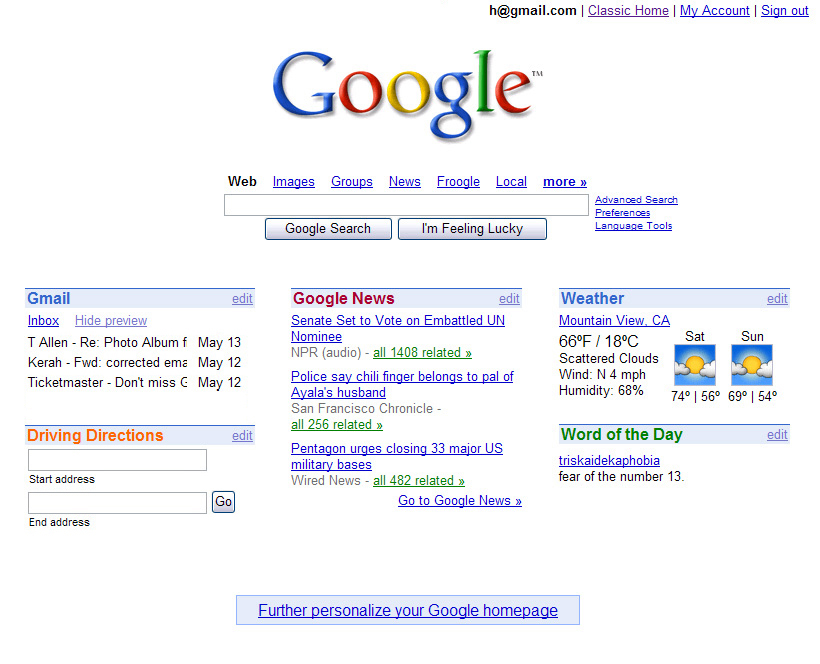
Time has an article about the latest campaign for promoting iGoogle using chic themes. Google tries to attract more users to the future social network and the new themes are a good opportunity to make people aware that Google's homepage can be more than just a simple logo, a search box and a bunch of links.

But iGoogle can be much more than a potential alternative to Facebook and other social networks: iGoogle users are more likely to have a Google account and use other Google services. Even if Google always says that users can customize the homepage with their favorite feeds and gadgets, it's much easier to find gadgets for Google's services than for Yahoo or Microsoft. iGoogle users are also more likely to visit Google's homepage and even to set iGoogle as the browser's homepage.

A Google spokesman told Time.com that "iGoogle currently accounts for 20 percent of visits to Google's home page", which is a lot if we take into account the number of unique visitors from November as measured by comScore: 500 million users for Google Search vs 22.5 million users for iGoogle. If these numbers are accurate, we could say that 5% of the users account for 20% of visits.

And the great thing is that, after clicking on the iGoogle link, Google sets a cookie preference so that all visits to google.com will be redirected to iGoogle. Of course, people can always reset the preference by clicking on "Classic Google", but probably few notice the link.

The classic homepage will probably remain an option for all those who want a simple interface and iGoogle will slowly become the default Google homepage. "The personalized homepage is a complement to the existing Google homepage - not a replacement. Keep using the original Google homepage if you want to. (We expect many people will.) But if you're keen to organize and customize your information, take a stab at designing your own homepage," explained Marissa Mayer in May 2005, when iGoogle was launched. The service has changed a lot since then and now is about to become the place were you collect, organize and share your online information.


{ via Blogoscoped Forum }

May 1, 2008

Google for iPhone, Widely Available

Google's unified interface for iPhone is now available internationally and for Google Apps users. Launched in December 2007, "Grand Prix" integrates the most popular Google services in a fluid interface that loads fast and is customizable.

Google Mobile Blog announces that the interface is available "in 33 new markets and 16 new languages, from Argentina to New Zealand, from Swedish to Chinese". If you have an iPhone, a simple visit to google.com should direct you to the special interface, while allowing you to go back to the "classic" interface. For Google Apps users, the address is a little bit complicated: http://www.google.com/m/a/DOMAIN (for example: http://www.google.com/m/a/google.com).

Google for iPhone packages rich mobile interfaces for Google Search, Gmail, Google Calendar, Google Docs, Google Reader, Picasa Web, Google Notebook and now Google News. Unlike the mobile interfaces offered for other devices, Google shows search suggestions, auto-complete for Gmail contacts, slideshows in Picasa Web and includes a presentation viewer in Google Docs.

I'm sure the plan is to extend the availability of this mobile offering to other high-end phones.


Update: an older iPhone interface is still available at http://www.google.com/m/i and there's also a classic Google homepage at http://www.google.com/m/classic. iGoogle for iPhone can be found at http://www.google.com/ig/i.

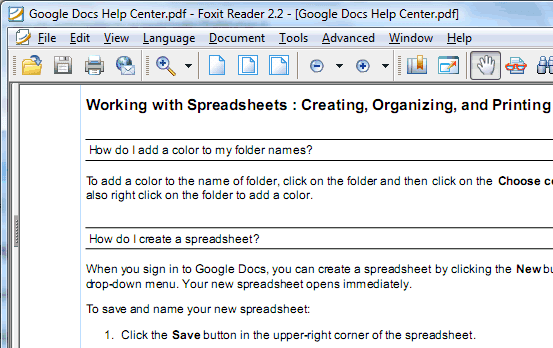
Download Google's Help Files


Did you ever want to get a help file for Gmail, Google Docs or for Google Desktop so you can print it or save it on your computer? All Google services have help centers that include information about features, tutorials, troubleshooting guides, but you need to find the information in a complicated hierarchy of topics or use the search box.

Fortunately, there's a way to save all the information related to a Google service: append ?fulldump=1 to the address of a Google help center. This doesn't work for all Google services, but here's a list of addresses that dump all the information from a help center (note that the pages are very large and are frequently updated):

Gmail Help: http://mail.google.com/support/?fulldump=1

Google Calendar Help: http://www.google.com/support/calendar/?fulldump=1

Google Docs Help: http://docs.google.com/support/?fulldump=1

Google Spreadsheets: http://docs.google.com/support/spreadsheets/?fulldump=1

Google Presentations: http://docs.google.com/support/presentations/?fulldump=1

Google Reader Help: http://www.google.com/support/reader/?fulldump=1

Google Video Help: http://video.google.com/support/?fulldump=1

YouTube Help: http://help.youtube.com/support/youtube/?fulldump=1

AdSense Help: https://www.google.com/adsense/support/?fulldump=1

Analytics Help: http://www.google.com/support/googleanalytics?fulldump=1

Google Desktop Help: http://desktop.google.com/support/?fulldump=1

Picasa Help: http://picasa.google.com/support/?fulldump=1

Google Toolbar for IE: http://www.google.com/support/toolbar/?fulldump=1

Google Toolbar for Firefox: http://www.google.com/support/firefox/?fulldump=1

Google Earth (PDF): http://earth.google.com/userguide/v4/google_earth_user_guide.pdf

To convert the HTML pages to PDF, try doPDF for Windows or any other free PDF printer. This Wikipedia article also has a list of PDF converters.