Google Sightseeing blog reports about an interesting incident in Google Street View: a plastic bag blocked Google's camera on a street from Alaska. While the blog suggests that someone placed the bag intentionally to sabotage Google's efforts, it's like that the wind is responsible for this ingenuous imagery.
"The bag remains in place for quite a long way actually - right along College Road, onto the Old Steese Highway and halfway up Minnie Street, where it finally disappears at the junction with Clara Street. Hopefully the discovery of this exciting technique will allow privacy advocates everywhere to finally thwart Google's endlessly evil efforts to provide us all with really useful driving directions!"
May 8, 2008
Google Translate Becomes the Best Free Online Translator
Google Translate's coverage has been expanded dramatically. It now supports the translation between any of the following languages: English, Arabic, Bulgarian, Chinese, Croatian, Czech, Danish, Dutch, Finnish, French, German, Greek, Hindi, Italian, Japanese, Korean, Norwegian, Polish, Portuguese, Romanian, Russian, Spanish, Swedish (the new languages are shown in bold). From 26 language pairs, Google Translate now supports 506 language pairs and becomes the most comprehensive online translation tool available for free.
Obviously, the translation is far from being perfect or even coherent, but it's a great way to understand the central ideas from a text. Now that Google Translate supports so many languages, it's not hard to imagine that you'll be able to read almost any web page in your language and maybe any application will be able to use Google Translate's APIs to speak your language.
"Most state-of-the-art, commercial machine-translation systems in use today have been developed using a rule-based approach, and require a lot of work to define vocabularies and grammars. Our system takes a different approach: we feed the computer billions of words of text, both monolingual text in the target language, and aligned text consisting of examples of human translations between the languages. We then apply statistical learning techniques to build a translation model. (...) Automatic translation is very difficult, as the meaning of words depends on the context in which they're used. While we are working on the problem, it may be some time before anyone can offer a quick and seamless translation experience," explains Google Translate's FAQ.

{ via Page2RSS }
Obviously, the translation is far from being perfect or even coherent, but it's a great way to understand the central ideas from a text. Now that Google Translate supports so many languages, it's not hard to imagine that you'll be able to read almost any web page in your language and maybe any application will be able to use Google Translate's APIs to speak your language.
"Most state-of-the-art, commercial machine-translation systems in use today have been developed using a rule-based approach, and require a lot of work to define vocabularies and grammars. Our system takes a different approach: we feed the computer billions of words of text, both monolingual text in the target language, and aligned text consisting of examples of human translations between the languages. We then apply statistical learning techniques to build a translation model. (...) Automatic translation is very difficult, as the meaning of words depends on the context in which they're used. While we are working on the problem, it may be some time before anyone can offer a quick and seamless translation experience," explains Google Translate's FAQ.
{ via Page2RSS }
May 7, 2008
Explore Places in Google Maps

Google Maps started to integrate some of the most popular mapplets and user-generated maps. When you search for a location (like Rome), you'll be able to see Panoramio photos, YouTube videos, places of interest, popular searches and maps so you can get a better sense of what to expect if you go there. As you zoom the map, the sidebar is updated to reflect your new location.
The feature is reminiscent of Flickr Places, but the map plays the role of placeholder for geotagged content.
Increase Font Size in Google Reader
Google Reader added an option to increase/decrease font size for all the posts: press = to magnify text and - to decrease its size. Unfortunately, Google Reader doesn't save your preference, so the next time you open it you'll see the original font size.
While most browsers include a zoom feature (Opera, IE7, Firefox 3) or an option to increase the font size, Google Reader applies the new font size only to the posts, not to the entire page.

There's also a new keyboard shortcut for sharing posts and adding notes: Shift+D. To see a list of all the shortcuts, press ? in Google Reader.
Oh, and one more thing: you can now delete notes, not just unshare them.

While most browsers include a zoom feature (Opera, IE7, Firefox 3) or an option to increase the font size, Google Reader applies the new font size only to the posts, not to the entire page.
There's also a new keyboard shortcut for sharing posts and adding notes: Shift+D. To see a list of all the shortcuts, press ? in Google Reader.
Oh, and one more thing: you can now delete notes, not just unshare them.
May 6, 2008
Display Google Talk Presence
If you wanted to post your Google Talk ID on a site and display an icon that shows your status, it's quite easy. Google offers a chatback feature for anonymous conversations with the visitors of a site and this feature has been recently updated with more ways to display the badge.
To get your presence icon, go to the badge generation page, select "Hyperlink and status icon (no frame)" from the list of styles, click on "Update badge" and copy the code in a text editor. You should identify a URL that looks like this (the bold part could be removed to simplify the address):
http://www.google.com/talk/service/badge/Show?
tk=LIST_OF_CHARACTERS&w=9&h=9
This image could be displayed next to your Google Talk username to show whether you are available for chat. Obviously, if you like the chatback feature, you could add the entire code generated by Google.
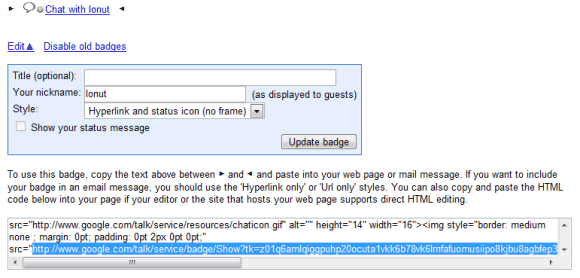
To get your presence icon, go to the badge generation page, select "Hyperlink and status icon (no frame)" from the list of styles, click on "Update badge" and copy the code in a text editor. You should identify a URL that looks like this (the bold part could be removed to simplify the address):
http://www.google.com/talk/service/badge/Show?
tk=LIST_OF_CHARACTERS&w=9&h=9
This image could be displayed next to your Google Talk username to show whether you are available for chat. Obviously, if you like the chatback feature, you could add the entire code generated by Google.
Google Maps Facelift
Google Maps added a lot of features in the past three years since it was launched without major interface changes. The application started to look cluttered with too many links, buttons and options, so a redesign was more than necessary.
Today Google Maps got a small facelift (compare to some screenshots from 2007) and I'm sure we'll see more changes in the next months. The search box is powerful enough to handle all kinds of queries, so it's not necessary to choose between finding locations and searching for local businesses. The option to get directions is still available and now supports address autocomplete based on your saved locations.
Google Maps homepage replaced the examples of searches with popular custom maps, showing that the application reached a new stage of development.


Update: Evan Parker from Google says it's only an experiment. "We're running the new UI as an experiment, so only a small percentage of users see it. If people like it better than the old UI then we'll launch it to all users after cleaning up the bugs and incorporating any changes based on feedback from the experiment."
Update 2 (July 29): The new interface is live.
{ Thanks, Simone and Philipp. }
Today Google Maps got a small facelift (compare to some screenshots from 2007) and I'm sure we'll see more changes in the next months. The search box is powerful enough to handle all kinds of queries, so it's not necessary to choose between finding locations and searching for local businesses. The option to get directions is still available and now supports address autocomplete based on your saved locations.
Google Maps homepage replaced the examples of searches with popular custom maps, showing that the application reached a new stage of development.

Update: Evan Parker from Google says it's only an experiment. "We're running the new UI as an experiment, so only a small percentage of users see it. If people like it better than the old UI then we'll launch it to all users after cleaning up the bugs and incorporating any changes based on feedback from the experiment."
Update 2 (July 29): The new interface is live.
{ Thanks, Simone and Philipp. }
Share and Annotate Web Pages in Google Reader
Google Reader's sharing feature was barely noticed when it was added, then it got more exposure when the shared items started to be broadcasted to Google Talk contacts and some sites aggregated shared posts. As Google Reader became more social, people discovered that it has some important limitations. "Have you ever wanted to share something that you were reading, but you didn't want to go through the hassle of subscribing to a whole feed for a single interesting article? And what about sharing content from sites with no feeds?, " asks Google Reader Blog.
Google Reader finally added an option to share any web page and to add notes for each shared item. Next to each post, there's a new action: share with note that can be used to explain why you found the post interesting or to add your comments. You can also go to the new Notes section to add a note or drag a bookmarklet to your browser's link bar so you can share any web pages, even if it doesn't have feeds.
Another improvement is that Google Reader shows small avatars next to each shared item and you can customize your public page by selecting a theme. But don't get to excited as the three themes that are available (ice cream, ninjas, sea) fail to impress and look terrible in Internet Explorer 7.


The new features are useful, but Google Reader didn't find a way to integrate discussions in the annotating feature, so you can reply to a comment. Even if it's not a feed reader, FriendFeed is a better place for sharing web pages and discussing them with the people you know or care about.
{ Thank you, Josh, Myo, Pascal. }
Later notes:
* you can't delete or edit notes
*there's no keyboard shortcut for "sharing with notes" the shortcut for "sharing with notes" is Shift-D because D is next to S on the keyboard and Shift-S is the shortcut for sharing
* when you share a post, Google Reader displays the full content of the post in an editable box. That means you can modify a post before sharing it. And that's not all: Google Reader shows the HTML code when you click on the editable box
* there's an overlap between this feature and services like Google Notebook or Google Shared Stuff.
Google Reader finally added an option to share any web page and to add notes for each shared item. Next to each post, there's a new action: share with note that can be used to explain why you found the post interesting or to add your comments. You can also go to the new Notes section to add a note or drag a bookmarklet to your browser's link bar so you can share any web pages, even if it doesn't have feeds.
Another improvement is that Google Reader shows small avatars next to each shared item and you can customize your public page by selecting a theme. But don't get to excited as the three themes that are available (ice cream, ninjas, sea) fail to impress and look terrible in Internet Explorer 7.
The new features are useful, but Google Reader didn't find a way to integrate discussions in the annotating feature, so you can reply to a comment. Even if it's not a feed reader, FriendFeed is a better place for sharing web pages and discussing them with the people you know or care about.
{ Thank you, Josh, Myo, Pascal. }
Later notes:
* you can't delete or edit notes
*
* when you share a post, Google Reader displays the full content of the post in an editable box. That means you can modify a post before sharing it. And that's not all: Google Reader shows the HTML code when you click on the editable box
* there's an overlap between this feature and services like Google Notebook or Google Shared Stuff.
May 5, 2008
Google OneBox for Premier League (and Other Sports Results)
Football* fans from the UK should rejoice: Google added an OneBox that shows scores and upcoming matches when you search for the name of a team (Arsenal, Manchester United etc). Apparently, Google shows the OneBox only for the US and the UK sites.
EPL Talk wonders if Google pays a fee to display this information, but I wouldn't worry about that. "By law, publishers must pay a license fee to the Football DataCo Limited company that in turns shares the money with the clubs in the Premier League and Football League."

It's interesting to notice that Google SMS and Google's mobile search engine show scores and schedules from NBA, NHL, MLB, NFL, NCAA and from many football championships: Primera División, Serie A, Bundesliga, Ligue 1 etc.

* Note for the American readers: you may replace "football" with "soccer" in this post.
EPL Talk wonders if Google pays a fee to display this information, but I wouldn't worry about that. "By law, publishers must pay a license fee to the Football DataCo Limited company that in turns shares the money with the clubs in the Premier League and Football League."
It's interesting to notice that Google SMS and Google's mobile search engine show scores and schedules from NBA, NHL, MLB, NFL, NCAA and from many football championships: Primera División, Serie A, Bundesliga, Ligue 1 etc.
* Note for the American readers: you may replace "football" with "soccer" in this post.
Monitor Google's Homepage with Page2RSS
Page2RSS is a very nice service that creates feeds from any web page, by including the new content and linking to a page that highlights the differences.
A simple example of web page that could be monitored using Page2RSS is google.com: a homepage that rarely changes only to celebrate important events or to announce new Google features. You could subscribe to the automatically-generated feed by visiting: http://page2rss.com/page?url=www.google.com/. This also works for international sites like Google Japan, Google Italy etc. Unfortunately, you'll also receive an update when Google puts the classic logo back.

Of course, the service is useful for any web page that doesn't offer feeds, but it's better suited for web pages that don't change very frequently since Page2RSS checks to see if there's new content every 4 hours. You could use it to generate feeds for changelogs, privacy policies, news sites, Google Labs or to find new features in Google's services, like Hindi support added to Google Translate on April 29. Can you find other interesting web pages that could be monitored using Page2RSS?
A simple example of web page that could be monitored using Page2RSS is google.com: a homepage that rarely changes only to celebrate important events or to announce new Google features. You could subscribe to the automatically-generated feed by visiting: http://page2rss.com/page?url=www.google.com/. This also works for international sites like Google Japan, Google Italy etc. Unfortunately, you'll also receive an update when Google puts the classic logo back.
Of course, the service is useful for any web page that doesn't offer feeds, but it's better suited for web pages that don't change very frequently since Page2RSS checks to see if there's new content every 4 hours. You could use it to generate feeds for changelogs, privacy policies, news sites, Google Labs or to find new features in Google's services, like Hindi support added to Google Translate on April 29. Can you find other interesting web pages that could be monitored using Page2RSS?
May 3, 2008
A Conversation About Google, Microsoft and Yahoo
The following video, created by Andrew Filippone Jr. and titled 'Charlie Rose' by Samuel Beckett, analyzes the hostility between the three companies and Microsoft's absurd strategy to buy Yahoo. "The erudite conversations and sober intellectualism have been replaced by an absurd world where illogic, inane dialogues, and open hostility rule. The one-on-one interview between Charlie [Rose] and his guest begins as usual but quickly goes awry, so much so that Charlie is warned that, somewhere, a man named Steve is not happy."
The "dialog" reminds me of the repetitive and nonsensical phrases from Eugene Ionesco's plays and it's much more interesting than all the news about Microsoft and Yahoo.
Here's the transcript for those who want to understand the text better:
CR1: Welcome to the broadcast. Tonight, a conversation about the future of technology and the internet and mobile devices and all that. We talk to Charlie Rose for the first time. Welcome. The future of technology... coming up.
What will the web do to content in terms of high cost, expensive, time-consuming content?
CR2: My perception is... but... you would know this much more than I do. OK, tell me four or five of those that we are to take a look at that are start-ups that have a brilliant idea.
CR1: Microsoft and Yahoo.
CR2: Microsoft... Yahoo.
CR1: Microsoft and Yahoo.
CR2: Microsoft... Yahoo.
CR1: Microsoft
CR2: Microsoft
CR1: Yahoo
CR2: Yahoo
CR1: Microsoft
CR2: Yahoo
CR1: Microsoft and Yahoo.
CR2: Microsoft... Yahoo.
CR1: Why wasn't Yahoo...?
CR2: Yahoo... Steve is not happy with the process so far.
CR1: Microsoft and Yahoo.
CR2: Don't do that! Google... Google... Google...
CR1: No, we're not gonna do that. I can never get Craig to talk to me about his economic model.
CR2: Google...
CR1: No
CR2: Google
CR1: No
CR2: Google
CR1: No, we're not gonna do that.
CR2: Google
CR1: Radiohead
CR2: Blogs
CR1: Google
CR2: Google... Google... Google...
CR1: Microsoft and Yahoo.
CR2: Google.
CR1: Microsoft and Yahoo.
CR2: Google.
CR1: Microsoft...
CR2: Google
CR1: Yahoo...
CR2: Google
CR1: Google... Yahoo...
CR2: Yahoo
CR1: We're making all this money and now the stock's price is going through the roof. And how can we use this advantage to enter new markets, to expand our market share, to beat the hell out of everybody?
CR2: Steve is not happy.
CR1: What's gonna happen?
Update: And the answer for "what's gonna happen" is... "Microsoft officially pulled its offer for Yahoo". "After careful consideration, we believe the economics demanded by Yahoo do not make sense for us, and it is in the best interests of Microsoft stockholders, employees and other stakeholders to withdraw our proposal," said a certain Steve Ballmer.
The "dialog" reminds me of the repetitive and nonsensical phrases from Eugene Ionesco's plays and it's much more interesting than all the news about Microsoft and Yahoo.
Here's the transcript for those who want to understand the text better:
CR1: Welcome to the broadcast. Tonight, a conversation about the future of technology and the internet and mobile devices and all that. We talk to Charlie Rose for the first time. Welcome. The future of technology... coming up.
What will the web do to content in terms of high cost, expensive, time-consuming content?
CR2: My perception is... but... you would know this much more than I do. OK, tell me four or five of those that we are to take a look at that are start-ups that have a brilliant idea.
CR1: Microsoft and Yahoo.
CR2: Microsoft... Yahoo.
CR1: Microsoft and Yahoo.
CR2: Microsoft... Yahoo.
CR1: Microsoft
CR2: Microsoft
CR1: Yahoo
CR2: Yahoo
CR1: Microsoft
CR2: Yahoo
CR1: Microsoft and Yahoo.
CR2: Microsoft... Yahoo.
CR1: Why wasn't Yahoo...?
CR2: Yahoo... Steve is not happy with the process so far.
CR1: Microsoft and Yahoo.
CR2: Don't do that! Google... Google... Google...
CR1: No, we're not gonna do that. I can never get Craig to talk to me about his economic model.
CR2: Google...
CR1: No
CR2: Google
CR1: No
CR2: Google
CR1: No, we're not gonna do that.
CR2: Google
CR1: Radiohead
CR2: Blogs
CR1: Google
CR2: Google... Google... Google...
CR1: Microsoft and Yahoo.
CR2: Google.
CR1: Microsoft and Yahoo.
CR2: Google.
CR1: Microsoft...
CR2: Google
CR1: Yahoo...
CR2: Google
CR1: Google... Yahoo...
CR2: Yahoo
CR1: We're making all this money and now the stock's price is going through the roof. And how can we use this advantage to enter new markets, to expand our market share, to beat the hell out of everybody?
CR2: Steve is not happy.
CR1: What's gonna happen?
Update: And the answer for "what's gonna happen" is... "Microsoft officially pulled its offer for Yahoo". "After careful consideration, we believe the economics demanded by Yahoo do not make sense for us, and it is in the best interests of Microsoft stockholders, employees and other stakeholders to withdraw our proposal," said a certain Steve Ballmer.
Subscribe to:
Posts (Atom)
