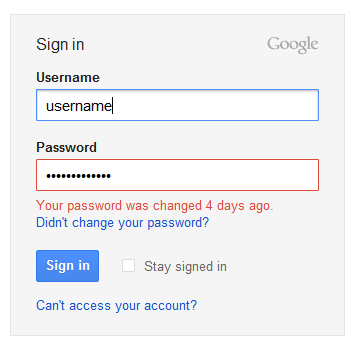
It looks like you've attempted to sign in using an old password. If you remember changing your password, just sign back in using your most recent password. If you remember changing your password but have forgotten your new one, you can regain access to your account by going to our password assistance page.
If you don't remember changing your password, someone else might have accessed your account and changed your password. In some cases, your previous recovery email or phone might be available on the password assistance page for resetting your password. If that's not the case, you'll have the option to fill out our account recovery form to verify your identity and reclaim your account.
To show this message, Google needs to store your old password (actually, a password hash, since Google doesn't store the actual password). This is probably useful if someone managed to access your account and changed the password. Obviously, you'll still try the old password and you won't understand why it no longer works.
{ Thanks, Venkat and Brandon. }

haha. you should edit the title to add hash to it! it's sensational right now. :)
ReplyDeleteAgree with Sushubh: that title isn't good at all. It will do nothing but scare people who only read the title of posts before starting to spread false rumors...
ReplyDeletewhy? just a small check like "IF password WRONG AND datepwdchange < 10 THEN display that generci message" will work. You could say that Google stores passwords if it would give you the abilityi to effectively restore it, not just because it knows WHEN a pwd was changed...
ReplyDeleteGoogle's just storing the last date when you changed your password. :p
ReplyDelete@Sushubh, John:
ReplyDeleteI replaced "stores" with "remembers" to make it clearer.
@Tambu, Manish:
Not true. The message is only displayed when you enter an old password.
Any security system worth its salt (pun intended) is going to keep a history of old password hashes in order to prevent the user from re-using old passwords. This fairly standard security measure would be impossible without such a history. Google is simply making additional use of this history to the user's benefit.
ReplyDeleteNice. But how to restore account in case some hacker deletes it?
ReplyDeleteFacebook does the same thing
ReplyDeleteThank you for this information I appreciate it. Have you heard about Acai Berry Select? Its wonderful.
ReplyDeleteI see no harm in that. Active Directory services usually store last 20 password hashes for security reasons ;)
ReplyDeletecan i know what was my first ever password using that?
DeleteAnd yet, Google blocks you from reusing a password... maddening.
ReplyDeleteThis is really nice for instance when your account got hacked you can be sure that there is something suspicious not just you forgot the new password. It's small but rally good security improvement
ReplyDeleteI did not change the password for my gmail account, and I am pretty sure that it has been hacked by someone (the same email id and password I used for one more website, which is also not working). I tried all the ways to recover to the account, but failed. After providing the recovery email, or secondary email id which we provide for back up, it sent a password reset link to that account. After going through it, it resulted in creating a new gmail account instead of recovering the existing one. It would be really great if anyone can suggest me how to recover the gmail account, or address this issue.
ReplyDeleteMany thanks in advance.
This is interesting, but how do you get google to remember your new password without having to retype it each time.
ReplyDeletei changed my password when i forgot my old one an new my htc phone is blocked an asking for my old passwork how can i find out wot my old password was help please
ReplyDeletemy phone was stolen. when i got it bak it had too many pattern attempts. so it wanted me to login in with my google account. i know the email but forgot the password. now i changed the password on my email and it still wont let me in it. i need to find out the password i had first.
ReplyDeleteGoogle gives two options for retrieving gmail password. first is using another Email and second is mobile number. if you lose your phone number then you can access verify another email.
ReplyDeleteHELLO. this no longer works this way. Yet I need to determine just this very information. When i last changed my password. Does anyone know a current way to determine this information ???
ReplyDeleteThank you
calgo2007@gmail.com
Check this page: https://www.google.com/settings/account
DeleteThis comment has been removed by the author.
ReplyDeletesorry I want to see my gmail account all password . how it possible.
ReplyDeleteI need all gmail all password. how it possible
ReplyDeletehello
ReplyDeletehow can i return old password for my gmail account after reset it , beacuse old password is saved on all my appliactions connecting with my gmial account and when i try to change password its refused it and tell me " Choose a password you haven't previously used with this account."
please this urgent help
how to find my old password after reset to new password in gmail?
ReplyDeletecould anyone tell i forget my gmail password and i have no longer access of recovery phone number.so how could i get my password..please help
ReplyDeleteGoogle I have my new password in my email account but my HTC has recently been locked it tells me to type in my old password to unlock it and I recently have forgotten it how can I figure out my old password so I can't unlock my device
ReplyDeletelast day when i tried to open my gmail account, it was shown that the password has been changed 18 days ago.. but i had'nt changed any.. when i tried to recover my account through mobile phone varification.. i failed to recieve the message.. someone has changed ma recovery email also.. so now iam totally stucked.. please help me to recover my account
ReplyDeleteWant my password to my Gmail account 19montanez79@gmail.com
ReplyDeletemy husband used to be free with everything and never kept any secret until recently everything changed so i began to suspect some foul play. he chat on phone for long and when he is done chatting he will clear his history so that i will not find anything. this went on for long until one day i decided to notify my friend about this and that was how she introduced me to her cousin who is a hacker. he showed me several other people who he helped crack password to gmail, yahoo, facebook, instagram, whatsapp and even 6 others where he hacked the account of some major corporation. he has the greatest mind because i never believed he could do it until he proved it to me by hacking into my husbands phone where i found so many evidence to proof that my husband had several affairs outside our marriage. well here is his email address if you need his help cyber_intel007@yahoo.com
ReplyDeleteHow to recover my gmail password that change by someone else and also change my recover phone number.
ReplyDeleteplus size halloween costumes for women
ReplyDeletesexy halloween costume ideas
halloween costumes kids
best halloween costume ideas men
diwali wishes
ReplyDeletehappy diwali greetings
happy diwali hd wallpapers
happy diwali sms
Someone else is using my account, and changed my recovery phone number ... how can i recover my account ??
ReplyDelete.I want to use the VERY FIRST PASSWORD I've used to reclaim and recover my account.
Help me please .
Help me please ...
DeleteI am trying to recover the password to my account I had since 2012. I know longer have access to that phone and need Goole to verify me.I also use the same address for my Facebook account.
ReplyDeletehello peeps!am a certified ethical hacker and a systems programmer who can bypass any firewall,i do job ranging from bank account hacks, school record upgrades, email hacks, facebook hacks, whatsapp hacks,text messages,viber. Just name it and it will be done.Contact me on brownsugarhacker66@gmail.com. Serious people only
ReplyDeleteI AM from UNITED STATE, my man was cheating on me since last year with his co_worker, i was upset and confused on what to do, i tried my best to win his heart back but all effort was wasted until on 21 of this February when i came across a spiritual man called DR MACK, i saw a many post about his wonderful work and i contact him via his Email and explained to him and he asked for some information which i gave him and he told me that my heart desire will be granted just in 3 days, i was skeptical but i gave me the chance to help me, to my surprise my Boyfriend called me 5 time to tell that he is so sorry and that he wants me back and wants to marry me, everything happened like a dream but i am so happy that i have my boyfriend back and we are planning to get married soon, if you want to Ex back please don’t hesitate to contact____dr_mack@yahoo.com…..
ReplyDeletehttp://www.yahoosuppotphonenumber.net
ReplyDeleteYahoo Support Phone Number
Feel free to share and get resolved an issue any time any where by letting our technical support team for yahoo mail to know that.
Enjoy some positive status
ReplyDeleteshort status for whatsapp with us and do not forget to share with friends.!!!!!
Enjoy some digital india with us.
ReplyDelete