An unofficial blog that watches Google's attempts to move your operating system online since 2005. Not affiliated with Google.

Send your tips to gostips@gmail.com.

August 9, 2007

Cure Information Overload Using Google Reader

Google's feed reader has an option to sort the feeds by relevance. It's only available if you go to "All items" and select "Sort by auto". The cryptic name should mean that Google Reader "prioritizes the items based on their importance to you" by analyzing your reading patterns.

This is especially useful if you go on vacation and don't read your feeds for a week or two. Instead of reading thousands of posts, you can just check the most important ones and then mark all as read.

Google Reader to Retire the Old Interface

If you still use the original version of Google Reader, you'll see this warning:

"We'd like to let you know that very soon we will be retiring our old Google Reader interface. Although we're sad to see it go, we're happy to report that we've been working hard on making the new interface as slick as possible based on feedback from users like you."

The initial design, launched in 2005, wasn't very successful and Google had to change it one year later. In less than a year, Google Reader became one of the most popular web-based feed readers.


Google Reader's initial interface was based on Dave Winer's idea of "river of news": the most recent posts are placed at the top, without any categorization. "Instead of having to hunt for new stories by clicking on the titles of feeds, you just view the page of new stuff and scroll through it. It's like sitting on the bank of a river, watching the boats go by."

The old Google Reader placed all the posts in the left sidebar and you could move to the next post by just hitting the space key. You could get a similar experience in the new version by changing the start page to "All items" in the settings and selecting the expanded view.

But people from Google Reader's discussion board disagree:

"For someone wanting to be able to quickly skim through all of their news feeds (like me) the old interface is simple and elegant without the unnecessary clutter that the new interface has," says Michael.

Google Reader has recently graduated from Google Labs (even if the logo doesn't yet reflect that), has a new Google Group and prepares the launch of some of the most requested features. Matt Cutts told Information Week that "Google Reader search is one of the top priorities on the team's list".

August 8, 2007

JavaScript Google Talk

Google Talk is available in three flavors: a Windows application, Gmail Chat and a Flash gadget that can be embedded into a web page. Zhou Renjian built a JavaScript version that looks a lot like the desktop client, even if it doesn't include voice calls. "It is first implemented in Java language using Eclipse SWT and Smack (A library for Jabber's XMPP). Then the client is converted to JavaScript with servlet supports. And then it's deployed on a Tomcat server." The Java code has been converted to JavaScript using Java2Script.


Of course, Meebo also uses AJAX and can be used to chat with your Google Talk contacts. But both are too complex to work on a mobile phone.

{ via Ajaxian }

Updated More Than One Minute Ago

Now that Google started to index web pages much faster, it replaced the date when Google last indexed a page...


... with the number of minutes, hours or days since that event:


I managed to see this new format mostly for queries that use the site: operator, but it should propagated to all the queries.

I wonder if we'll ever see an option to sort the results by date or to restrict the results to a date interval (Google offers some limited options in the advanced search interface).

Google News Adds Comments

Google News is useful if you want to read all the related articles in a single view and to get an unbiased overview of the most important stories, but it lacks interactivity and user participation. To change this, the news site will allow comments, but only from people involved in a story.
We'll be trying out a mechanism for publishing comments from a special subset of readers: those people or organizations who were actual participants in the story in question. Our long-term vision is that any participant will be able to send in their comments, and we'll show them next to the articles about the story. Comments will be published in full, without any edits, but marked as "comments" so readers know it's the individual's perspective, rather than part of a journalist's report.

While the idea is interesting, it's very hard to materialize it. The participants in a story have to:

1) read Google News
2) read the story that involves them
3) mail the comment to: news-comments@google.com
4) prove their identity (this could be tricky)

The problem is that all of these take time and the reaction might come too late, when the story is no longer important. Besides, journalists already try to include the positions of every party involved in a story. Here's a quote from Reuters' handbook of journalism:
As Reuters journalists, we never identify with any side in an issue, a conflict or a dispute. Our text and visual stories need to reflect all sides, not just one. This leads to better journalism because it requires us to stop at each stage of newsgathering and ask ourselves "What do I know?" and "What do I need to know?" In reporting a takeover bid, for example, it should be obvious that the target company must be given an opportunity to state their position. Similarly in a political dispute or military conflict, there are always at least two sides to consider and we risk being perceived as biased if we fail to give adequate space to the various parties.

The difference between a Google News comment and a quote from a news story is that the comment is unedited and complete. "News articles (...) often include quotes and statements, but all this information is usually edited to fit together in one cohesive article."

Google hopes to "enhance the news experience for readers, testing the hypothesis that - whether they're penguin researchers or presidential candidates - a personal view can sometimes add a whole new dimension to the story." That's true, but you can also read interesting perspectives from people that aren't mentioned in a news story. Or from people that witnessed a news.


Google's dilemma is that it wants to include interesting comments, but without deciding what comments to publish.

"We want to make the full spectrum of views and information on a story available to all Google News users, and we think this feature will help us to do that without sacrificing quality of our coverage. Each comment will provide you with additional insight because it comes from individuals with information related to a story, who otherwise might not have an outlet to present it. As a result, each story will only display a few comments."

Google will start to test this new feature in the US edition of Google News, but I think the success will be very limited unless they allow more people to participate. Google has all the tools necessary for citizen journalism (mobile video upload in YouTube, mobile photo upload for Blogger, personalized Google Maps), but it doesn't use them.

August 7, 2007

Google Video with Multi-Lingual Closed Captions

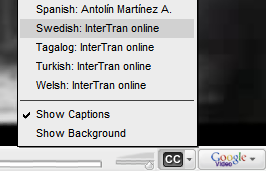
Not many people know that Google Video lets you add closed captions for your videos. The nice thing is that you can add captions for more than one language, but I'm not sure if Google selects the right language based on your IP or your browser's settings.

Antolín Martínez used Subtitle Workshop, a free software for editing subtitles, and translations produced by volunteers or obtained from Google Translate, Babel Fish, InterTran to add closed captions in 26 languages for Charlie Chaplin's slient movie "The Kid". The movie, released in 1921, is in the public domain.

Here's what the author says about his idea: "This project shows how the power of the web 2.0 can be used by us – the ordinary people - to do nice and productive things together. It follows, in some sense, the altruists' lines that Chaplin referred in the last scene of his movie The great dictator. I hope that will be repeated by other people – and by me - to improve [the] great public domain films hosted at Google Video."

If your language is not yet available, you can translate the script and send it to Antolín here. An automated speech-to-text system and a translation engine, helped by some human contributors, could make a lot of videos accessible to a larger audience, even if the translation wouldn't be perfect.

About the movie. "The Kid was Charlie Chaplin's first full-length movie. It, more than anything else to that date, made Chaplin a living legend. It took over a year to produce, and was an incredible success for Chaplin." (archive.org)

Tip: You can change the language by clicking on the little arrow next to the "CC" logo from Google Video's player.


The movie: (also available at Google Video)

Google APIs for Researchers

Google has a new search API that can only be used for research. Another educational-only API allows programmatic access to detailed results obtained by Google's machine translation.

"The University Research Program for Google Search is designed to give university faculty and their research teams high-volume programmatic access to Google Search, whose huge repository of data constitutes a valuable resource for understanding the structure and contents of the web. Our aim is to help bootstrap web research by offering basic information about specific search queries. Since the program builds on top of Google's search technology, you'll no longer have to operate your own crawl and indexing systems."

Even if this new API is less limited than the now-unsupported SOAP API, you can't send more than a single query in one second and you can't use it to display "interactive search results for end users".

Greg Linden thinks that Google should be more open. "It is good that Google is making tools available to researchers, but they may have to go further than a throttled search API. As is, many researchers trying to work at large scale still will have to build their own crawls and indexes."

Other search engines offer less restrictive APIs, but Google tries to protect its most valuable asset as much as possible. The only official Google Search API works only for client-side coding and lets you access the top 8 search results.

The translation service "provides researchers, in the field of automatic machine translation, tools to help compare and contrast with, and build on top of, Google's statistical machine translation system". For example, you can request a list of the best possible translations of a text with detailed information about the scores.

New Cities in Google Maps Street View

Google Lat/Long Blog announces that Google Maps added street-level imagery for 4 new cities: San Diego, Los Angeles, Houston and Orlando, but only San Diego has high-resolution imagery. Street View is also available in: Denver, Las Vegas, Miami, New York City, and San Francisco Bay Area.

An army of inquisitive minds will start to search for people caught in awkward situations and Google will have to remove some of these pictures, for privacy reasons. A Google representative will explain once again that "Street View only features imagery taken on public property. This imagery is no different from what any person can readily capture or see walking down the street."

These images can have many practical uses. "Real estate shoppers can inspect homes and neighborhoods. Diners can see a restaurant's location on a block. Friends can pinpoint a meeting place." And fans will start looking for their favorite celebrities, mostly in Los Angeles.

Google Custom Search Blog Hacked?

All the posts from Google's Custom Search blog were deleted and there's a new post written by someone who doesn't speak English very well (my emphases).

Google Custom Search, is the wonderful product from Google which many webmasters have been looking and dream for. It allows webmasters to create their own custom search engines to search only the sites he/she wants.

Also Google Custom Search is integrated with Ad-sense, which means make money while keeping users on your site for longer time with custom search engine.

I'll cover up more on this powerful tool very soon in my next blog.

Good Luck for all the Custom Search customers(??).

Cheers,
Srikanth


Google uses Blogger for all of its 50+ blogs. It wouldn't be the first time when one of Google's official blogs has problems: last year, Google's main blog was accidentally deleted in March and was hacked in October.

Update (90 minutes later): Everything is back to normal. There's no official explanation for this incident.

Update 2: The explanation is pretty strange. "We accidentally classified ourselves as spam, and our ever-perceptive Blogger settings caught us. The Custom Search Blog has since been restored, and we're taking steps to ensure this doesn't happen with other Google blogs in the future." So Google deleted the blog because it was classified as spam and then someone set up a new blog at the same address.

Update 3 (August 10): More details from Google's Sean Carlson via Search Engine Watch. "Blogger's spam classifier misidentified the Custom Search Blog as spam. If a spammer gets caught by our automated classifier, the blog owner will receive notification of this identification. At the owner's request, the Blogger team will review the blog to verify that the blog in question isn't spam. In this case, the Custom Search Blog bloggers overlooked their notification, and after a period of time passed, the blog was disabled. The content wasn't deleted, but it was removed from the URL. Even after blogs are disabled as spam, the owner can write in requesting a review for her or his blog to be restored. If the review proves that the owner's content was not in fact spam, the blog will be restored with all content. So, when we saw what happened on Tuesday -- and we're well aware that our content wasn't spam -- we restored the official Google Custom Search Blog. The individual who had claimed the URL and published the blog post in reference still has his content; it's just hosted at a new URL."

August 6, 2007

Storage API for Google Documents


Google launched a new API, this time for Google Docs & Spreadsheets. The API allows you to upload files, obtain a list of all the documents and perform searches programmatically. You can authenticate securely, without passing your credentials to the applications.

Google Documents List Data API is too limited to use it for creating a Microsoft Office plug-in that synchronizes a list of documents, but it should be enough for adding an option to open a document directly in Google Docs, without downloading the file. It's also possible to create a new file manager for Google Docs or to build your own GDrive by adding the photos from Picasa Web Albums and the posts from Blogger in a single interface. More complex options can be found in the spreadsheets API, that lets you access and edit a spreadsheet at the cell level.

As observed by Tony Ruscoe, Google changed the terminology for files: you'll work with word processor documents (instead of just "documents") and spreadsheets. The generic name for files that can be edited by Google Docs is documents: this could be another step that prepares the introduction of Google's presentation app and another name change, this time from Google Docs & Spreadsheets to Google Documents (or Google Docs).

{ via Google Blogoscoped }