An unofficial blog that watches Google's attempts to move your operating system online since 2005. Not affiliated with Google.

Send your tips to gostips@gmail.com.

August 14, 2007

Embedding Google Maps

While made online mapping more accessible and easy to integrate with your data, it's still not trivial to include a simple map in your site. You could make a screenshot, but your map wouldn't be interactive, or you could use Google Maps API, but that's too complicated if you don't know JavaScript.

Fortunately, there are sites that solve this problem and provide you some code you can paste in your site. Map Generator is very easy to use: enter the address, the type of map (street-level, satellite or hybrid), its dimensions and you could build a map like this:


My Maps Plus lets you embed personalized Google Maps by entering the address of the KML file generated by Google Maps. This way, you can showcase more than one location.

According to APCMAG, Google Maps will launch next week an option to easily embed maps. "First up, if you know how to embed a YouTube video in your blog, you'll be able to embed Google Maps in your website, Google promises. It'll be as simple as cutting and pasting a bit of HTML code into your website, just like a YouTube video. The embedded maps have the full functionality of Google Maps -- they provide satellite view, map view or hybrid view, and users can click and drag the maps around." They'll probably look the iframe included above and you'll see them in a lot of pages that provide contact information.

{ via Mashable }

Google Health Prototype


New York Times reports that Google's plans for a service that puts you in control of your health information start to take shape. This service could help you make more informed decisions about your health, get personalized recommendations from specialists and share this information with other people.
A prototype of Google Health, which the company has shown to health professionals and advisers, embodies the consumer-centered philosophy. The welcome page reads, "At Google, we feel patients should be in charge of their health information, and they should be able to grant their healthcare providers, family members, or whomever they choose, access to this information. Google Health was developed to meet this need."

A presentation of screen images from the prototype - which two people who received it showed to a reporter - then has 17 other Web pages including a "health profile" for medications, conditions and allergies; a personalized "health guide" for suggested treatments, drug interactions and diet and exercise regimens; pages for sharing information, receiving reminder messages to get prescription refills or visit a doctor, and pages to access directories for nearby physicians and specialists.


More about Google Health straight from the horse's mouth:

* Health care information matters - "Health information should be easier to access and organize, especially in ways that make it as simple as possible to find the information that is most relevant to a specific patient's needs."

* How do you know you're getting the best care possible? - "There is a lot of material out there about drugs, diseases, procedures and treatments. How do you know what is trustworthy and what isn't? Search is great at finding us places with relevant information, but it is hard to know which links are reliable and which are less so."

* Is there a doctor in the family? - "We have been talking to many medical experts to understand what the best guidelines are, and how we can determine which ones apply in different circumstances. If such guidelines were more available to patients, they might be able to, by inputting information such as age, gender or medications, learn about recommended screening tests and other preventive measures, or about harmful drug interactions."

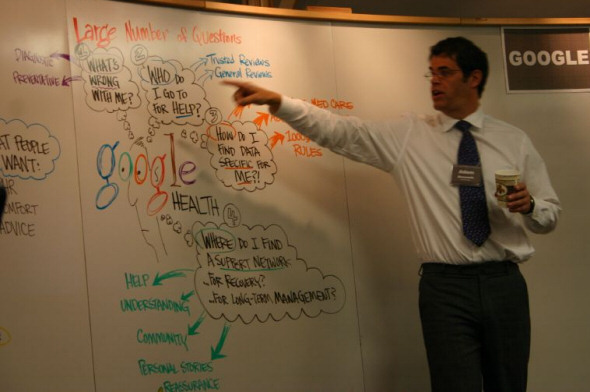
* Some screenshots of the prototype.

{ The first screenshot is licensed as Creative Commons by Philipp Lenssen. The second image, where you can see Adam Bosworth (VP at Google and Google Health's architect), is licensed as Creative Commons by AlphachimpStudio. }

August 13, 2007

The History of Your Book Searches

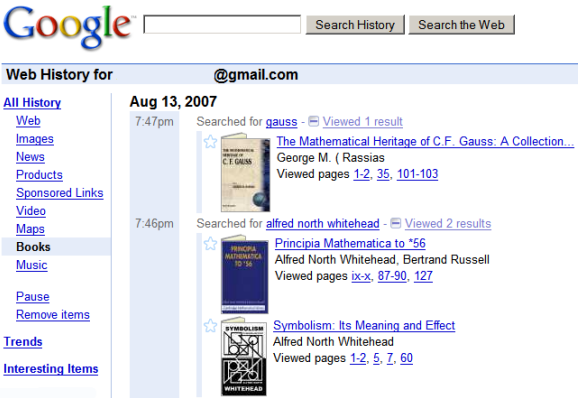
Google Web History is more useful starting from today because it has support for a new Google service: Book Search. All your queries, all the books you've opened and a list of the pages you've read are available, sorted chronologically. You can also search the books, but only the title is searchable, which is rather weird.

Web History is a service that lets you "view and search across web pages you've visited in the past". The standard version only logs your Google queries and the associated search results you click on, but if you enable web history, Google can track all the pages you visit. This makes your web history persistent (browsers usually keep your history for about 7 days), fully searchable and always available.

Google Earth, a Personal Journey

When you open Google Earth, there's no guide that suggests you where to go. You only have a search box and an entire planet to discover.

In an interesting paper titled "Google's Geospatial Organizing Principle" [PDF], Michael Jones from Google describes the philosophy behind Google Earth and Google Maps, two products that try to find the answer to an important question: "where?".
Whitehead saw education as a cyclical process of stages - romance, precision, and generalization - with a reverent emphasis on romance, the emotional involvement on the part of the learner that initiates rewarding educational experiences. Just as children play with building blocks in simple wonder for years before noting patterns in their gravity- and friction-driven behavior and decades before learning an engineers appreciation for stress and strain, Whiteheads romance is the play and wonder in our initial steps toward precisions deeper understanding and generalizations broader insights.

Leveraging the role in learning played by interest and curiosity, our user experience is meant to enhance the romance of unguided personal exploration, thereby enticing users toward a journey of understanding.

Our ultimate expression of the roles of romance and context in answering where? is Google Earth, a network-based browser for searching and displaying information in situ. It lets users navigate a geospatial Web of places in a planetary application metaphor with where and when as the organizing principles.

The vision for Google Earth inverts the roles of Web browser as application and map as content, resulting in an experience where the planet itself is the browser. Three-dimensional navigation lets users fly and swoop down to the Earth, where they search by looking, clicking, and typing. (...)

Our geospatial products create an information landscape spanning global and human scales using visual context, direct manipulation, and Alfred North Whitehead's insights to advance Google's mission. We trust the sense of place to entice romance, facilitate precision, and encourage generalization as users search and explore our maps and globes.

{ via Google Earth Blog }

August 11, 2007

What Do You Use Google Docs for?

It may be a better blog editor than the one included in Blogger or other blogging platforms. You may use it to read an OpenOffice document (OpenDocument) or a Microsoft Word document on a computer that doesn't have a compatible software. Or maybe it's nice to know that your documents are always available even if you use a different computer. You could a keep a simple ToDo list, write a book, brainstorm ideas or collaborate on a school project. You may even use it a wiki, like did when I invited you to define Google collaboratively.

"I used Google Docs exclusively to teach my daughter her senior Civics/Gov't course. In a course we put together she had to analyze and summarize various aspects of each state government's branches. So, there was a doc for each state then a final paper discussing what she found and her supported opinion on what works best. Sharing the docs saved lots of paper and printing and hassle. It was as close to paperless as possible," argues Lynn.

"Teachers are publishing announcements about upcoming assignments and monitoring student progress via the revision history. In the revision history, you can see clearly who contributed to what assignment and when; if a student says he or she worked on a given project for five hours, it will be documented (no more "dog ate my homework" excuses). Additionally, faculty are using GDS to keep track of grades, attendance, student projects and assignments. Students are using GDS to stay organized and work more effectively. Google Docs & Spreadsheets helps promote group work and editing skills, and encourages multiple revisions and peer editing. Students can go online to collaborate with other students, teachers, parents, relatives and tutors, and enter updates anytime from anywhere. And through their revisions history, kids can check how they've revised a document and who has helped. Not to be outdone, Google spreadsheets allows students to track their grades, assignments, semester goals, baseball statistics, car expenses, or anything else that interests them," thinks Gordon F. Snyder Jr.

"I love Google Documents. I'm a journalist and it allows me to work on stories without transfering everything back and forth across devices," says Steven Allen Adams.

"Our daily shopping list was written on scrap paper in the kitchen. If my wife was able to go shopping during her lunch break at work, but did not have the list it took a phone call to clarify what was on the list. Items could not be added at the last minute, again without a phone call to the other. The solution was a shared spreadsheet designed to print on one sheet of A4. The items are categorised in the same order as the layout at the local supermarket. Each of us can add items at any time without having to contact the other, and each of us can go shopping in confidence that we have the latest list. After printing out the spreadsheet, the cell contents are deleted and the list starts again," confesses Mick.

What do you use Google Docs & Spreadsheets for?

Google Pack Adds StarOffice


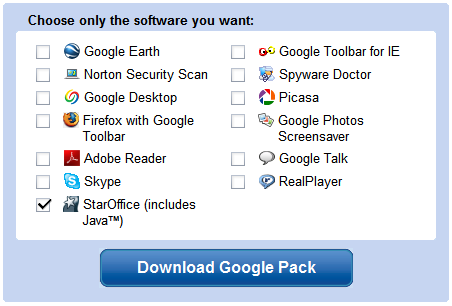
Google Pack, the collection of applications recommended by Google, includes a new software: StarOffice, an office suite developed by Sun. In 2000 Sun released StarOffice's source code, which became the foundation of OpenOffice.org, an open source project sponsored by Sun.


StarOffice 8 is a full-featured office suite that contains a word processor, a spreadsheet tool, applications for presentations, databases, math formulas and drawing. It has support for most Microsoft Office formats (except for the formats introduced in Office 2007), but it can also export documents as PDF out of the box. The software normally costs $70, but it's available for free in Google Pack. It's worth noting that StarOffice has a huge installer (more than 140 MB), so you should download it only if you have a fast Internet connection.

It will be interesting to see why Google didn't choose to include OpenOffice.org, the primary difference between StarOffice and OpenOffice.org being that StarOffice includes some proprietary components like clip-art graphics, fonts, templates and tools for Microsoft Office migration.

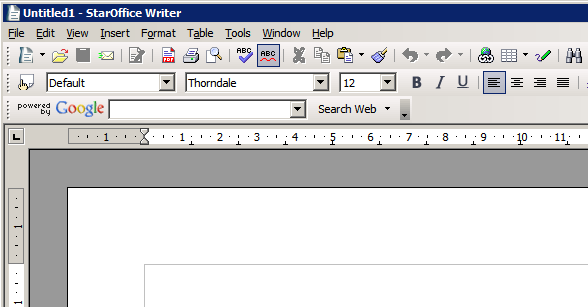
The next step would probably be the addition of a plug-in that lets you synchronize local documents with Google Docs & Spreadsheets, so you can have the best of the both worlds: edit complicated documents offline, collaborate and store files securely online. For now, StarOffice is integrated with Google Search and Google Desktop.


{ Thank you, Dan. }

August 10, 2007

Google Video Store Closes. The End of DRM Is Closer


On the same day when Universal Music decided to experiment with DRM-free MP3 downloads, Google announces the closing of its video store.

New York Times reports that "Universal Music Group will sell a significant portion of its catalog without the customary copy protection software" in the most important digital music retail services, with the significant exception of Apple's iTunes. EMI started to sell DRM-free music on iTunes in April.

The video store launched in January 2006 by Google is about to close. "Google Video is the first open video marketplace where any video producer, large or small, can upload their content and distribute it for free or at a price. Video prices are set by the content provider with no minimum or maximum dollar-limit. Owners also have the choice to offer their content with or without copy protection – enabling them greater control over its distribution," announced Google at launch. Unfortunately, very few videos were available for sale and some initial content providers decided to leave Google Video.

Here are some excerpts from an email sent to Google Video customers a couple of hours ago:

"In an effort to improve all Google services, we will no longer offer the ability to buy or rent videos for download from Google Video, ending the DTO/DTR (download-to-own/rent) program. This change will be effective August 15, 2007. To fully account for the video purchases you made before July 18, 2007, we are providing you with a Google Checkout bonus."

To play copy-protected videos, Google Video required to use a special media player and to log in to your Google account. "Copy-protected videos are encrypted files. To decrypt these files and allow you to view the video's content, the Google Video Player needs to communicate with Google over an active Internet connection." Google Video Player is no longer available, but you can still upload videos.

It's interesting to watch Larry Page's CES keynote from 2006 and see how many things have changed since Google Video's launch:


{ Thank you, Shivan. }

Define Your Own Top Search Results

I told you last week that Google is experimenting with a new feature that lets you place custom web pages at the top of search results for some queries. Even if this feature may not be released to everyone, there's a way to define custom results using Google Co-op's subscribed links.

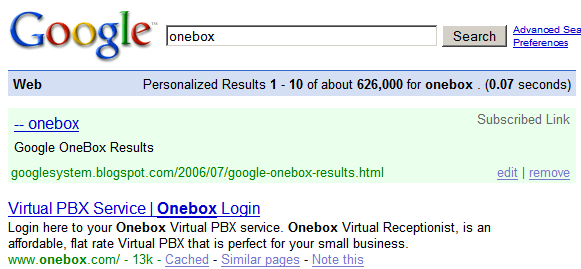
For example, when I search for "onebox", I may want to read this page from my blog. The colored box from the screenshot below includes a user-defined web page.


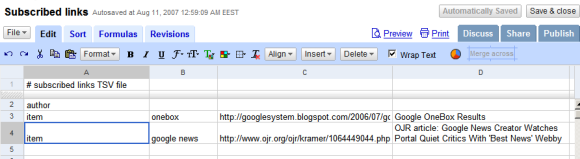
You can define a list of web pages by creating a new Google Spreadsheet using this format:

* the first row contains: # subscribed links TSV file
* the second row contains: author
* all the other rows should contain four columns: in the first column type item, the second column contains your query, the third column includes the web address and in the last column you could write a small description of the web page.


Then you should publish the spreadsheet, enable "automatically re-publish when changes are made", click on "more publishing options", select TXT from the drop-down and copy the URL. To add this file to Google Co-op, enter the URL here and choose a name for your subscribed links. Google will visit the file in less than a minute and you could test if everything went OK by entering one of your queries at Google.com.

The nice thing is that you can edit the spreadsheet and Google will refresh the list of links in a couple of minutes. You can only define a custom link for a query and the web page doesn't replace the top search result: it's displayed in a special OneBox at the top of the page only for you and only when you're logged in.

Organizing Chaos: Folders vs Labels vs Search


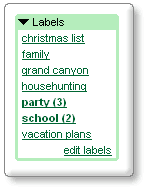
When Google launched Gmail in 2004 many people wondered why it doesn't have folders. Gmail let you organize your messages using labels, which act like virtual folders: you can place a message in more than one folder.

Every computer user understands the concept of folder:

"In computing, a directory, catalog, or folder is an entity in a file system which contains a group of files and/or other directories. A typical file system may contain thousands (or even hundreds of thousands) of directories. Files are kept organized by storing related files in the same directory. A directory contained inside another directory is called a subdirectory of that directory. Together, the directories form a hierarchy, or tree structure."

Organizing your files using an hierarchy of folders is complicated because you have to decide how to name your folders, how to structure them and where to put each file. Because the three structure becomes too big, you won't be able to see all your folders, so you'll spend a lot of time trying to find folders.

Gmail actually didn't pay too much attention to email organization, because it included a very powerful tool: search. Instead of finding the folder that contains a message and browsing through that folder, you could just find your message by typing some information like sender's name or keywords from the message body.

When the Internet started to grow really fast in the late '90s, web directories like Yahoo couldn't keep up with this growth and were replaced by search engines. Creating hierarchies is time-consuming and often unnecessary.

Google's desktop search engine lets you open files without knowing the path, using a simple search. For many people, search engines have replaced the address bar and their queries act as unique labels for web pages.
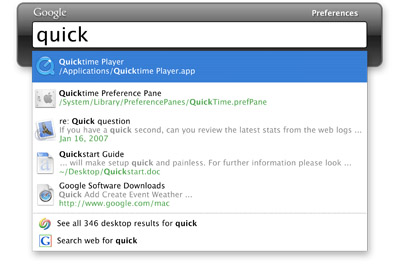

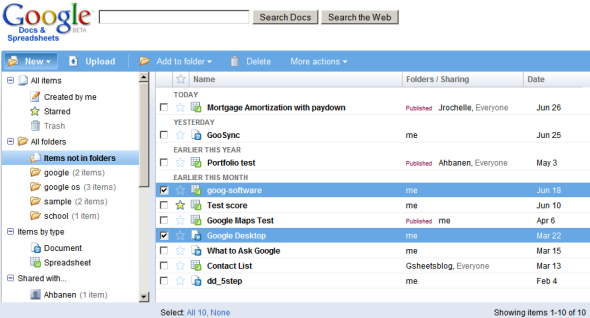
But folders are comfortable and somehow more manageable, especially if you have to organize a small number of documents. Google introduced folders in Docs & Spreadsheets so you can use drag & drop to organize your files, but there's something strange about these folders: you can still place a document in more than one folder and it's not possible to add subfolders. Google actually added a hybrid combination between folders and labels. A similar hybrid was introduced in Google Reader: a feed can be placed in more folders.

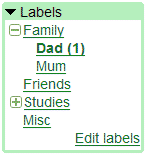
Labels (also called tags) are also a form of metadata used as a primitive way to describe multimedia files. Because it's difficult to analyze images and videos, YouTube and Flickr let you add tags when you upload a file so people can find them.

"A tag is a (relevant) keyword or term associated with or assigned to a piece of information (e.g. a picture, article, or video clip), thus describing the item and enabling keyword-based classification of information."

The problem with labels is that it's hard to visualize them once they accumulate. Weighted lists (or tag clouds) emphasize the most frequent labels, but aren't very useful to display a large number of labels. Hierarchical labels bring the same problems associated with folders, but let you categorize your labels (for example: work, personal, family as main categories). Here's a Greasemonkey script that adds hierachical labels to Gmail.

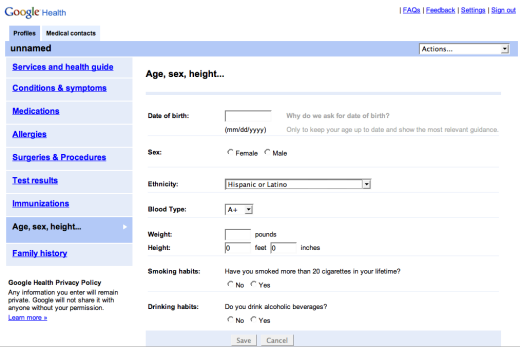
While the right combination between folders and labels is yet to be found, search is probably the best way to "organize" documents. You organize the chaos dynamically, based on your needs. But to do this, you need a smart search engine that goes beyond keyword matching.
August 9, 2007

Pay for More Gmail Storage

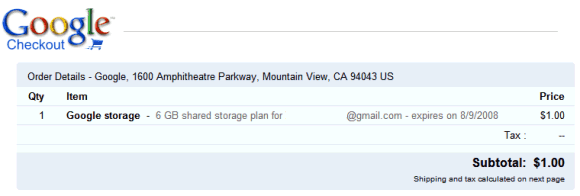
Google will start to use a model similar to Picasa Web's premium plans to let you buy more storage for different Google services, including Gmail. So for $20 a year, you'll get 6 GB that can be used to store photos in Picasa Web Albums and to send or receive messages in Gmail. It's unclear whether Google intends to add other services, but Google Docs and Page Creator are possible candidates.

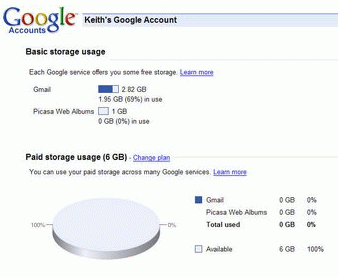
You can manage your storage options from this page. Here are the current plans for upgrade:

* 6 GB ($20.00 per year)

* 25 GB ($75.00 per year)

* 100 GB ($250.00 per year)

* 250 GB ($500.00 per year)

(Note: Initially, the price for the 6 GB option was $1, but Google quickly changed it to $20.)


In February, Sergey Brin announced that Google "will start selling additional storage capacity to e-mail users with extraordinary needs". While not many people need more than 2.8 GB for storing mail, the unified storage could be more useful because you can manage it dynamically, like a virtual hard drive.

So the good news is that you have more storage options: Picasa Web costs much less, you can upgrade your Gmail storage in case you run out of space and GDrive is closer. The bad news is that others offer better prices: Yahoo Mail offers unlimited storage for free, Flickr gives you unlimited storage for $25 a year and Microsoft's SkyDrive is already here.


{ Via Google Blogoscoped. Screenshot from Keith. }