An unofficial blog that watches Google's attempts to move your operating system online since 2005. Not affiliated with Google.

Send your tips to gostips@gmail.com.

August 29, 2007

The Quality of Google Book Search


Paul Duguid wrote an interesting article about Google Book Search in which he analyzed the quality of the indexed editions and the search results by doing a search for Lawrence Sterne's "Tristram Shandy", a novel from the 18th century. Mr. Duguid noticed that the Harvard edition of the book had many quality problems and some text wasn't scanned properly. Google Book Search doesn't distinguish between the volumes of a book, so it's difficult to realize that the Stanford edition is actually the second volume of the book.
Google may or may not be sucking the air out of other digitization projects, but like Project Gutenberg before, it is certainly sucking better–forgotten versions of classic texts from justified oblivion and presenting them as the first choice to readers. (...) The Google Books Project is no doubt an important, in many ways invaluable, project. It is also, on the brief evidence given here, a highly problematic one. Relying on the power of its search tools, Google has ignored elemental metadata, such as volume numbers. The quality of its scanning (and so we may presume its searching) is at times completely inadequate. The editions offered (by search or by sale) are, at best, regrettable. Curiously, this suggests to me that it may be Google's technicians, and not librarians, who are the great romanticisers of the book. Google Books takes books as a storehouse of wisdom to be opened up with new tools. They fail to see what librarians know: books can be obtuse, obdurate, even obnoxious things. As a group, they don't submit equally to a standard shelf, a standard scanner, or a standard ontology.

Patrick Leary, the author of the article Googling the Victorians (PDF), has a pragmatical response, as seen on O'Reilly Radar:
Mass digitization is all about trade-offs. All mass digitizing programs compromise textual accuracy and bibliographical meta-data so that they can afford to include many more texts at a reasonable cost in money and time. All texts in mass digitization collections are corrupt to some degree. Everything else being equal, the more limited the number of texts included in a digital collection, the more care can be lavished on each text. Assessing the balance of value involved in this trade-off, I think, is one of the main places where we part company. You conclude, on the basis of your inspection of these two volumes, that the corruption of texts like Tristram Shandy makes Google Books a "highly problematic" way of getting at the meanings of the books it includes. By contrast, while acknowledging how unfortunate are some of the problems you mention, I believe that the sheer scale of the project and the power of its search function together far outweigh these "problematic" elements.

When scanning and indexing millions of books, it's difficult to assess the quality of each edition. Google Book Search's main goal is to let you discover books you can borrow or buy later on. But Google could add an option to rate the quality of each digitized book or build algorithms that detect flaws or differences between editions. So the next time you do a search for Tristram Shandy, all the editions are clustered and the best one comes up first.
Internationalization and Google Search Results

Google has always tried to be accessible: the search interface is available in more than 100 languages, the results are modified based on your location, the interface is simple and universally accessible.

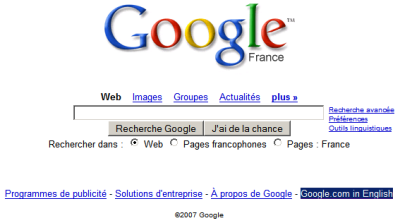
If you don't live in the United States, you noticed that google.com automatically redirects to your local domain, that shows messages in your language and custom-tailored results for your location. This is especially noticeable if you live in a country that doesn't have an important Internet presence and you see unimportant pages getting high rankings just because they happen to be written in your language.

Monomo Blog compares two local versions: the British Google and the German Google and notices important differences:

"Let’s say you search for something technical, like a certain Javascript Library - the pattern that the German portal displays more sites in German persists - but from a quality point of view the differences can be stark (the number of German speaking sites against English speaking ones surprisingly matters!). It seems that the priority of the guessed native language, overrules other aspects like relevance in quite a dramatic fashion. It is quite possible that you’ll never find a particular reference on the German Portal which features on the first result page on the British portal."

Google offers options to translate search results in your language, but only for a small number of languages. The cross-language search interface, which lets you search web pages written in foreign languages, is still an experiment. But until Google manages to translate all the web pages to a universal language and let you find any information available on the web, regardless of the language it was written in, Google could at least ask you the languages you know or you are comfortable with.

Meanwhile, if you want to use the standard version of Google, click on "Google.com in English" at the bottom of any Google homepage or type google.com/ncr in your address bar. Google's cookie will save your preference, so the next time you go to google.com you won't be redirected to the local version. Google also offers the option to search for web pages written in a certain language or from a certain country (advanced search) and you can see the search results from another location by adding the gl parameter to the URL (for example: http://google.com/search?q=bank&gl=us shows the results from the US).


I don't use Google's localized versions because they're often not in sync with the original version, the translation is not very good and sometimes difficult to understand, the product is not fully localized (the help center is still in English) and the overall quality is significantly inferior. But in the case of search results, you also miss important information and find more spammy or irrelevant search results.

Monomo also thinks about the cultural implications:

"Now of course there is a whole bunch of well meant arguments which make the case for regionally optimised search results, but what are the implications? Surely if a whole culture or an language area (...) are constantly served fairly reduced differing information by the quasi monopolist, the knowledge base of that area will start to differ."

So even if it's important to tailor some search results to the user's location, language or interests, that doesn't mean you should sacrifice the quality of the results and lower user's expectations.

YouTube Launches New API

YouTube migrated its API from REST/XML-RPC to Google Data so you can use the same package for accessing different Google services. The new API provides read-only access to user profiles, videos uploaded or bookmarked by a user, subscriptions, video comments, related videos, playlists, search results. And because the default output is Atom feeds, you can use the API to subscribe to a lot interesting data. Here are some examples of feeds that help you track a user's activity:

http://gdata.youtube.com/feeds/users/username/uploads - videos uploaded by username

http://gdata.youtube.com/feeds/users/username/favorites - videos bookmarked by username

http://gdata.youtube.com/feeds/users/username/playlists - playlists created by username

http://gdata.youtube.com/feeds/users/username/subscriptions - username's subscriptions

Some useful parameters for the feeds:

?max-results=50: the maximum number of items from a feed (by default, a feed includes only 25 items).

?alt=rss or ?alt=json: change the output format to RSS feeds or to JavaScript code (JSON) that can be easily used from web applications.

?vq=query: use this parameter to create a filter for a feed. Obtain only the videos that contain your query in the metadata (title, tags, description).

?orderby={updated, viewCount, rating, relevance}: sort the items from feed by upload date, number of views, rating or relevance.

Example of a feed:

http://gdata.youtube.com/feeds/users/google/uploads?
vq="google+maps"&orderby=viewCount
(the videos about Google Maps uploaded by Google, sorted by popularity)

These feeds can also be used in applications like Miro to export your videos from YouTube.

{via YouTube API Blog}

FlashEarth Comes to Google Earth

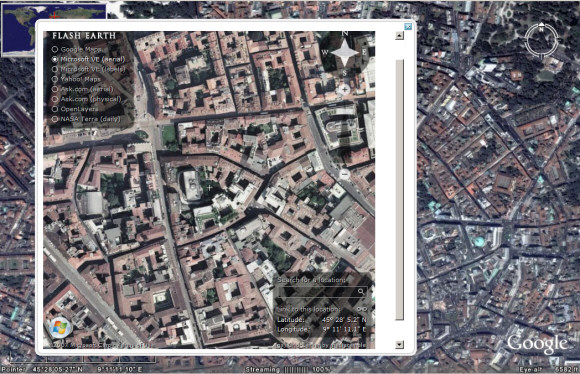
You've probably heard about FlashEarth, the site that lets you compare the satellite imagery offered by Google Maps, Yahoo Maps, Microsoft Virtual Earth, Ask.com and more. Now you can use FlashEarth directly from Google Earth thanks to a layer created by Barry Hunter. "As you move around the globe a little white arrow follows you around, simple click it to get an approximation of the current view in FlashEarth in a popup balloon."

This could be useful if Google Earth doesn't have a very good coverage of a certain area or you just want to see the same image from a different perspective.

August 28, 2007

Gmail's Collaborative Video

The wait is over. Google launched an interesting challenge last month: "Help us imagine how an email message travels around the world."

"A few of us on the Gmail team came up with an idea to stitch together a bunch of video clips that all share one element: someone hands the Gmail M-velope in from the left of the screen, and hands it off to the right. Put them all together, and they form one long chain of hand-offs," detailed the Gmail Blog. The number of responses was impressive: more than 1,000 videos that included Gmail's M-velope logo. Google selected some of the best videos, edited them and created a final video that showcases some of the most important values behind Gmail: creativity, collaboration and fun.

Connect to Google Talk on Your Mobile Phone

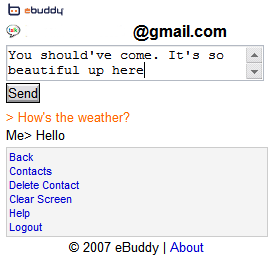
Until Google Talk releases a mobile version (or anything else), there's a simple way to chat with your friends from the mobile phone. eBuddy, an all-in-one web messenger similar to meebo, has recently started to support Google Talk. eBuddy has a mobile version available at m.ebuddy.com that can be used to chat with your contacts from Yahoo, MSN, AOL, Google and MySpace.

The interface is very simple, but it's optimized for the small mobile screens by displaying the messages in the reverse order. The web page refreshes every 20 seconds to automatically display the new messages.

While eBuddy promises it doesn't store your usernames and passwords, you should only use the service if you think it's trustworthy. There are many other ways to access Google Talk on your mobile phone, but this one doesn't require to install an application. iPhone users should rejoice.

August 27, 2007

Google Facebook App

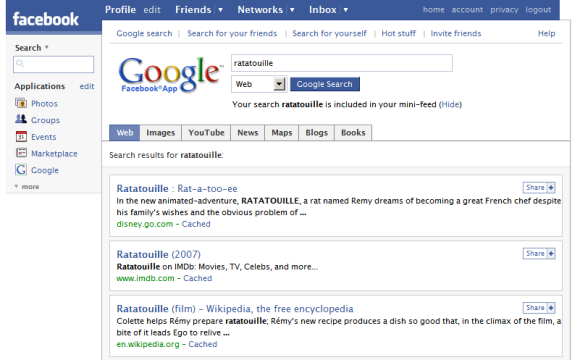
Google made a lovely app for Facebook that lets you search the web and share the results with your friends. Your queries are automatically included in Facebook's mini-feed, so your web history can be shared with your friends. There's also a page that showcases popular results found by other Facebook users.

The application has been created using Google's AJAX Search API, the only search API still supported by Google.


At the moment, Google only uses your web history to personalize search results. Maybe in the future you'll be able to share some parts of your logs with your friends (for example, your bookmarks) and obtain better search results by using information from the profiles of your contacts. Yahoo tried to do this with MyWeb 2.0, but failed.
With the release of MyWeb 2.0, Yahoo has added an extensive array of new features focused on community-based searching and sharing of information. "It basically enables people to tap into each other's personal web by searching their trust network of friends," said Eckart Walther, vice president, product management, Yahoo. (...)

Yahoo has also developed a new relevance algorithm called "MyRank" for MyWeb 2.0. "It's a new search engine that we wrote that can search across thousands of nodes and millions of pages in a trust network," said Walther. Unlike PageRank and other link analysis techniques used by general-purpose search engines, MyRank is designed to ferret out clues to relevance based on the pages you and your community have saved to MyWeb 2.0.

Find This Place in Google Maps

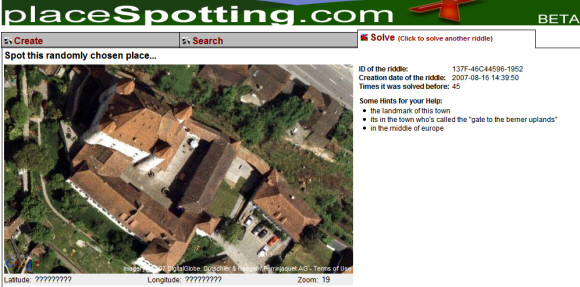
PlaceSpotting is a site that lets you create and solve riddles using Google Maps. Your task is to find a certain location on the map with the help of a satellite image and some hints. The problem is that you can only drag and zoom the map, there's no search box that lets you enter the name of a country or an address. Fortunately, you don't need to find the exact location: the latitude and longitude can be partial matches.

If you have no idea how to solve the riddle, the copyright information from the satellite image is sometimes pretty useful. For example, in the screenshot below one of the companies that provided the imagery is Dütschler, from Switzerland. You can also use the information from the three hints to find the city. The source code of the page also contains some interesting data from Google Maps API, but that's usually called cheating.

Bloglines Upgrades to Stay in the Game


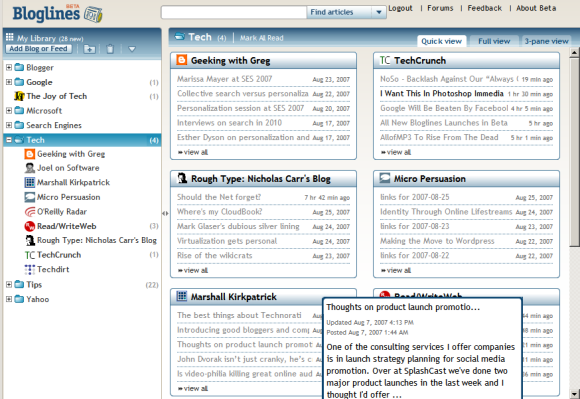
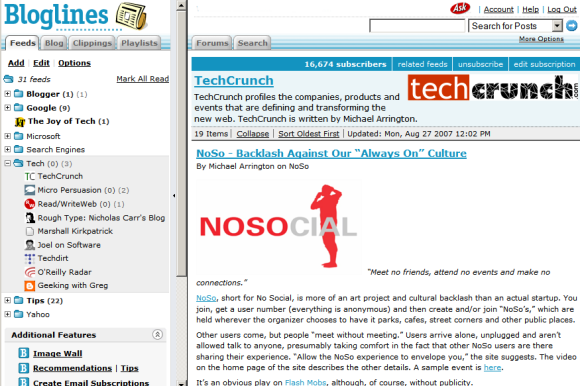
Bloglines, still a popular web-based feed reader, launched a beta version that puts it in line with more recent applications like Google Reader. If Google's feed reader was heavily inspired by Bloglines, it's time for Bloglines to add some features from Google Reader.

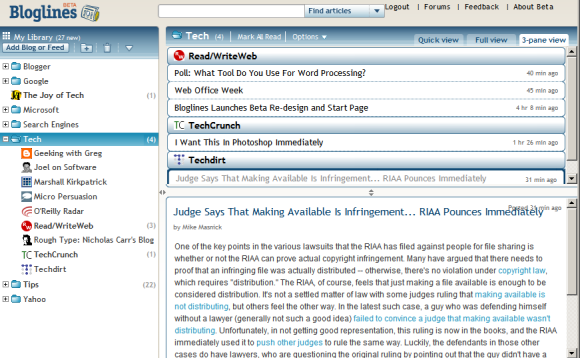
The most important change is that Bloglines doesn't use the old-fashioned frames and loads new data using AJAX. Bloglines offers three views:

* quick view (similar to Google Reader's list view) that only shows the titles

* full view (corresponding to Google Reader's expanded view) which also displays the content of the feed posts. Unlike the old version of Bloglines, the posts are marked as read only if you scroll down to read them.

* 3-pane view (screenshot above). This is similar to the way desktop email clients like Outlook or Thunderbird display mail, but it doesn't provide a good experience if you read long posts.

The quick view brings an interesting idea: grouping the feeds from a folder and automatically creating pages like the ones from iGoogle, Netvibes, Pageflakes. Bloglines even lets you create a start page with your favorite feeds.


But the most useful new feature is feed management using drag-and-drop. Now you can easily move feeds from one folder to another one without opening a new page or going to the settings.

Bloglines doesn't want to stop here: they promise to add other features like sharing feeds and the option to create a link blog. "Since this is a Beta, some features and functionality will be missing. Bloglines is very powerful, so it'll take some time to get all your features into the new redesign. The full-featured original Bloglines (considered by many to be the best feed reader on the market) will continue to be available, and Bloglines subscribers can use both sites to access their subscriptions and compare experiences," explains Bloglines.

Bloglines has many features not available in Google Reader (like search, notifier, recommendations, email subscriptions, public profiles), but the main reason people started to migrate to other feed readers was the interface. Here's what Gina Trapani from Lifehacker wrote in a post from last year:

"I'm not exactly an easily-offended aesthete, but Bloglines' design made me wince from the get-go. It's just plain ugly. The color (which I took pains to change with the Bloglines teal-killer Greasemonkey script) , the font, the boxiness of it all - and after awhile a design you don't like starts to drag on you, becomes work to look at and use."

August 26, 2007

Google Lets You Remove People from Street View

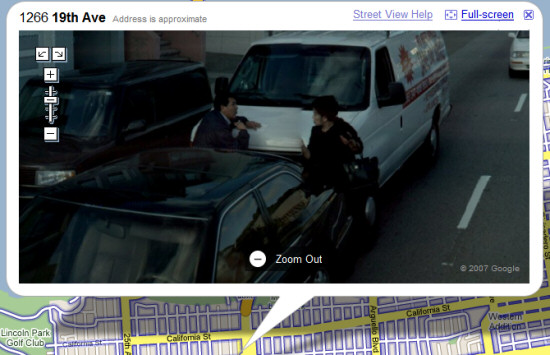
Because of the potential privacy problems, Google decided to change the policy for removing faces and license plate numbers from the Google Maps Street View imagery. According to CNET, "anyone can alert the company and have an image of a license plate or a recognizable face removed, not just the owner of the face or car".

Marissa Mayer said that Google changed the policy 10 days after the product's launch, but didn't announce it. "We looked at it and we thought that's really silly because that's not the point of this product. The purpose is to show what the stores look like, what houses look like. If someone says, 'Hey, there's a face here,' ... it doesn't matter whose face it is."


Google Maps help center continous to be vague about this: "Street View contains imagery of public property, which is no different than what you might see driving down the street. Imagery of this kind is available in a wide variety of formats for cities all around the world. That said, we understand that Street View imagery may contain objectionable content. If you've seen content like this, please see our help article on how to report inappropriate images." Basically, you have to click on "Street view help" link next to the image, select "Report inappropriate image" and fill out a form.

The street view images could be even more useful if they didn't contain people, cars or other transient objects. People passing by don't define a place, they just happen to be there. Because Google and Immersive Media take a lot of photos from a single place, it's not very difficult to detect the overlays. There's even a free software that allows you to remove tourists from photos.

So one should expect that Google will automatically remove people and cars from the images. Maybe, at some point, Google will also offer an API that lets you add objects created with SketchUp or other 3D modeling software and integrate the imagery in Google Earth.