An unofficial blog that watches Google's attempts to move your operating system online since 2005. Not affiliated with Google.

Send your tips to gostips@gmail.com.

August 25, 2008

Response Summary for Google Forms

Google Docs experiments with automatically generating response summaries for forms. If you edit a form and click on "View responses", Google shows charts for questions with multiple choices and lists the first answers for free-style questions.


The summaries are pretty basic but they reveal more information than the raw data. Hopefully, until the feature is officially launched, Google will make the summaries interactive and customizable and users will be able to publish them.

To see all the spreadsheets from your Google Docs account that include forms, go to http://docs.google.com/#forms.

Marriage Proposal in Google Street View

"My name is Michael Weiss-Malik, and I work for Google. I don't work on the Street View team, but I interact with them pretty regularly. They decided to coordinate a pre-announced Street View run outside Google's Mountain View offices, with the idea that Googlers could line up along the street and appear in the imagery. So I put together my "Proposal 2.0" billboard and showed up, hoping that it'd be readily visible. And it was," explains Michael on his site.

The image has been added on August 5 and it shows eclectic messages like "Proposal 2.0: Marry me, Leslie", "Hi mom" or "I love Street View".


View Larger Map

{ via Neatorama }

YouTube Uploader Powered by Gears

You can now upload videos larger than 100 MB to YouTube without installing a dedicated software. YouTube started to use Gears to upload videos.

The latest version of Gears introduces some new features that make manipulating large files so much easier.
Gears now makes uploading large and multiple files on the web much easier, giving you the primitives to roll a resumable uploader, which means hopefully we can see custom desktop uploaders go away soon. (...) Another cool new feature is the Blob API. Unlike strings, blobs let you reference arbitrary binary data — a first for JavaScript! Therefore, blobs can more naturally represent things like files and images, and they can be passed around efficiently. (...) We have also extended the Desktop API with a new method, openFiles(), which allows users to select multiple files of a particular content type, and then returns them as blobs for easy uploading or worker processing.


The multi-video uploader is useful if you want to upload more than one video from a single video and if some of your videos have more than 100 MB. "Each video can be up to 10 minutes in length and up to 1GB in size. These videos will be available in My Videos after they have finished processing. It may take 30 minutes or more for extremely large files to appear on your My Videos page."

{ Thanks, Hebbet. }

Google Translate OneBox

Google has a new OneBox for quick translations. You can just search for "translate", followed by a word or an expression and the optional "into English". For example, you can search for [translate désormais] and Google shows the entry from an automatically-generated bilingual dictionary.


Unfortunately, you can't use the search box as a shortcut for Google Translate because full texts aren't yet translated. The bilingual dictionary is only available for the following language pairs: English <-> French/Italian/Spanish/Portuguese/German/Russian/Chinese/Korean/Hindi. It's interesting that Google shows results from Google Image Search next to the translations.


{ Merci, TomHTML. }

August 22, 2008

Shallow Reader

I don't like to read feeds in Google Reader or in any other feed reader. After subscribing to sites that seem interesting, Google Reader makes them boring and uniform. All the subscriptions lose their identity and become random bits. There's also the pressure of having to read the new posts and clean the "inbox" which makes you skip interesting posts or just skim them.


"Skim = To read or glance through (a book, for example) quickly or superficially." (The American Heritage Dictionary of the English Language, Fourth Edition. Houghton Mifflin Company, 2004.)

When you open Google Reader and there are 400 new posts, each article becomes a mission from a hopeless game created by yourself. You want to be free again, so you pretend to read some of the articles or just their titles, without a context and without seeing the full picture. "Mark all as read" is your only ally, but you don't want to admit that you need it.

"Subscription - Contractual agreement between a seller and a buyer to provide the buyer with a service or product to be delivered (served) over a period of time specified in the contract at a total price that is dependent upon the duration of the service." (Dictionary of Marketing Terms. Barron's Educational Series, Inc, 2000.)

Feed readers seemed a good alternative to newsletters because you gain access to more content without having to reveal your identity, you can always unsubscribe and it's easier to share the content. But newsletters were less frequent and had a personal touch.

"Shallow - Lacking physical depth; having little spatial extension downward or inward from an outer surface or backward or outward from a center." (WordNet)

Reading becomes a mechanical task that needs to be completed, instead of a rewarding intellectual activity. You no longer pay attention to details because you're anxious to "read" everything.

"Read - To examine and grasp the meaning of (written or printed characters, words, or sentences)." (The American Heritage Dictionary of the English Language, Fourth Edition. Houghton Mifflin Company, 2004)

APIs for Finding Location

Google launched two APIs for finding the location of a user from a web application. The most simple way, which is also the least precise, is to derive some information about location from the IP. Google AJAX API has an object named google.loader.ClientLocation that includes "metro-level granularity properties": country, region, city, low resolution latitude and longitude. This could be useful if you want to customize a web page for a specific country or to prefill information about location. You probably noticed that google.com automatically redirects to the appropriate international domain and that when you create a Google account your country is already selected.


To get a more precise location, you could use the new Geolocation API from Gears 0.4. "The Geolocation module provides the best estimate of the user's position using a number of sources (called location providers). These providers may be onboard (GPS for example) or server-based (a network location provider)." The API includes a method that lets you track the changes and perform an action based on the new location. Unlike the AJAX API, this requires that users have Gears 0.4 installed and they explicitly allow the application to obtain location information. Unfortunately, Gears is only available for Firefox, IE and IE Mobile, but the team promises to extend the availability to other browsers. Gears for Safari will soon be released, so S60 and iPhone support shouldn't be far away. Google Mobile Blog has two examples of sites that already use the Gears API.

Meanwhile, Yahoo has developed a very interesting platform called Fire Eagle which connects the applications that obtain location information to other application that use the information. "The service has two major functions for users—it allows a user to update their location and then gives them full control of how and where they share that location. A user can perform these functions on the central site, but can also update or access their location data using any other authorized 3rd party application - on the web, on a desktop application or on a mobile device."


As more people start to use Internet services on mobile phones and the devices become more capable, location will be used in almost all applications to deliver more relevant information: a social network could displays the friends near you, a photo sharing service could show photos taken near your location, while a shopping search site could find the best price for a professional digital camera in your area. You can already find interesting applications for Symbian S60, iPhone, Android, but they will become really useful when everyone will broadcast the location.

August 21, 2008

Export Google Notebooks

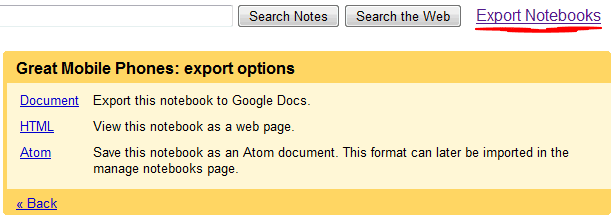
Google Notebook provides options to export each notebook as HTML or in the Atom format, but it's not very easy to export all your data. A Greasemonkey script automates the tedious work by reformatting the mobile page and adding links to the HTML or Atom version of each notebook.

The default format is Atom and you should use it if you want to edit the notebooks on your computer and then import the files to Google Notebook. It's a good idea to use the HTML format for archiving your notebooks.

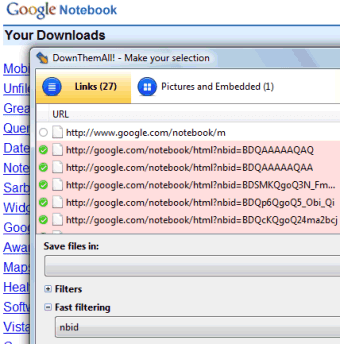
This script requires Firefox, Greasemonkey extension and a download manager like DownThemAll that saves all the files linked from a page or some of them.


After clicking on "Export notebooks", right-click and select "DownThemAll!". Choose a folder where to save the files, type nbid in the "Fast filtering" box and click on "Start".


Peter Shafer wrote a similar script for exporting Google Docs documents.

Photosynth Launches

Two years after the first technology preview, Microsoft officially launched Photosynth, an interesting way to combine overlapping photos from a place and explore the place in detail from different angles. "Using techniques from the field of computer vision, Photosynth examines images for similarities to each other and uses that information to estimate the shape of the subject and the vantage point the photos were taken from. With this information, we recreate the space and use it as a canvas to display and navigate through the photos."


PhotoSynth requires a Windows-only plug-in that also lets you create synths, but the results depend on the number and quality of your photos. Microsoft suggests to "start by taking a panorama of your scene, then move around and take more photos from different angles and positions. When moving around objects, try to get one photo every 25 degrees or so. That will make the synth work better."

There are some interesting places that can be explored, but this technology will become really useful in conjunction with geocoded photos from sites like Flickr or Panoramio. Google Maps already overlays photos from Panoramio, so the next step could be to combine these photos using "Panoramio Look Around", but the results won't be anywhere close to Photosynth.

{ via Data Mining Blog }

August 20, 2008

Translate YouTube's Search Results

YouTube tests a new option that translates the search results into your language using Google Translate. Now that you can independently select the interface language, it would be nice if the user-generated content was available in the same language.

YouTube didn't translate the titles and descriptions for all the videos, but it decided to use Google Translate's JavaScript API to perform the translations when they are needed, much like Twitter Search. If you click on "translate results into my language", YouTube sets a preference and all the search results will have titles and descriptions in your language, assuming it's supported by Google Translate.

The translation API offered by Google can be easily integrated in web applications, especially that it can now preserve HTML markup. I expect to see a lot of applications that take advantage of the API, from webmail services like Gmail to browsers and IM clients.


In other machine translation news, Google Dictionary has a new interface and it now supports more language pairs. There's also a section for definitions found on the web.


{ Thanks, Aleksandr. }

August 19, 2008

Google Widget for Custom 404 Error Pages

Google Toolbar 5 for IE (and soon for Firefox) has a useful feature that adds custom 404 error pages. If a site doesn't customize the error page and you click on a broken link or mistype the web address, Google Toolbar shows a list of suggestions: the site's homepage and some searches that could help you locate the right page.


Google implemented a similar error page for google.com and now you can add it to your own site. If you have access to the web server and you can customize the 404 error page, Google provides a widget that enhances the page. "The 404 widget is a quick and easy way to embed a search box on your custom 404 page and provide users with useful information designed to help them find the information they need. Where we can, we'll also suggest other ways for the user to find the information they need, thus increasing the likelihood that they'll continue to explore your site," explains Google.

The widget can be found in Google Webmaster Central, by selecting a site from the dashboard and clicking on Tools > Enhance 404 pages. Unfortunately, it requires JavaScript, so a small number of visitors will not see it.


Google has some recommendations for creating useful error pages: informing visitors that the page could not be found, recommending popular pages from the site, using a consistent design and preventing 404 pages from being indexed by search engines.

The Webmaster Central Blog mentions that this feature is experimental and that not all the sites show great suggestions.