You can add a document to multiple folders without creating copies. Just go to "all items" and drag the document to more than one folder. Since the sidebar doesn't show subfolders, you can't drag the document to a subfolder.
What if you want to remove one of the labels? There's no interface option for this, but you can use this workaround: click on the label you want to remove in the sidebar and drag the document to one of the other labels. To remove all the labels, drag the document to "Items not in folders".
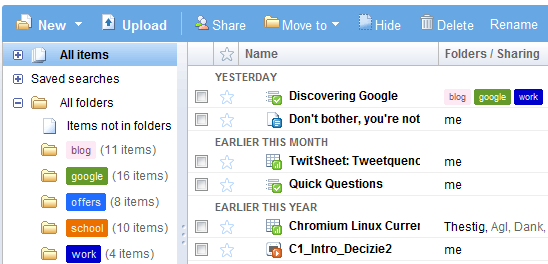
Google's hybrid between folders and labels still needs some improvement: subfolders are not displayed in the sidebar, you can't add multiple labels in a single step and it's not obvious that folders are actually labels.

Labels is the most stupid development by Google. EVERY other provider has folders. Zoho tried the label stuff too... but as we can see they have folders as well.
ReplyDeletefolders work well for organization of very simple file/folder groupings...but fail when you try to manage large volumes of more complex information (i.e. when files pertain to more than one category) and they do this without causing data redundancy
DeleteThis comment has been removed by the author.
ReplyDeleteI think folders are the stupid option - they have limited flexability & waste space with multiple copies of files that are harder to manage.
ReplyDeleteheirachical labels, if done well(they aren't), would be perfect for both file & email organisation.
Folders are generally supported by a 'but we know how these work' argument (or the above 'but everyone does it this way') which nicely avoids the possibility of making a better system.
/rant
sorry for being harsh, but I feel it is fair here
- imma
"What if you want to remove one of the labels? There's no interface option for this"
ReplyDeleteActually there is - just go inside the folder you wish to move your document out of, select move to from the menu and then select remove from current folder.
Folders are a terrible thing.
ReplyDeleteDown with folders!
Nothing ever comes under one folder, nothing.
Labels are a much more efficient way of describing the linked contents.
I use this on my computer as well, i don't use folders to store a single file.
I just save things in a "hive" folder (groupings of 1000 files in sub-folders), then symlink everything across several descriptive folders.
Such as People and Friends and Brown Hair.
Still need to finish my file manager to make browsing it even easier. (Explorer sucks for browsing in general)
This is basically a global version of what Picasa tries to do for images (and video), but without the overhead and extra space usage for the database.
Now if they could just let us share anything with a label instead of just the individual docs
ReplyDeleteI would take Gmail's Labels system over this any day any time.
ReplyDeleteEspecially if they add Sub Labels.
What about adding Latex support ZOHO style to Docs?
Labels are better than category. I use Gmail mainly for that.
ReplyDeleteI just want interoperability between all these webs apps. We should be able to open a text document hosted on Google Doc with Zoho or whatever else word processing application we want, web-based or not, and without the hassle of exporting/importing.
ReplyDeleteI want Zoho (and open office) to directly open my http://docs.google.com/Doc?docid=xxx links.
Then the way each service organize the documents hosted on it/opened with it would become a trivial matter, as anyone would be able to use it's favorite service to host them.
@Alex,
ReplyDeleteWhat your instructions are missing is that you should ditch the use of nested folders if you want to use the folders as the labels they actually are.
Otherwise you may find yourself one day using identical looking labels that only have there name in common, but not their position in the folder hierarchy.
I vote for Labels. I do not see the need for hierarchical folders when you can just use the doc search. Furthermore, a keyboard short cut to go to a certain label works awesomely in gmail. We should import that function to google docs.
ReplyDeleteLabels are great - but the best part about labels is the easy searching through my gmail with labels - I can't do that with googles doc folders - what are they thinking? They already have the technology...
ReplyDeleteGreat blog BTW...
I am a very basic computer user (emails and surfing only virtually). I can move my INBOX messages to my folders simply by clicking on the message and then on the 'Move to' box when my list of folders comes up for selection. This is not possible when I want to move my SENT messages because the box is marked 'MOVE TO INBOX'. Even if I do this, not only does the message not appear in my inbox, but it does not disappear from the sents list! Hope this makes sense. It's extremely irritating not being able to organise my activity in an orderly and businesslike manner.
ReplyDelete@John
ReplyDeleteThe 'sent messages' is not a folder so much as a search/list of the messages that you have sent, so moving things out of it isn't possible that I know of - it would be like saying 'i didn't send that' ;-)
I'm afraid i can't really help with the items not then showing up in your inbox, it seems to move mine there when i try :-(
GMail (via the web interface) tends to make more sense if you think of things as searches rather than folders, I think things get more complicated if you're using POP or IMAP but i don't so have little knowledge in those.
Folders are needed in Gmail. I work on multiple projects that have multiple major parts. The projects recur each year. So, I have a ProjectX2008 folder with 10 sub-parts to it. I have a ProjectX2008 with 12 sub-parts to it. I now have ProjectX2009 and ProjectY2009, each with parts. So, my current solution is to have folders such as ProjectX2009, ProjectY2009, Part1, Part2.... I assign each e-mail to a Project and a Part label. This is rough, mostly because I now have a completely unmanageable number of labels, including those for personal business, etc. I also must perform 3 operations to label and archive each e-mail. Sheesh. Subfolders would solve this all for me. Labels are a nightmare and slow. I can't imagine how unmanageable my label list will be 2 years from now. "Do I have a label for that or not?"
ReplyDeleteThank you Imma. I appreciate that Sent Messages is not a label. I still don't know why Google allows selected Sent messages to be Sent To Inbox only (and not to a selected label as with Inbox messages) - this worked very simply when I was with Lycos. I don't know what POP and IMAP are, I'm afraid.
ReplyDeletelabels are the better option of organizing documents.
ReplyDeleteFor Firefox users, there should be a workaround to use hierarchical labels. You just install Better Gmail 2 and do some configuring. https://addons.mozilla.org/en-US/firefox/addon/6076
ReplyDeleteIn reviews section there are some rumors, that the add-on has not been updated for some time and hidden labels feature is unavailable at this time. Have not had time to check this add-on out myself, but if it is so, then maybe there will be some update to fix this issue.
This comment has been removed by the author.
ReplyDeleteGoogle Docs Rock. Microsoft must be worrying :P as google is ready to play game which MS Playing from LONG.
ReplyDelete"Items not in folders" disappeared yesterday this is not good
ReplyDeleteI think having both folders and labels would be a great idea.
ReplyDeleteThis way i could keep all mails from and to a company for example in a folder, but tag them for individual projects they are working on, where this would win out is that several companies can work on the same project and therefore a filter on Tag would bring all the items for the project together, regardless of the folder i keep them in for my convenience.
The "Items not in folders" disappeared on my folders list for some reason...
ReplyDelete@Don: thanks for the workaround in regards to going into the folder itself and using "remove from this folder" - works great!
now there's a visual way to remove folders. Simply highlight (with a checkbox) the document in any folder view that the document is in, then click on the folders drop-down and uncheck the folders you don't want the document to be a part of. Problem solved.
ReplyDeleteLabels are fine some of the time but when one wishes to navigate around and look at folders each with a few files, nothing beats a tree view. Labels are too free form while a tree is limiting its easy and familiar. Sometimes too much choice is a bad thing, look at the iphone, its the standard not because of overwhelming choice but because its simple and offers just enough functionality to help the user.
ReplyDelete@rocket-gwt it sounds like you *want* to spend time searching through folders to find the right file :-(
ReplyDeleteSurely it's much faster to just pick two labels or type something in a search box?
This is all new now. It's called "organize" and works like a combination of folders and tags. Pretty much everything people are looking for on this thread seems to be covered - correct me if I'm wrong.
ReplyDeleteI also found this picture showing all the tips on google http://howtohacklife101.blogspot.com/2011/03/how-to-use-google.html
ReplyDeleteWe use folders and like them - but we use a folder for each client then subfolders to breakdown into specific projects.
ReplyDelete@Texas Process Server
ReplyDeleteThat sounds nice, but have you ever had the situation occur where one project is for several different clients?
In that instance it is useful to be able to link several clients to a project or document ;-)
We have to have folders with our apartment locator service - one for clients, and one for apartment shoppers and never shall the two meet in sub folders.
ReplyDeletefolders are just the 2d view of a 3d labels view, they should not be treated as "revolutionary" vs "simple", they should be seamless to change from one to another, and everyone uses the most suitable for her / his kind of infonomy
ReplyDelete