
November 3, 2006
Sort Google Videos by Rating
Google Tries to Solve YouTube's Legal Problems
 Financial Times reports that Google wants to offer all the copyright content from YouTube legally and to add even more.
"Chief executive Eric Schmidt and other managers have met CBS, Viacom, Time Warner, NBC Universal, News Corp and others, say people familiar with the talks, offering tens of millions of dollars in upfront payments for the right to broadcast their video content legally on YouTube."
Many videos have been removed from YouTube, including a list of videos that included content from Comedy Central, as a result of DMCA requests. In fact, a big share of YouTube's popularity is due to the copyrighted content.
Financial goes on and compares YouTube with Napster: "YouTube could face the same fate as Napster, the file-sharing service that gained enormous popularity seven years ago before the music companies sued it for copyright infringement and put it out of business." Napster didn't have a corporation to take care of its interests or a business model. YouTube is about to have both things.
Forward Conversations in Gmail
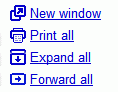 Message grouping is one of the best features of Google's webmail application. Until now, you could print an entire conversion, expand all the messages, but you had to forward each message individually. Now you can just click on "Forward all" in the right sidebar.
This option creates a new message that contains:
* the subject of the first message from the conversation
* all the messages from the conversation in chronological order, without quoted text
* all the attachments
This is useful if you want to send someone an exchange of emails.
November 2, 2006
Drawing Tools in Google Earth
The latest beta of Google Earth 4 includes a feature previously available only in the paid versions: drawing tools. "The path and polygon drawing tools are now available in the free product. You can easily sketch figures on the imagery for richer annotations and can share these overlays as KML or KMZ files."
You can use these tools to mark some regions on the map.
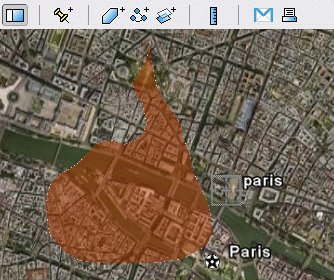
There's also a way to measure distances between two locations and the length of a path. Just click on the ruler, define your path using the mouse and see the distance.
The latest version of Google Earth is available here.
You can use these tools to mark some regions on the map.
There's also a way to measure distances between two locations and the length of a path. Just click on the ruler, define your path using the mouse and see the distance.
The latest version of Google Earth is available here.
Google Checkout, Free Until the End of the Year
It's not official, but Google plans to offer another discount for Google Checkout. This time, Google will offer free payment processing until the end of the year, for sellers that create an account at this page. Normally, sellers pay 2% plus $.20 per transaction. Google Checkout, launched in June as a way to buy things faster and safer, didn't have a big success, so Google had to continually push the product with all kinds of promotions. Also many users had problems using the service. This move will attract many online stores and the product may finally get some praises, if Google fixed their problems and improved the customer support. So if your favorite online store decides to accept Google Checkout, will you use it? { Via Andy Beal. }
Update: it's official.
Update: it's official.
Simple Text Sharing
I sometimes need to share small pieces of data without using complicated things like mail, an IM client. I just want to paste a small text somewhere and assign a URL. But that URL must be very simple or there must be a way to access the page without knowing the address.
I call this "simple text sharing", but other like to call it Nopaste. http://rafb.net/paste/ is a site where you can paste a piece of code or just some text, type a nickname, a description and that's it. If you don't want to remember the URL of your text, you can just go to "Recent pastes" and locate it quickly (fortunately, the site doesn't have too many visitors).
Another solution is cl1p, where you can upload files and choose the address.
I call this "simple text sharing", but other like to call it Nopaste. http://rafb.net/paste/ is a site where you can paste a piece of code or just some text, type a nickname, a description and that's it. If you don't want to remember the URL of your text, you can just go to "Recent pastes" and locate it quickly (fortunately, the site doesn't have too many visitors).
Another solution is cl1p, where you can upload files and choose the address.
Gmail Mobile, Java Application
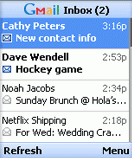 Google launched a new version of Gmail Mobile, this time as a Java application. If you go to gmail.com/app, on your Java-enable mobile phone and download the small application, you'll be able to use Gmail, almost as easy as on your desktop. Some key features:
* Up to five times faster access and use, thanks to automatic pre-fetching of messages
* Drastically reduced clicks and scrolling to access email
* Fewer keystrokes for reading, composing, or searching mail
* Attachments, including files and photos, viewable and automatically resized to fit the user's phone
You should check the requirements, the most important being J2ME (Java) MIDP2. Gmail Mobile is also available from your browser if you go to gmail.com (or m.gmail.com) on your mobile phone, but you won't get these features.
November 1, 2006
Gmail Attachments with a Life of Their Own
Gmail attachments need to have their own life. You should be able to forward scattered attachments. If you don't need an attachment, you should delete it, without deleting the entire mail. Attachments should be searchable, as they provide much more context to an email.
Yahoo Mail tries to implement separate views for attachments and the result is impressive. Maybe Google decided to wait until GDrive's launch.
Yahoo Mail tries to implement separate views for attachments and the result is impressive. Maybe Google decided to wait until GDrive's launch.
One
If I were to define blogs, I'd say they are an honest form of expression. Sharing what's interesting to you with an audience, discussing what do you think about current events, building connections and links.
I started this blog last year as an exercise. I've been following Google's evolutions for many years and I thought this is a good excuse to learn more about a company I like.
I didn't invent the concept of Google Operating System, I just wanted to tell its story. The platform is already there, some pieces are already built, but Google's operating system will continue to amaze us in the months to come.
What have I learnt in this year of blogging? You can learn from other people without stealing their work. Mistakes are sometimes the beginning of an exploration. Comments can make a small idea much more valuable than it really is. The best way to report news is to create them.
When I create a new post, I try to write it for me. If I find it useful for me, if it makes me happy or if it's something I really need to write, I'll press "Publish post".
While the first months of this blog were just a small echo, the first post that made an impact was Google Browser, an April Fool's Day joke. Without that (shallow) post, this blog wouldn't exist now. The impressive audience that followed after that little post made me more responsible and forced me to grow.
Thank you, Philipp Lenssen and the impressive community from Google Blogoscoped. Thank you, those who read this blog, write their comments or send tips. Thank you, Google for being the most interesting subject in the tech industry.
I started this blog last year as an exercise. I've been following Google's evolutions for many years and I thought this is a good excuse to learn more about a company I like.
I didn't invent the concept of Google Operating System, I just wanted to tell its story. The platform is already there, some pieces are already built, but Google's operating system will continue to amaze us in the months to come.
What have I learnt in this year of blogging? You can learn from other people without stealing their work. Mistakes are sometimes the beginning of an exploration. Comments can make a small idea much more valuable than it really is. The best way to report news is to create them.
When I create a new post, I try to write it for me. If I find it useful for me, if it makes me happy or if it's something I really need to write, I'll press "Publish post".
While the first months of this blog were just a small echo, the first post that made an impact was Google Browser, an April Fool's Day joke. Without that (shallow) post, this blog wouldn't exist now. The impressive audience that followed after that little post made me more responsible and forced me to grow.
Thank you, Philipp Lenssen and the impressive community from Google Blogoscoped. Thank you, those who read this blog, write their comments or send tips. Thank you, Google for being the most interesting subject in the tech industry.
Google Talk Has Offline Messages
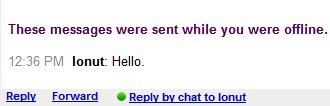
Google Talk lets you send offline messages to your contacts. The messages will be delivered the next time they log in to Google Talk.

As you can see in the screenshot below, the messages can be found in the Chats section from Gmail.
{ Via Googling Google. }

As you can see in the screenshot below, the messages can be found in the Chats section from Gmail.
{ Via Googling Google. }
Subscribe to:
Posts (Atom)
