If you constantly receive messages you'd like to ignore from the same persons or Gmail's spam filters aren't too good for you, it's time to create a blacklist. How to do that in Gmail?
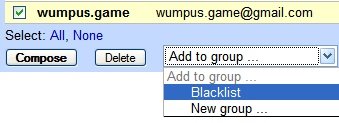
1. Go to Contacts, click on Groups and create a new group (let's say "Blacklist").
2. Click on "All contacts", check the email addresses you don't like and add them to the group (at the bottom of the window).
Each time you send a message to someone not in your Contacts list, Gmail will automatically add the person for you. So if you didn't reply to a person, you'll have to add the mail address in the last step.
3. Go to Groups / Blacklist and click "Compose to group". Copy the text from the "to" field.
4. Paste it here and click "convert". Then click on the resulting text and copy it. (This is a simple JavaScript. No address will be sent to a server.)
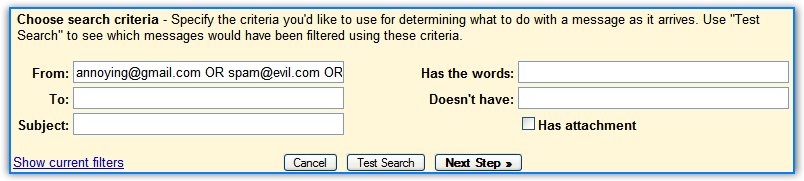
5. Create a new filter. Paste the text obtained above in the "from" field, check "Also apply to..." and "Delete it".
If you want to add more addresses, edit the filter by appending " OR newaddress1 OR newaddress2 ... OR newaddressN" in the From field.
Note that if you only want one or two address, you can create just the filter described above, by adding the address in the From field. If you want to block many addresses, it's time consuming to do this manually by copying each email address from the contact list.
Related:
When will you run out of Gmail storage space?
Hide spam counter in Gmail
More interesting Gmail filters

nice.. I must try this hack out !!
ReplyDeletesee, if you could filter against contact groups, you wouldn't need to do all this.
ReplyDeleteNot a bad idea. I actually did the inverse; I created a whitelist of all my contacts and created a filter rule that basically selects all messages that have an attachment and are not from my whitelist contacts. This should catch most of the image spam I get, which has nonsense in the e-mail body and the advertisement in attached GIFs.
ReplyDeleteThanks for the trick, but i like to filter on parts of the body like "Dear Home Owner" and so on.
ReplyDeleteI do not understand, why it isn´t possible, because google is scanning the body already for displaying the ads...
I like this idea, but it means you have to be constantly updating your whitelist or blacklist using the contacts. It would be much simpler if gmail would allow you to reference the contacts from the filters so you would automatically have an up-to-date whitelist.
ReplyDeleteI just wish GMail would delete the mail filtered and not just dump it in the trash for later manual deletion.....especially if I've gone through the trouble to create a filter specifically to delete something
ReplyDeleteAnd while I'm ranting why can't they make REAL FOLDERS instead of this filter/label non-sense......Yahoo's new mail feature is actually pretty nice despite the annoying ads...I think I'm dumping GMail until they can figure this stuff out as these are two of my favorite features in almost every single e-mail client on the planet.
I have a much simpler solution.
ReplyDeleteCreate a filter.
In has words:
type (without quotes): "is:spam"
You should have a dialogue box that advises against it, click ok, it works, than tell it to delete it.
Yes, I've already written about that, but that's useful only to send all the spam to trash. If you don't want to get an email from someone, you could mark it as spam, but maybe it's not a good idea because you could mislead Gmail's filters.
ReplyDeletethis is retarded the direstions don't work!!!!!!!!!!!!!!!!!!11
ReplyDeletewhy is this so hard or it is not imposible, am i so stupid or what
ReplyDeleteThere is a Gmail-Feedback form
ReplyDeletehttps://mail.google.com/support/bin/request.py?contact_type=suggest
There are feature requests.
check "Ability to block a user from sending mail to your account"
send info to google.
if a lot of users do this, they will inegrate it!!!
its good...
ReplyDeletejust tried this.
ReplyDeletegreat workaround until gmail finally has its own blacklist feature.
there was a bit of a difference on the adding a filter part mainly due to interface changes in gmail but i've been able to figure it out.
Wouldn't it be better if Google just gave you a button to block the DOMAIN of an email sender?
ReplyDeleteIf gmail is supposed to be so great, why do I have to basically do a rain-dance just to do what I want done???????
I agree. I have a hotmail account that let's me block a sender, or a sender's domain.
ReplyDeleteIt's the most beautiful thing I've ever seen.
Now there are HUNDREDS of email addresses AND domains from which I will never receive any communication EVER again. I don't have to set up some ridiculous "Filter" and I don't have to do a "rain-dance" to block people.
I was very hesitant about switching to gmail...and, to be real honest, the inability to simply block a sender or a sender's domain is just killing it for me.
I'm afraid I must whole-heartedly agree:
"If gmail is supposed to be so great, why do I have to basically do a rain-dance just to do what I want done???????"
OK, so what's the big difference between adding a list of addresses in Hotmail's blocked senders and creating a Gmail filter that automatically deletes any message sent from the same addresses? In Gmail, you'll find the messages in the Trash. I don't think this is a big problem.
ReplyDeleteYou can enter domains in Gmail's filters, not only email addresses, so the "blocked senders" feature would be somewhat redundant. But Gmail should still add it, because not many people know about filters.
I want to blacklist because it has the satisfaction (I believe) of letting the spammer know that his mail did not reach the intended recipient. ie he is a looser.
ReplyDeleteTrue, I can filter out the spam, but it never give this satisfaction.
No, the email doesn't bounce in Hotmail.
ReplyDeleteThank you, thank you,
ReplyDeleteJust used you converter, helped me create a 20 address filter.
i think nothin
ReplyDeletehow can i even leave a f*ckng comment when i dont have this but u want the readers 2 respond?
ReplyDeleteHi
ReplyDeleteHelp me how to block mail id.
The 'has words' "is:spam" filter worked for me.
ReplyDeleteThanks!
reis~54
The converter javascript has some minor bug. It doesn't treat quoted text separately than comma separated email addresses - hence input like:
ReplyDelete"mylastname, myfirstname " <the_dark_monster@mail.com>, <evil_script_checker@halloween.com>
produces incorrect output. In any case, great posting - hit on this page while trying to search for creating filter based on groups on Google Help forums. Cheers,
Thanks a bunch
ReplyDeletejust got em all in there, hoping it works
matt
We really really really want a filter that looks like this :
ReplyDeleteif sender in MyGroup then (do what ever)
Please! Don't make us beg.
I just want to know how to create a group...email addresses that I want to send a lot to about 6 people. I could do it with incredimail but can't figure it out in gmail.
ReplyDeleteHow to create a group in Gmail? Go to the Contacts page, click on the second icon that has a "plus" and enter a name for your group. Then go back to "My contacts" and select the contacts you want to add to the new group (you could use the search feature). When you selected the contacts, click on the Groups drop-down and then select "Add to [name of your group]".
ReplyDeletei created two mail for to test filter option is working fine or not.i created filter one of my gmail id and block from other one.I made a filter criteria as , if i get any mail from the user1 again it has to fwd the user1 mail to that user.As we have the option called Forward it to.But its not working....please help me.
ReplyDeletei tested again,its not working for forwarded id also from same domain.I meant fwd mail id also if it is @gmail.com ...its not working....
ReplyDeleteI agree with PeteW
ReplyDeleteI really really want to be able to reference my contacts and My groups in the filter screen.
Thanks! I got rid of a spammer from a company called clicked cash.
ReplyDeleteThis is FANTASTIC! As a teacher, I can now create class filters in one shot! Thank you!
ReplyDeleteAnother call to let us filter by groups, that way each time we add someone to the group we wont also have to add them to the filter. I always forget the second step and people get left out of emails.
ReplyDeleteCan't figure out how to create a filter that works based on a specific contact or group without any additional manual steps. E.g. "delete any email from that contact (or group)". Is this still a no go? Sad...
ReplyDeletesonprice2001@yahoo.com
ReplyDeleteSpammer
E-mails are certainly playing an important role in communicating with people who are connected on the virtual space. One can send and receive a mail either from his e-mail account from a web browser or an account configured in an e-mail program.click here
ReplyDelete