At the beginning of this year, Google announced a partnership with DivX Inc. that will make Google Video easy to integrate with electronic devices.
"Google and DivX can work together in the connected home to give consumers, content providers and consumer electronics manufacturers the freedom to move content across secure devices and platforms which are affordable, easy to use, and provide for greater access to richer, more meaningful digital media," says Jordan Greenhall from DivX.
"Our goal with Google Video is to make the world's video content accessible to people, and working with DivX is a very important step toward extending that service beyond the PC to consumer electronics devices," adds Susan Wojcicki from Google.
Yahoo already has Yahoo Go, an initiative that allows you to connect your PC, TV and mobile phone and make it easy to migrate the data from one device to another one. One of the feature of Yahoo Go is playing videos from Yahoo Video on your TV.
The DivX video compression technology offers DVD quality at up to 10 times the compression of MPEG2 files, so it's a good fit for online video. Google Video already encodes video in DivX4 and audio as MP3, so they can play on most DivX-enabled DVD players. The problem is that videos need to have higher resolution to be suitable for TV.
When the contextual video ads will be ready for prime time and more premium videos will be available on Google Video, will this be the future of TV? You'll watch only the programs you like, you'll be able to select from pre-configured channels or create your own channel for free. The ads will be targeted to the program and to you (as you'll login to a Google Account), so they'll be more relevant for advertisers and yourself. We only need a device to make this easy and straightforward.
Related:
A brief history of Google Video
What's next for Google Video?
August 20, 2006
Google Calendar's Quirks and Their Hilarious Cure
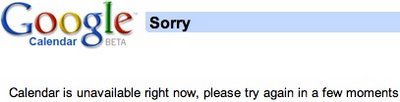
Google Calendar's support page mentions some peculiar behaviors that happen in rare situations. Google's solutions are somewhere between strange and hilarious.
Why am I receiving a corrupted screen on Google Calendar?
If you’re receiving a corrupted screen while accessing Google Calendar, please clear your browser's cache, sign out of Google Calendar, close your browser, and restart your browser. In some cases, it may be necessary to clear your cache more than once.
I keep receiving repeated SMS messages from Google Calendar. Help!
Occasionally, if the communication between your mobile device and your mobile providers doesn't go smoothly, you may receive duplicate SMS message notifications. When this occurs, just turn your mobile device off and on a couple of times, and see if that makes a difference.
If that doesn't fix the problem, please contact your mobile provider and ask them to reset your SMS message settings.
Why do I receive a 500 error when importing events?
You may receive a 500 error when importing events from iCal or CSV files that contain a large amount of data. If you receive this error, wait for five to ten minutes with your browser window open and then close your browser. Next, open your browser and sign into your Google Calendar to see if your events were imported.
If your events have not been imported, try importing events from a smaller range of time.
Related:
Google News bloopers
Please uninstall our Gmail notifier
Google Calendar productivity tools
August 19, 2006
Mac Notifier for Gmail and Google Calendar
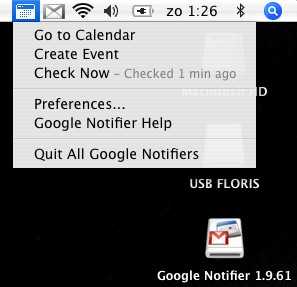
Mac users have a new way to be updated about the events from Google Calendar. The new Google Notifier, released as an universal binary, alerts you about the upcoming events and includes all the features from Gmail notifier. So now you can check both your mail and agenda with the same tool. Outlook is one step closer.
As usual, I'll be delighted if my visitors who use Mac take the time to test the small tool and share their opinion.


{ Screenshots by Floris van Eck. }
Other Google software for Mac:
Picasa Web Uploader, Video Player, Google Earth, Sketchup
As usual, I'll be delighted if my visitors who use Mac take the time to test the small tool and share their opinion.

{ Screenshots by Floris van Eck. }
Other Google software for Mac:
Picasa Web Uploader, Video Player, Google Earth, Sketchup
The Search Battle For IE7
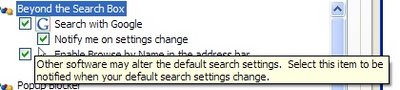
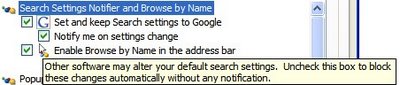
After my post Google is your default search, that reported a new feature in Google Toolbar 4: a monitoring tool that blocks any attempt to replace Google with other search engine in Internet Explorer, but remains loaded even if it is disabled - Google has updated the toolbar. They removed the bug, so the monitoring tool can be disabled and they also changed the wording in the settings:
4.0.1019.2378:
4.0.1019.5266:
While Google insists that this feature was added to prevent malware to change the default search engine in the settings, I think Google wanted to counterattack the software from Yahoo or Microsoft that includes the option to change the search engine enabled by default (Google's software also does that). If you download Yahoo Messenger or Windows Live Messenger, and keep the default settings, you'll change the search engine to Yahoo or MSN. But what's so important about the search engine in IE? you'll ask. The major battle of the default search engine is for IE7, a browser that has a search box, unlike the previous versions.
"The main issue is that many users do not have security software that prevents their search settings from being changed without their consent. As more advanced browsers and browser features become available, search settings in IE will become increasingly important. The notifier enhances a user’s control over their internet browsing experience. If users want to keep Google as their search setting, we want it to be easy for them to do so," says Benjamin Lewis, Product Manager for Google Toolbar.

4.0.1019.2378:

4.0.1019.5266:

While Google insists that this feature was added to prevent malware to change the default search engine in the settings, I think Google wanted to counterattack the software from Yahoo or Microsoft that includes the option to change the search engine enabled by default (Google's software also does that). If you download Yahoo Messenger or Windows Live Messenger, and keep the default settings, you'll change the search engine to Yahoo or MSN. But what's so important about the search engine in IE? you'll ask. The major battle of the default search engine is for IE7, a browser that has a search box, unlike the previous versions.
"The main issue is that many users do not have security software that prevents their search settings from being changed without their consent. As more advanced browsers and browser features become available, search settings in IE will become increasingly important. The notifier enhances a user’s control over their internet browsing experience. If users want to keep Google as their search setting, we want it to be easy for them to do so," says Benjamin Lewis, Product Manager for Google Toolbar.

What's Next For Google Video?
To further increase its user base and to keep its users more on the site, Google Video will concentrate on personalization.
To feel at home, users need a profile page that contains details about themselves, their favorite videos, their comments, their personal videos and their topics of interest. Google Video will also create a personalized homepage that contains videos that match people's interests. The videos already watched, the ratings and the information gathered from web search will be helpful for creating this kind of service.
Google Video will need to improve its search, by using the labels and the comments to complement video descriptions. They also need to include an advanced search that will allow you to sort the results by rating, number of views, number of comments, number of blog embeddings and to search videos by language, quality of image or safe-for-work status. Speech-to-text conversion will bring more information about the videos and will create a search experience comparable to the current web search, but the technology needs to be improved in order to be used in the real world.
Contextual video ads will allow Google Video to deliver premium content for free, and that will include TV shows, music videos, documentaries and more. As long as the ads are not intrusive and deliver relevant information, they'll be successful.
More quality videos, easier to find videos and a more personal experience. I think this is the key for a better Google Video.
Also see:
A brief history of Google Video
Why is YouTube more popular than Google Video?
Google Video tips
To feel at home, users need a profile page that contains details about themselves, their favorite videos, their comments, their personal videos and their topics of interest. Google Video will also create a personalized homepage that contains videos that match people's interests. The videos already watched, the ratings and the information gathered from web search will be helpful for creating this kind of service.
Google Video will need to improve its search, by using the labels and the comments to complement video descriptions. They also need to include an advanced search that will allow you to sort the results by rating, number of views, number of comments, number of blog embeddings and to search videos by language, quality of image or safe-for-work status. Speech-to-text conversion will bring more information about the videos and will create a search experience comparable to the current web search, but the technology needs to be improved in order to be used in the real world.
Contextual video ads will allow Google Video to deliver premium content for free, and that will include TV shows, music videos, documentaries and more. As long as the ads are not intrusive and deliver relevant information, they'll be successful.
More quality videos, easier to find videos and a more personal experience. I think this is the key for a better Google Video.
Also see:
A brief history of Google Video
Why is YouTube more popular than Google Video?
Google Video tips
August 18, 2006
Google Persistent Memory
 Google launched many features that deal with saving personal stuff, but the big picture in which all of them will be integrated is yet to be revealed.
Search across computers (Google Desktop)
Index and search the documents and viewed web pages from across all your computers.
Save Google Gadget content and settings (Google Desktop)
Access gadget content and settings like To Do lists, Scratch Pad notes, favorite stocks, and more from any computer.
Google Browser Sync
Google Browser Sync for Firefox is an extension that continuously synchronizes your browser settings – including bookmarks, history, persistent cookies, and saved passwords – across your computers.
Search History
Search History lets you view and manage your history of past searches and the search results you've clicked on.
Gmail
Don't throw anything away. Over 2755.742333 megabytes (and counting) of free storage so you'll never need to delete another message.
Do you see a pattern here? Google wants to create a persistent memory for all your virtual belongings: your queries, your bookmarks, your history, and ultimately your files. When you leave a footprint on a computer, it should propagate to Google and become a persistent footprint, something you can retrieve from any other computer connected to the Internet. The computer is just a cache, a temporary place until the information becomes universally available. Wherever you go, you have your online history with you. All the pages you've visited, all the searches you've made, all the chat logs, all the documents.
Google wants to blur the distinction between your personal computer and the web. The first visible sign was when they integrated desktop search interface into Google.com. The second step is creating online tools that partially replace similar desktop applications (see Gmail, Calendar, Writely, Spreadsheets). The third step will be synchronizing the files between online and offline applications and solving the right access problem (what's public, private or restricted).
You can have more than one computer, and all the files will be synchronized. You can be at a public computer and still view and edit your files.
While GDrive is not yet here, its first signs are clearly visible. GDrive will have two components: a desktop client which will be Google Desktop and an online interface that will integrate most of Google's online replacement tools.
"With infinite storage, we can house all user files, including emails, web history, pictures, bookmarks, etc and make it accessible from anywhere (any device, any platform, etc)" was the prophecy and the first signs are already here. As in Dali's painting, the vague memories erased by time will be recreated and kept alive.
Related:
Mozy - Online backup
Box.net - Free online storage
Add Events To Google Calendar Faster

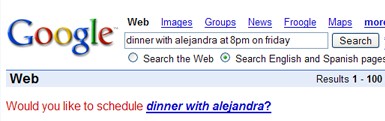
If you use Google Calendar and the latest Google Toolbar for Internet Explorer or Firefox, you can add a custom button that allows you to view the next 10 events from your agenda. There's also an easier way to add events to your calendar: type the text for the event in the search box and select Google Calendar from the list.
Type, for example, "lunch on 25 august 6pm at Newicks" and Google Calendar will parse you natural language text and transform it into an event.
For Firefox, there is an interesting extension that monitors your Google queries and offers an option to add an event if the queries follow a typical pattern.
Related:
Calendar Gadget for Google Homepage
Upload Pictures From Picasa To Flickr
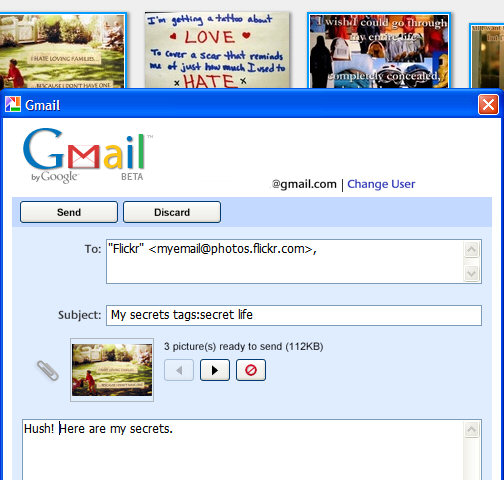
1. Go here, sign in to Flickr and copy the email address provided.
2. Open Picasa, select the pictures and click on the "Email" button from the bottom of the window.
3. In the subject type the title of the picture followed by the tags.
In the body, type the description of the photo.
Subject example:
Sunny Valley tags:trip july "lucy cradle"
As Picasa is integrated with Gmail, the best thing is to use the Gmail account. Next time you want to send photos, just type Flickr in the "To" field and the autocomplete function will help you find the email address where to send the pictures. Remember to keep it private.
This method has some limitations: if you send more than one photo, all the photos will have the same title, description and tags, so you'll have to edit them from the Web interface. Flickr says there's no limit for the number of photos sent by email, but don't send too many, especially if they are high-resolution photos.
{ Based on a post from Digital Media Minute. }
Related:
Picasa 2.5 review
Online image editor for Flickr
Are Search Engines Biased Towards Popular Sites?
If you think a little about search engines, you'll conclude they make popular sites even more popular. People are likely to find popular sites in the search results, they link to them and increase their popularity. This ultimately leads to a Googlearchy, a hierarchy artificially maintained by search engines. Arstechnica found a study called "Topical interests and the mitigation of search engine bias" that shows these conclusions are not valid.
"Traffic increased far less than would be expected if search engines were enhancing popularity. It actually increased less than would be predicted if traffic were directly proportional to inbound links. In the end, it appears that each inbound link only increases traffic by a factor of 0.8. The results suggest that the reliance of web users on search engines is actually suppressing the impact of popularity."
One explanation for this is that people already know popular sites and they want to discover other interesting sites. Another one would be that popularity is limited by the audience, so it can't grow infinitely.
"Our result has relevant conceptual and practical consequences; it suggests that, contrary to intuition and prior hypotheses, the use of search engines contributes to a more level playing field in which new sites have a greater chance of being discovered and thus of acquiring links and popularity, as long as they are about specific topics that match the interests of users as expressed through their search queries."
Search engines aren't the only way people find information, as is the case with viral content sent by email or instant messages. So until search engines find a measure for interesting content, next time you use search engines think there are a lot of great things on the Internet you've never stumbled upon. And visiting the same sites from your favorite closed circle won't help.
"Traffic increased far less than would be expected if search engines were enhancing popularity. It actually increased less than would be predicted if traffic were directly proportional to inbound links. In the end, it appears that each inbound link only increases traffic by a factor of 0.8. The results suggest that the reliance of web users on search engines is actually suppressing the impact of popularity."
One explanation for this is that people already know popular sites and they want to discover other interesting sites. Another one would be that popularity is limited by the audience, so it can't grow infinitely.
"Our result has relevant conceptual and practical consequences; it suggests that, contrary to intuition and prior hypotheses, the use of search engines contributes to a more level playing field in which new sites have a greater chance of being discovered and thus of acquiring links and popularity, as long as they are about specific topics that match the interests of users as expressed through their search queries."
Search engines aren't the only way people find information, as is the case with viral content sent by email or instant messages. So until search engines find a measure for interesting content, next time you use search engines think there are a lot of great things on the Internet you've never stumbled upon. And visiting the same sites from your favorite closed circle won't help.
August 17, 2006
Free Access to Writely
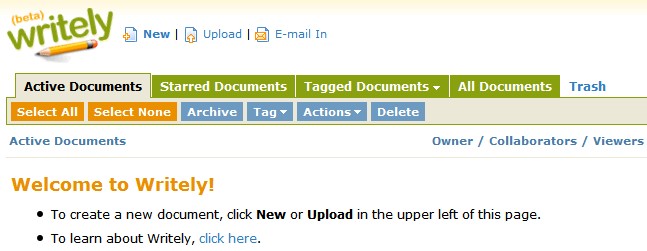 Writely Blog is proud to announce that Writely access is now free for everyone. Just sign up for an account.
Writely is a word processing tool acquired by Google this year. Since it was acquired, users were required to have an invitation to try the product. You can read my negative review, but there are many people who like Writely.
Also:
Google Analytics and Google Spreadsheets are available without invitation
Subscribe to:
Posts (Atom)
