An unofficial blog that watches Google's attempts to move your operating system online since 2005. Not affiliated with Google.

Send your tips to gostips@gmail.com.

September 1, 2007

Google OS Tab for Your iGoogle Page

Google has improved the way you can share iGoogle tabs with your friends. Now you can also share the settings, so a weather gadget will keep the information about locations, zip codes and temperature scale.

Here's a Google OS tab that contains some of the most popular Google gadgets grouped in three columns:

- navigation and search (links to the most important Google services and to your bookmarks, a gadget for searching the web)

- news (the top Google News and your feeds from Google Reader)

- communication (Gmail, Google Calendar, to-do items and Google Docs)

This tab remembers some of the changes I've made to the gadgets: I removed some Google services from the list of links, I added a custom section to the Google News gadget and disabled local search in Google Mini Search.


To share a tab, you need to click on the small arrow next to its name, select "Share this tab" and enter a list of friends. If you only want to get the URL that lets you share the tab, you can enter your email address. The changes aren't reflected in the iGoogle pages that contain your shared tab, so make sure everything is in the right place before sharing the gadgets.

August 31, 2007

August 2007 Recap: The Good, the Bad and the Ugly

This month Google didn't release its presentation tool, didn't launch any new version for Google Talk and JotSpot is still outside Google Apps. But what did Google do in August?

Mapping
Google launched a new version of Google Earth that lets you explore the sky and also includes a "hidden" flight simulator. Google Maps made it easier to embed maps into your site without knowing JavaScript. Four new cities from the US were added to Google Street View.

Communication
Gmail added the option to pay for more storage and started to share this additional storage with Picasa Web Albums. Gmail is now the top webmail service with the least amount of free storage. orkut suffered a small redesign and it's not ugly anymore.

Search
Google News had a lot of updates this month: the addition of comments from persons involved in a story, videos hosted by YouTube and articles from news agencies like AP that will be hosted by Google. Google indexes web pages faster than ever and gives more options to find fresh web pages.

Video
Google Video closes the video store and concentrates on advertising-supported solutions. YouTube experiments with overlay video ads for premium content.

This month we also found out that the internationalization of Google search has interesting side-effects, Google Browser is already here, Google Docs has a lot of interesting uses and organizing data is a difficult task.

Tip of the month: use Google Reader to power your blogroll.

Google Earth Easter Egg: Flight Simulator

Apparently, the latest version of Google Earth has an easter egg: a flight simulator. It's not quite like Microsoft Flight Simulator, but it's a promising start.

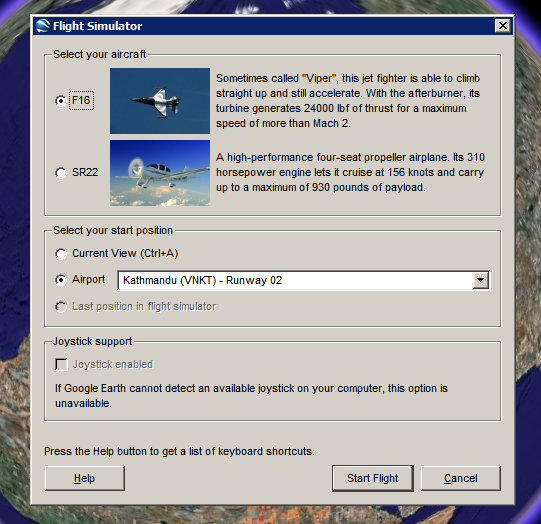
How to see this feature. Make sure you have Google Earth 4.2. Open the application, click on the globe and then press Ctrl+Alt+A. You should see this dialog that lets you choose one of the two aircrafts (F16 "Viper" and SR22) and an airport.


Here's the initial view from London Heathrow Airport:


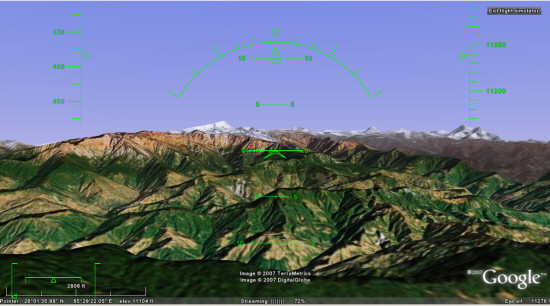
... and here's a nice view from Kathmandu:


To fly, you need to read this list of keyboard shortcuts, but you can also use a mouse or a joystick. "To disable or enable mouse controls, left click (single click on a Mac). Once mouse controls are active, the pointer shape changes to a cross on your screen."

Marco Gallotta, who found this feature, has some tricks: "Moving on though, you can get a quick start by holding Page Up for a few seconds to increase to maximum thrust (thrust meter is the left bar of the lower-left meters). Once you've accelerated to a sufficient velocity use the arrow keys to take-off. The keys are in reverse as one would expect with any flight simulator, so use the down arrow to take-off. When you've gained enough altitude then stabalise the aircraft to a straight flight path. It can be rather tricky to get the hang of as the controls are quite sensitive."

This easter egg could become a standard feature in the next versions of Google Earth and it will bring even more fun to the application.

Google News Starts to Host Content

Adding comments and videos hosted by YouTube were a clear signal that Google News starts to become more aggressive and wants to go beyond the comfortable status of being a news aggregator.

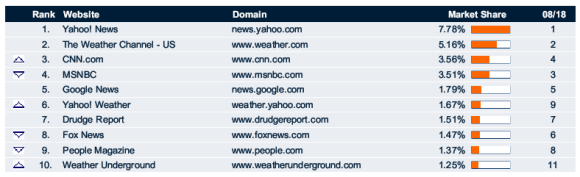
(source: Hitwise. The market share for news & media sites, based on US Internet usage for the the week ending August 25, 2007)

As a results of its partnerships with important news agencies like AFP and Associated Press, Google News will host original content from these sources.

"Our goal has always been to offer users as many different perspectives on a story from as many different sources as possible, which is why we include thousands of sources from around the world in Google News. However, if many of those stories are actually the exact same article, it can end up burying those different perspectives. (...) By removing duplicate articles from our results, we'll be able to surface even more stories and viewpoints from journalists and publishers from around the world. (...) Because the Associated Press, Agence France-Presse, UK Press Association and the Canadian Press don't have a consumer website where they publish their content, they have not been able to benefit from the traffic that Google News drives to other publishers. As a result, we're hosting it on Google News," explains the Google News Blog.

It's unclear whether Google will monetize the hosted content or will add new features that let users interact with news. What's clear is that today is a turning point for Google News that could bring more users and less friends from the press.

Google News was created as a tool that clusters related stories so you can read different perspectives on the same event. Unlike Yahoo News, Google News doesn't have editors: the homepage and all the other sections are generated algorithmically. Until this month, the site didn't host original content, so you could only find headlines, snippets and thumbnails from articles. To read the entire article, you had to go to a different site. Google was sued by many news organizations, including AFP, for copyright infringement and some of them won.

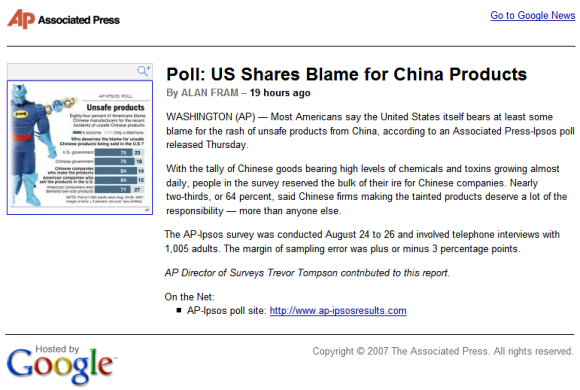
Example of article hosted by Google News:


Related:
The history of Google News

Google as a Bank


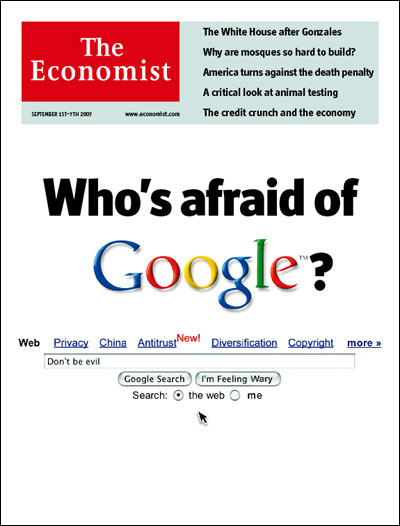
The Economist compares Google with a bank that stores and manages a lot of information (some of it, personal information).

"Google is often compared to Microsoft (another enemy, incidentally); but its evolution is actually closer to that of the banking industry. Just as financial institutions grew to become repositories of people's money, and thus guardians of private information about their finances, Google is now turning into a custodian of a far wider and more intimate range of information about individuals. Yes, this applies also to rivals such as Yahoo! and Microsoft. But Google, through the sheer speed with which it accumulates the treasure of information, will be the one to test the limits of what society can tolerate." (my emphasis)

As with any bank, you need to trust it, to make sure it has transparent policies, that it serves your interests and it doesn't have "hidden costs". Your ISP, your doctor, your employee, your bank - all have a lot of personal information about you and some of it could migrate to online services like Google Health, Google Checkout, Google Web History or Google Web Accelerator. The worst thing that can happen to Google is losing the trust of its users, so Google has another incentive to not betray peoples, besides the mythical "Don't be evil" corporate motto.

The Economist thinks that Google should find the right balance between users' privacy and storing personal data indefinitely. Google already does a good job at explaining the consequences of your actions and how could some options affect your privacy, but it would be nice to expand the Web History to a big personal center that shows all the information Google has about you and provides ways to remove or export some of the information.

"Google in effect controls a dial that, as it sells ever more services to you, could move in two directions. Set to one side, Google could voluntarily destroy very quickly any user data that it collects. That would assure privacy, but it would limit Google's profits from selling to advertisers information about what you are doing, and make those services less useful. If the dial is set to the other side and Google hangs on to the information, the services will be more useful, but some dreadful intrusions into privacy could occur. The answer, as with banks in the past, must lie somewhere in the middle; and the right point for the dial is likely to change, as circumstances change."

{ The second photo illustration: "At last!", licensed as Creative Commons. }

Related:
Google as a personal assistant
Google, Behind the Screen (documentary)

Embed Multiple Google Calendars

Google Calendar will improve the feature that lets you embed calendars in a site, by adding the option to include multiple calendars, giving you more control regarding the display and the size and adding a week view.

You can embed a calendar by clicking on the small arrow next to its name in the left sidebar, selecting "Calendar settings" and then clicking on the blue "HTML" button. A configuration tool will generate the code.

Google slowly rolls out this update, so you may still see the old version that lets you embed only a single calendar at a time.


{ Thank you, Nick Chirchirillo. }

Update (Sept. 6): the feature is live.

August 30, 2007

Easy Way to Find Recent Web Pages

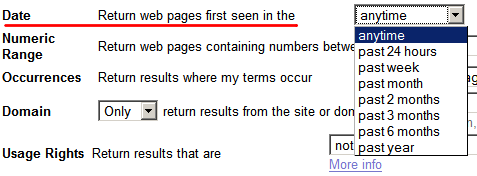
Now that Google indexes pages extremely fast and saves the date of the first indexing, it would be nice to have more options for restricting search results to a date range. Google only provided three options in the advanced search: see all the pages last updated in the past 3, 6 or 12 months and a difficult-to-use operator (daterange).

The advanced search page has been updated and it shows four more options: find the web pages first indexed in the past day, week, month or in the past 2 months.


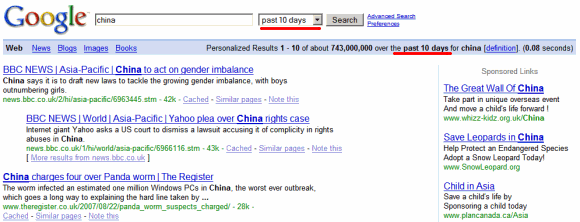
If you remove all the uninteresting parameters from the search URL, you'll find that as_qdr is responsible for date restrictions. For example, here's how to restrict a search for [China] to pages first seen by Google's crawler in the past 24 hours:

http://www.google.com/search?q=china&as_qdr=d

Note that you'll only find new web pages and not pages that were updated in the past 24 hours. That means you won't find homepages from popular sites or other frequently-updated pages. If the date range is small, you'll mostly find news and blog posts.

The nice thing is that you can change the value of as_qdr to custom intervals. Here are all the possible values of the as_qdr parameter:

d[number] - past number of days (e.g.: d10)
w[number] - past number of weeks
y[number] - past number of years

For example, http://www.google.com/search?q=china&as_qdr=d10 lets you search for pages that contain "China" and were created in the past 10 days.


A finer control (hours) and an option to sort the results by date would make this feature almost perfect.

Google Gadgets that Talk to Each Other

You could say that widgets (or gadgets, as Google likes to call them) are small applications that bring together a lot of information relevant to you. Now what if these gadgets would communicate with each other by sending small messages? PubSub is a new beta feature available at iGoogle. You won't find too many gadgets that use this feature, at least for now.

"PubSub allows multiple gadgets on the same page to send and receive data from each other. In other words, you can now build a gadget that communicates back and forth with one another. This introduces a brand new concept and strategy involved when writing gadgets. Information is no longer constrained to fit inside a single gadget. Instead, you can now split up various pieces of information amongst multiple gadgets and allow them to communicate with each other to paint a bigger picture. Gadgets now have the ability to be more closely integrated with one another and present a network of information to users."

This works if you add at least two gadgets, so it makes sense to create an entire tab with interactive gadgets (here's a sample tab). For example, you could have a gadget that includes a search box and other gadgets that show search results from different sources. Or another gadget could collect events (new email, new event, breaking news) and cleverly organize them based on your preferences.

"PubSub is a new framework which allows 'publisher' gadgets on iGoogle to communicate changes to 'subscriber' gadgets that have declared interest in those changes. This is currently available only on iGoogle and publisher/subscriber gadgets must be on the same page."

If you intend to write gadgets that use this new feature, read the documentation. How would you this framework?

Two Ways to Watch the Same YouTube Video

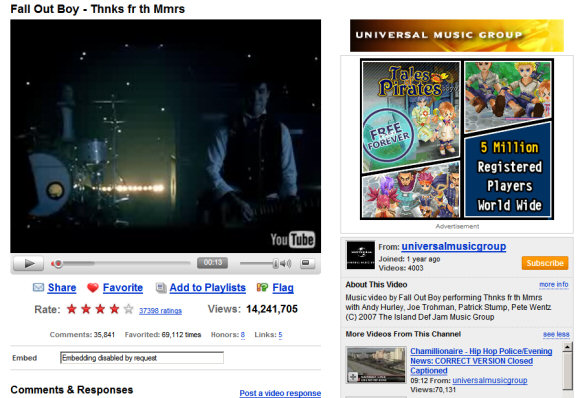
It's very interesting to see the differences between two (almost) identical videos available on YouTube. The first one was uploaded by Universal Music, the owner of the distribution rights, and is displayed using a new YouTube player in the new interface, available as an option for most other videos. Next to the video there's an AdSense banner and the video can't be embedded ("embedding disabled by request).


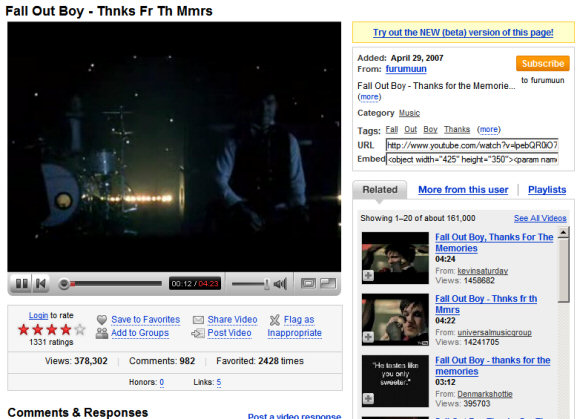
The second video was uploaded by a normal YouTube user, is displayed using the old player, the new interface is an option, there's no ad next to the video and you're able to embed the video into your site.


The first video has more than 14 million views, while the second one only has 378,000. I'll leave the comments to you.

New Context Menus in Google Docs

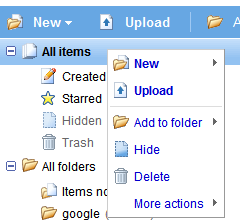
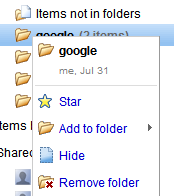
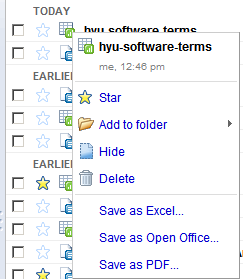
Google Docs added context menus to the document manager. Now you can right-click on a file or anywhere else inside the application and choose one of the appropriate actions. The new menu has an artificial look and is extremely long if you right-click on a document. Maybe Google Docs will add other views that allow easier selection of multiple documents.

Menu #1: right-click anywhere inside the application. The menu duplicates the existing toolbar.


Menu #2: a special case is the menu for folders, which erroneously includes the option "Add to folder".


Menu #3: right-click on a file. The menu shows all the actions corresponding to the type of file you selected. The only options left out are: new file/folder and upload.


If you use Firefox and see the standard context menu, go to Tools/Options, select the Content tab, click on the Advanced button next to the JavaScript option and check "(Allow scripts to) disable or replace context menus".

Among the new features that should be included in the next versions are: table of contents, integration of Webster Dictionary and Encyclopedia Britannica, the option to search the web for selected text and exporting documents as MP3 using text-to-speech technology.