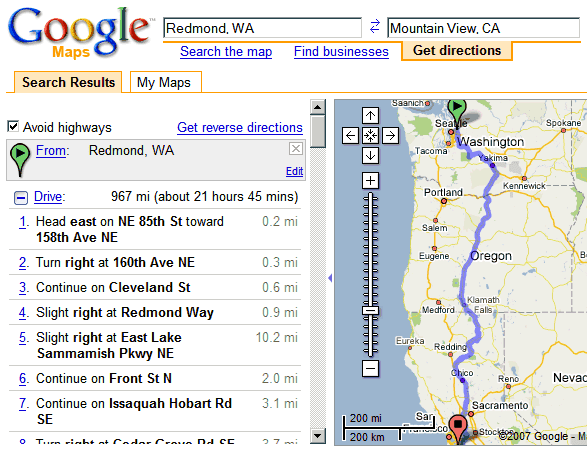
If you use the directions from Google Maps and you're afraid of driving on highways or you're a biker, you'll definitely like the new option to avoid highways. "When you click the
Avoid Highways checkbox, the route instantly updates to one that tries very hard to stay off of interstates, motorways, and other major roadways. This may give you a much longer path, but one that you may find more suitable," explains
Google LatLong Blog.
For example, if you
go from Redmond to Mountain View and avoid the highways, you need 8 extra hours.

Looks like a great service for drug / human trafficers. Perhaps even weapons dealers.
ReplyDeleteTrue... But some of us love to ride our scooters which aren't exactly the most highway safe vehicles.
Deleteopposite them people like to blend in with the crowd on the interstates pass a lot more cops on the non highway routes
DeleteI've been waiting for this feature for a long time. It's one of the only features keeping me from choosing Mapquest over Google Maps for directions.
ReplyDeleteNow if Google can add an "Avoid Tolls" box I'll be set :)
Yeah, I had to frequent to mapquest to avoid highways. Not sure why Google took so much time to get this done.
ReplyDeleteI love how they route you down US Highway 97 through Central Oregon on that map (versus I-5). As somebody who drives that nasty stretch of road every day, let me assure you that I'd rather ride my bike down I-5 than ride my bike down 97.
ReplyDeleteI think Highway 101 down the coastline might be a bit safer, but it's an ugly toss up either way. It'll certainly be more scenic.
I am a grandmother and i am afraid of busy highways,
ReplyDeleteI also love to drive slow and enjoy the lovely views,
Thank You,
This is a wonderful option for people who are anxious driving major highways. Anonymous
ReplyDeleteI can't find the avoid highways check box. Is it no longer available?
ReplyDeleteellen, (as you probably figured over these two months) you need to 'Show Options' first.
ReplyDeleteThis is needed for a long time- I want to know how to avoid freeways to avoid a humungous and very frustrating traffic- which is always there when i need to drive.
ReplyDeleteWanna travel back roads from Lafayette Indiana to Indianapolis
ReplyDeleteCarR
Does anyone know for sure whether the option is reliable ? I have to get to pembroke ON from Brampton, without getting on any highways (I don't have my G licence yet) and have a feeling that the directions its telling, consists of highways.
ReplyDeleteI don't usually like driving back roads, but my truck isn't shifting correctly so it is a welcomed choice now.
ReplyDeleteI don't usually like driving back roads, but my truck isn't shifting correctly so it is a welcomed choice now.
ReplyDeleteYes... Thank you.
ReplyDeleteYes... Thank you.
ReplyDelete