An unofficial blog that watches Google's attempts to move your operating system online since 2005. Not affiliated with Google.

Send your tips to gostips@gmail.com.

May 16, 2006

Google Notebook Review

Google Notebook is live. It's a small tool useful if you want to make research on the web - you may want to compare different brands of cars, or gather information for a school project.

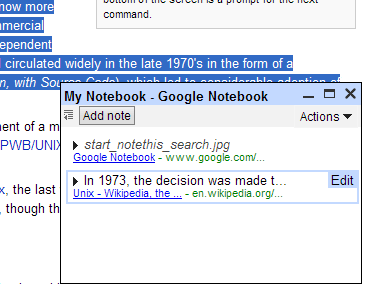
It comes as a Firefox extension or as a Internet Explorer plugin. After you install the extension, go to a page, select a fragment from the page that can include images, right-click and choose "Note this". You'll see a very small windows in the bottom-right corner which will stay there even if you go to another page. You can open or close the notebook from the status bar.

If you maximize the notebook, a new tab will open, but the new page will have all your notes in full size. You can edit the notes with a rich-text editor, print the notebook and even create more than one notebook. If you have more than one notebook, you can move a note from one notebook to another using drag and drop, but the experience isn't great (in Firefox, it doesn't work most of the times). Divide a note into sections to organize your notes, especially if you want to print them.

While Google Notebook keeps the general layout of your selection, it doesn't respect the style of the page. For example, if an image has an inline style defined, Google Notebook copies that, but if the page defines its style in an external stylesheet or in the head section, Google Notebook ignores the style.

The rich editor for notes is a small version of Google Page Creator engine, but it doesn't work well, so use it just to change the text or the links, not to adjust the layout. There's no undo or a way to edit the HTML code. If you make something stupid with the note, press Cancel and the note will revert to the previous form.

The selection from Flickr:


The selection rendered by Google Notebook:


You can adjust the spacing if you drag the small indicators you can see in the screenshot above.

By default, a notebook is private. If you want to share it, you can make it public. This way, it will become searchable at this page (for the moment, search is not available).

All in all, Google Notebook is a handy tool that works well for a small list of notes. You can search your notes, but you can't go to a note from the search results so it will be difficult to organize a large set of notes.

A similar solution to Google Notebook is Clipmarks, a service that has additional features: you can tag notes, comment on other people's notes. A note in Clipmarks looks like this.

Related:
Google uses the community to improve search results
May 15, 2006

Top 10 Google Gadgets

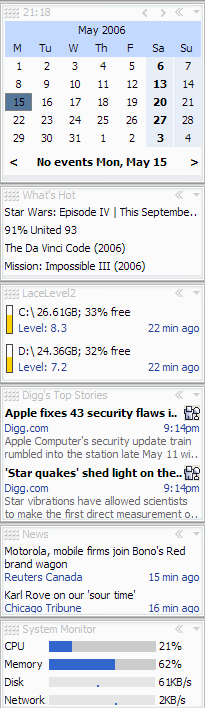
These are my favourite Google gadgets for Google Desktop 4. Some are new, others were available in Google Desktop 3, but most are extremely useful and have a big advantage over standalone applications: you can see their display all the time.

#10.
System Monitor - Shows CPU usage, memory usage, disk activity, network activity.

#9.
Desktop Netstat - Monitor your computer's network connections in realtime. You can view all TCP connections with local address, remote address and owning process for each connection.

#8.
Desktop News - View the latest news from Google News. If you enable Advanced Features in Settings, the news will be tailored to your taste. If you click on many tech news, you'll see more news about science and technology.

#7.
Digg Top Stories - You'll never miss an interesting news from Digg from now on.

#6.
Wireless Signal Meter - A gadget created by Google that shows wireless signal strength.

#5.
LaceLevel2 - Monitors fragmentation level of your local drives. This way you'll know when you need to defragment your hard-drive.

#4.
AdSense Status - View how much have you earned from your Google AdSense account.

#3.
Google Calendar Gadget - You can manage events and see what's going on this month without going to Google Calendar site. The definite Google Calendar plugin.

#2.
gdShredder - Securely shred files/folders using drag and drop, the recycle bin, and free disk space so that the data can never be recovered.

#1.
What's Hot - Tracks popular news and blog posts from Technorati, BlogPulse and other sites.

To add these gadgets, download Google Desktop 4, click on "Add +" button from the top and search for the name of the gadget. Most gadgets can be added instantly.

If You Search For Google On Yahoo


If you search for Google on Yahoo you'll find an interesting search box at the top of the results that suggests you to get real and continue to search on Yahoo. I have a suggestion for Yahoo: what about redirecting the first result (that is google.com) to a page that says: "404: Page Not Found"?

Windows Media Player 11

Nothing new from Windows Media Player 11. The glass design doesn't look good, it's black, it has too many button scattered all around the place. It has an inline search feature that works well for large media libraries, it doesn't lists artists and songs in trees - the new media player uses a similar approach to Windows Explorer.

But there are people that say Windows Media Player 11 has many new features. Let's see:

"Some of the unique features of Media Player 11 are a deeply integrated music library for both online and offline content, a new and improved interface, the ability to connect to additional hardware easily, and integrated, easy-to-use tools for following the process of any task (downloading music, burning CDs, synching music, or streaming video, just to name a few). Media Player 11 has a new integrated feel, too — one that makes online, network, and offline content indistinguishable. Many of the improvements are due to the redesigned interface, which includes simplified trees, helpful shortcuts on the menus and menu bars, and an advanced and improved media library. There are now Back and Forward buttons, giving Media Player a web-browser feel; a lightning-fast WordWheel search tool for getting through the library; and Xbox 360 support."


You can download WMP 11 from Softpedia (Windows 2000/ XP - download size: 22MB).

May 14, 2006

Add Gadgets To Google Pages

You can add modules/gadgets (like those on your personalized Google homepage) to a page in Google Pages.

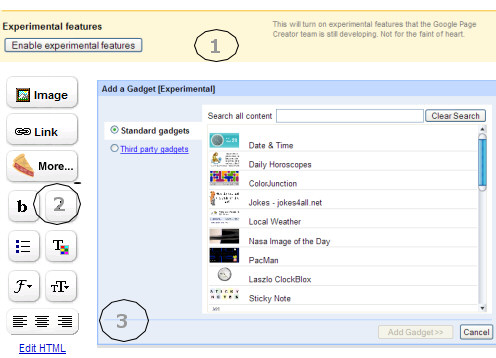
1. Go to Site settings and enable experimental features. (Accept the "not for the faint of heart" feature.)

2. Go to a page, click on a editable area and click on "more" (the new button from the left toolbar).

3. You'll see a dialog that lets you add a gadget. You can view latest news, local weather or play PacMan right from your page.


Related:
Google Pages review
Google Desktop 4.0 with gadgets

Do You Trust Google?

Google Blogoscoped quotes a German podcast that asks "why do we trust Google more than Microsoft?". I found some diggers' comments more interesting than the podcast, so I will quote two great opinions:

YES, I TRUST GOOGLE

"People who think Google does anything with your e-mail that other webmail services don't do are the ones who don't have the facts. Gmail basically scans your e-mail for keywords so it knows what ads to fetch. The mechanics of it aren't really any different from a spam filter or spell checker, and the likelihood of abuse is absolutely no different. In fact, this wouldn't even be the most efficient way to abuse your privacy. If they wanted to do something nasty with your e-mails, it would be done behind the scenes without necessarily having any connection with an ad system or anything else. And in that respect, any public webmail system on the planet could be doing whatever they want with your e-mails and you would have no way of knowing. Yes, you have to trust that Google isn't abusing your rights, but it's no different than any other public webmail service.

The same argument goes for tracking browsing behavior. Anyone could be doing it (and in fact, I'd be willing to bet that every major search engine does) whether they use cookies or not. To an extent, I can track people visiting my website, seeing them move from page to page across multiple visits, without the use of cookies (although a cookie would help improve the tracking accuracy). Google's cookie is no different from any other search engine's preferences cookie, except they happened to be the first major search engine to use such a distant expiration date. The expiration date is basically the date at which your browser should automatically clear your cookie. If you want the cookie to expire right now, just clear your cookies manually.

Again, those who think Google is doing anything more privacy-invading than other search engines or webmail services are the ones who don't seem to have the facts here. From a technical point of view, all such services have as much ability to follow your behavior and report it to the government."

NO, I DON'T TRUST GOOGLE

"I don't trust Google. The amount of tracking they do on everyone is worrying. It's not Google per se that worries me, as they have a pretty decent track record, but it's who will get access to this information in the end. What if Google is bought by another company some time in the future? Or if laws are passed that allow various governments access to our data?

Google knows pretty much everything about us, from our search queries, our surfing habits tracked by Google ads, they know where we live and where we go by our Google Maps queries and if you have a GMail account, they know a lot more about you personally. It's a gold mine."

May 13, 2006

Yahoo To Microsoft: You Have No Chance In Search

Terry Semel, Yahoo's CEO, turned down Microsoft's offer to buy a part of Yahoo Search division, reports Financial Times.

"[We discussed] search, and Microsoft co-owning some of our search. I will not sell a piece of search – it is like selling your right arm while keeping your left; it does not make any sense."

"My impartial advice to Microsoft is that you have no chance. The search business has been formed."

"I do not expect [web] search to decline but it may not be the way you do it two or three years later," he said. "Is web search the killer application or just the first? Knowledge search, as they call it in Korea, or social search, as we call it, has blown through the roof. There may be changing dynamics."

What have we learnt? Microsoft has to improve its search engine by itself. Or else, it won't be the default search engine in IE7 for too long. Even if the Department of Justice agrees.

More from Search Engine War:
Terry Semel wish he had bought Google in 2001
Microsoft found how to win Google battle
Google vs. Microsoft: I want to be the default search engine in IE7

Nokia 770 Will Include GTalk


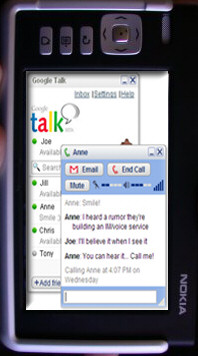
Nokia 770 Internet Table which offers Wi-Fi access and high-resolution touch screen will include Google Talk as a VoIP application.

Engadget found out that Nokia will launch this model Tuesday and it will cost around $390.

The Nokia 770 Internet Tablet's software is upgradeable and currently runs on the Linux-based Internet Tablet 2005. It includes Opera browser, internet radio, PDF viewer and media player.

The upgrade to the Internet Tablet 2006 operating system will include support for additional services, like VoIP and Instant Messaging.

Related:
Google Talk Tips

Yahoo Could've Bought Google In 2001

Terry Semel, Yahoo's CEO feels sad about something that didn't happen in 2001. Semel met with Larry Page and Sergey Brin and talked about the possibility of acquiring Google. Google's founders said that Google was worth $1 billion, but it's not for sale. After a week, Google's price was $3 billion. Terry Semel didn't understand why Google had a such a big price, since their revenue was almost non-existent.

"And I said, well you still have the same business you had two weeks ago, right? Which adds up to nothing. So obviously we couldn't and didn't buy the company."

Well, that's lack of vision. Google had a lot of problems convincing investors that a search engine is a good place to put your money. Andy Bechtolsheim, one of Sun's founders was the first to invest $100,000 in Google.

May 12, 2006

Gmail Avatars

After introducing in Google Talk the option to select a picture to represent your identity, Google extends the avatar to Gmail.


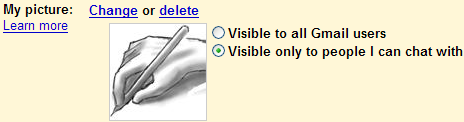
The picture shows up when you roll over a name in your inbox, Contacts, or Quick Contacts list. You can show your picture to everyone or only to your friends (the people that can see when you're online in Google Talk or Google Chat). A very cool feature is that you can suggest a photo for a contact.


Google tries to build a strong community of users. Everything started with Google Talk, and now continues with Google Co-op, Google Notebook - both social tagging tools. Using some gadgets from Google Desktop, you can play games with your friends and even send files. This will become standard features for Google Talk.

So expect more social products from Google.

P.S.: the feature will roll out in the next days, so don't be surprised if you don't see it.