An unofficial blog that watches Google's attempts to move your operating system online since 2005. Not affiliated with Google.

Send your tips to gostips@gmail.com.

September 16, 2007

Online Presentation Apps: Google Presently's Competition

TechCrunch reports that Google will launch a new product next week at Techcrunch 40, while The Inquirer found out that "Google is presently touring publishing houses to show Presently, so even if they make hacks sign an infuriatingly Web 1.0 non-disclosure agreement, an announcement can’t be far off." Now that Google's presentation tool (code-named Presently) is about to be released, let's see what are the most important online apps that let you create and share presentations.

Sharing

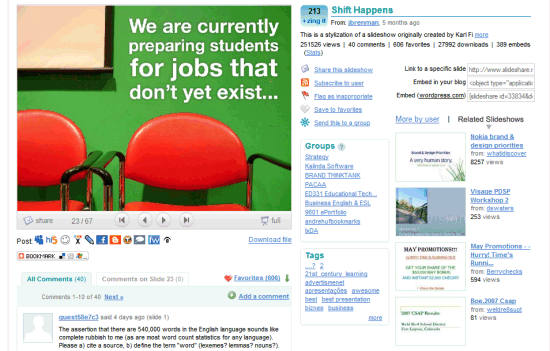
SlideShare lets you upload PPT, PDF and OpenOffice presentations without creating an account. The file size limit is 30MB and it's easy to upload multiple files. You can view the presentation in a Flash player that doesn't support keyboard shortcuts or switching to a certain slide. SlideShare uses an interface similar to YouTube, so you'll find many features from the video-sharing site (comments, tags, groups, favorites, stats, embedding code), but also a way to download the presentation. Unfortunately, you can't actually edit the presentation, so the site is mostly useful if you want to create an online version of a presentation that can be shared with other people.


Creating

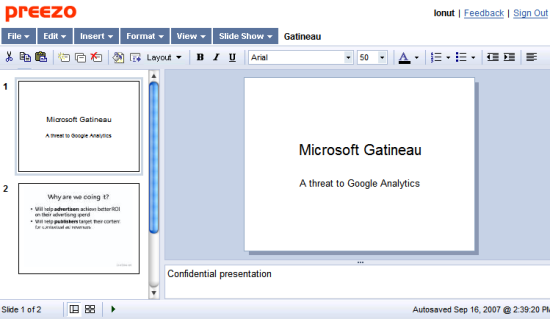
Preezo lets you create simple presentations, but it can't import PowerPoint files. The interface is simple, there are few formatting options, there's no collaborative feature, you can't search text in your presentation or export your presentation. You'll probably like the slide sorter and the wide variety of transitions. The presentation can be published online and embedded into a site.


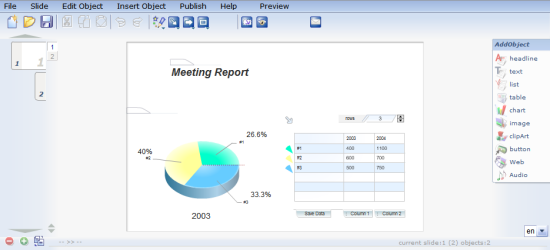
Spresent uses advanced vector graphics animation to create nice-looking charts, tables, shapes. The interface is inspired by Adobe Flash (the tool for developers, not the player).


Collaborating

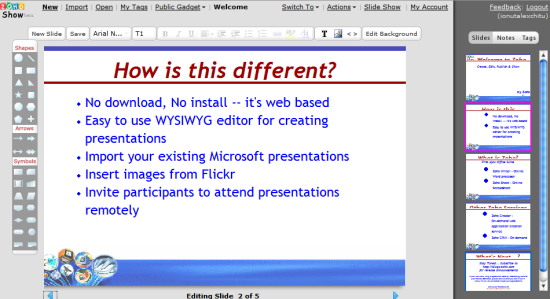
Zoho Show can import presentations (less than 10 MB), but I wouldn't recommend trying to edit them. Zoho Show does a poor job at rendering presentations and it's one of the weakest Zoho apps. You can add shapes, arrows and change the text formatting. Even if the application says you can collaborate when editing a presentation, the feature is not functional.


ThinkFree Show also has a 10 MB limit for uploading files and the rendering is not very good. There's a quick edit mode that allows you to modify the text and a power mode that uses a Java applet. The Java interface looks exactly like Microsoft Powerpoint 2003, but it's much slower and has less features. You can collaborate with other users, but you don't see the changes in real-time.
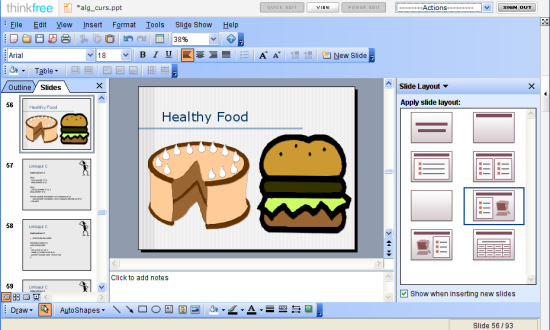


Both Zoho and ThinkFree have full online suites. ThinkFree hosts more than one million documents and has a social networking community around office documents. Here's an interesting comparison between Google Docs and ThinkFree, from ThinkFree's blog:
Google Docs and Spreadsheets obviously has a larger market share in the industry, after all with the Google name and marketing team behind it its bound to have few users out there. GD&S is a great lightweight tool, but having the best MS Compatibility and the highest level of feature functionality of any online office suite has propelled us into the second spot.

While Google is attempting to become the platform of choice, with everything from Gmail to a news service, we have focused on the office functionality and delivering it in ways that no one else can:

* offline/online, and now a hybrid with ThinkFree Premium
* on-demand/on-premise
* tiered accessibility Power Edit (Java) / Quick Edit (AJAX) / Flash
* tiered sharing - private, shared restricted, shared unrestricted, read only, published

Google Presently has a big chance to become a powerful alternative to these applications if:

* it can do a good job at importing PowerPoint files (and not just small files) - most presentation apps have problems
* you can export the presentation as a PPT, HTML or SWF file
* the collaboration works as good as in Google Docs - I couldn't find an app that allows real-time collaboration
* it can add content from the web (Flickr photos, YouTube videos, Google Maps)
* you can embed the presentation in your site (or just some slides)

The PowerPoint viewer from Gmail is already a good option for embedding presentations and the screenshots from TonicPoint (acquired by Google) show an already mature application.

Google Maps in Your Sidebar

Mini Map Sidebar is probably the greatest Firefox extension for maps and geographical information. Its simple interface hides a lot of powerful tools that help you find places directly from your browser's sidebar.

The sidebar lets you drag and drop addresses from the current web page, search the map, get the latitude/longitude, embed the map or send a link by email. It's also easy to switch from Google Maps to Yahoo Maps, Windows Live Local or Google Earth. You always have a list of recent addresses, so you can go back to another address with just a click or select them when you want to get directions.

The extension also adds two options in the contextual menu that let you open the selected address in the sidebar or in a new tab.

Other interesting features: geodiscovery (if a page has geotags, you can view the locations - for example: some Flickr photos), preview KML files before opening them in Google Earth, find places reviewed at Platial and Tagzania.

Overall, the extension is very useful if you need to map a lot of places and opening Google Maps in a new tab is too time-consuming.

September 15, 2007

Google Maps Covers 54 New Countries

Google Maps increased the number of countries that have street maps and satellite imagery with 54. "We've more than doubled our coverage of Latin America and are now mapping three times as many countries in Asia as before. (...) We have better detail for some countries than others, but this is just the beginning," boasts Google LatLong Blog. While this a good news, some people complain that "the data is inaccurate and outdated" or only available "at the highway or major-road level".

Here's a list of the new countries, powered by Google Spreadsheets (the area is automatically generated using the GoogleLookup function and can be inaccurate). The largest country is Kazakhstan and the smallest territories are Bermuda and Aruba. Argentina, the eighth largest country in the world, is still a blank area on the map.


Profiles for iGoogle's Gadget Developers

If you like an iGoogle gadget, there's a big chance that the author wrote other great gadgets. Just click on the small arrow next to the title, choose "About this gadget" and the developer's name will point you to a profile page that contains all of his/her gadgets.

iGoogle also has a "hall of fame" of the authors that wrote the most popular gadgets. There's no overall ranking, as Google shows different rankings for each international edition. Here's the #1 gadget developer for the US edition of iGoogle: Phillip Olsen, who wrote 147 gadgets.

To find if one of your Gmail contacts writes gadgets, enter his/her name in iGoogle's search box or go to the My Community page.


"The evolution of this gadget ecosystem reminds me of the early evolution of the web itself. Many of our gadget developers, like many early web developers, built gadgets primarily for fun, and the hobbyist developer community remains vital to the success of the gadgets platform. As iGoogle grew, a second motivation for gadget development arose: impact. Building a gadget has become a way to reach millions of users on a daily basis. We now see companies building gadgets for the same reasons that companies started building websites in the early days of the web - to reach new and existing customers," writes Sep Kamvar, the lead software engineer of personalization at Google. He also mentions that iGoogle is a product that tried to answer a simple question: "What do I want to see?" and show this information without entering a query. Introducing an API for creating gadgets made it easier to offer a wide range of content. "Gadgets from our top developers get tens of millions of page views per week, and our users can choose from more than 10,000 gadgets in the directory."

The Number of iGoogle / Google Reader Subscribers

Google Webmaster Tools becomes more useful every month. Initially developed as a way to submit sitemaps, the service expanded its focus by displaying interesting information Google has about your sites, but shouldn't be available to the public: top search queries are the queries that most often returned pages from your site, PageRank distribution, backlinks, crawling errors. Google Webmaster Tools is also a way to alert webmasters about sites that violate Google's quality guidelines.

A new feature shows a list of feeds from your site and the number of subscribers that come from Google services. "If your site publishes feeds of its content, this page will display the number of users who have subscribed to these feeds using Google products such as iGoogle, Google Reader, or Orkut. Because readers can use other sites and aggregators to subscribe to your content, your total number of subscribers from all sources may be higher." At the beginning of the year, Google started to include the number of subscribers in Feedfetcher's user-agent, but only people that had access to the logs or used a service like FeedBurner could see it. Now everyone who authenticates a site in Google Webmaster Tools can see the number of subscribers.


Even though this blog's main feeds are redirected to FeedBurner, they still have Google subscribers. That's because Blogger does a temporary redirect to FeedBurner (HTTP/1.x 302 Moved Temporarily) and Google Reader treats them as separate feeds.

Google Reader's main competitor, Bloglines, shows extensive information about each feed: the number of subscribers and a list of those who made their subscriptions public. This information is even included next to the feed's URL in search results and can be obtained through an API. The complete list of backlinks, displayed in Google Webmaster Tools, is publicly available at Yahoo: just use the link operator. So some of the data could be easily made available to the public without causing too much trouble.

September 14, 2007

Visualizing Photos Recently Uploaded to Blogger


Blogger launched a new feature that shows the latest uploaded photos in a never-ending slideshow. Blogger Play is addictive, like many other real-time visualization tools, and could be a pretty good screensaver. The slideshow leaves out vulgar pictures, so the screensaver would be safe-for-work. "Blogger Play is (...) a great snapshot of what people are thinking and posting about, right now" and it expands the stream of recently-updated blogs from Blogger's homepage.

To create a screensaver from a web page, you can use RunSaver for Windows and IdleWeb for Mac (both are free, but there are more polished commercial alternatives).

Blogger Play was developed two years ago, but it remained a cool toy for Google employees. "Shortly after Blogger launched photo uploading two years ago, one of our engineers whipped up a web page that would show us the pictures that were being uploaded in real time. The result was fun, often beautiful, but above all, compelling. We couldn't stop watching. Over the years we've kept this photo scroller as part of the Blogger offices, on a monitor or projector, as an interesting (distracting?) slideshow, and a reminder of the diversity and vivaciousness of Blogger blogs."

Technorati has recently launched a real-time visualization of the most recent posts from the blogosphere, but it only shows posts from popular blogs. Now that Google indexes web pages really fast, it would be interesting to search for something and see the new web pages added at the top of the search results as soon as they're indexed.

September 13, 2007

Google Lunar X PRIZE


Google sponsors an exciting challenge to reconquer the Moon and bring interesting data from there. "Private companies from around the world will compete to land a privately funded robotic rover on the Moon that is capable of completing several mission objectives, including roaming the lunar surface for at least 500 meters and sending video, images and data back to the Earth." The prize is $30 million and the intention is to revive the interest for exploring the Moon.

"The Moon is a stepping stone to the rest of the solar system and a source of solutions to some of the most pressing environmental problems that we face on Earth – energy independence and climate change. Already, governments from around the world recognize the importance of lunar exploration, and national space agencies from the United States, Russia, China, India, Japan, and the nations of Europe plan to send probes to the Moon in the coming decade."

Google teamed up with the X PRIZE Foundation, well-known for the Ansari X PRIZE, a competition that offered $10 million to "the first non-government organization to launch a reusable manned spacecraft into space twice within two weeks". Google bought a replica of the SpaceShipOne, the winner of the Ansari X PRIZE, and installed it inside Building 43 at Googleplex.

In other news, Google Moon received an update and now includes "high-resolution immersive panoramas from every Apollo landing site (available in context for the first time), historic audio clips, re-projected high-resolution charts, surface imagery, and elevation data from the Clementine and Apollo missions". There's also a new Google site that showcases other space-related Google projects.


More at:
Google's Official Blog
Google LatLong Blog

Surprising Thumbnails in Google Search Results

Google crawls the web to find new or updated web pages, but these pages can be grouped in different categories. For example, some web pages include videos. If Google decides that a site contains a lot of videos, it might add it to Google Video and show thumbnails next to the snippet.

The query Amir Blumenfeld shows thumbnails next to a blog that occasionally posts videos and next to a "tumbleblog" that mostly consists of videos (the first and the seventh result from the screenshot below). The videos are hosted by other web sites (in this case, Vimeo) and the thumbnails are only included for homepages.

Google added thumbnails next to video search results as part of the Universal Search program that blends heterogeneous results from different specialized search engines. While the thumbnails sometimes help to describe a video, they also attract your attention as they're one of the few non-textual parts of the page.

It will be interesting to see if Google will eventually show different snippet formats depending on the type of a site (for example, Google could show the author of a blog, the date of a research paper, thumbnails from a photo album or the price and other information about a product).


{ via Googlified }

September 12, 2007

Google SMS Adds Location-Based Personalization

Google SMS is a very useful service that lets you text your query and receive instant answers. In addition to web search results, you can find local businesses, get directions, check the weather and use it for unit conversions. The problem is that Google doesn't know your location, so all your messages have to include information about your location, especially for local searches.

Now you can save your location by sending a SMS that contains:
set location [city, zip code, address]

To check the weather you only need to send "weather" instead of "weather 90210". This minimizes the text you need to type, so it saves time and effort.

Google SMS is available in the US, Canada, Germany, Japan, Spain at google.com/sms, but this new feature works only in the US.

Google Maps also has an option to set a default location, which is used to personalize your search results. "For those users who have provided a default location in Google Maps, Google will personalize results based on that location. For example, if a user has entered a default location into Google Maps and types in library, the results will bring up the user’s local library."

Google's Cricket OneBox

Google doesn't have too many sports-related features (there's a sports section at Google News and that's about it). The small OneBoxes are the perfect place for displaying live scores or information about teams and players, like you see in Live Search.

Google launched today a special feature for the Twenty20 World Championship of cricket. Search for cricket, cricket [Country] to see the latest scores and a list of current matches.

In true Google spirit, the OneBox links to three sources of information, some of the best sites about cricket, but it's interesting to see that the links contain oi=prbx, the same value used for the Bourne Ultimatum promotion. "Prbx" probably means "promotion box" and that doesn't look very good for Google.


{ via Google Blog }

Update: There's also a rugby OneBox, for the Rugby World Cup: