If you create a web site, a difficult task is to test if it looks properly in most of the browsers and the operating systems that your users are likely to use. Unfortunately, this requires that you install multiple operating systems, buy more than one computer or use virtual machines.
An easier way to test your site is to use online services like BrowserShots, which generates screenshots for a web page in more than 80 versions of the most common browsers used in Windows, Linux, BSD and Mac. The process takes time and you may have to wait up to an hour to see the screenshots.
Adobe BrowserLab is a recently-launched service that has the advantage of generating screenshots almost instantaneously, but the number of browsers that are tested is smaller: Firefox 2.0 (XP, OS X), Firefox 3.0 (XP, OS X), IE6 (XP), IE7 (XP), Safari 3.0 (OS X). The service has an interesting "Onion Skin View", which superimposes one screenshot over another to see the differences between the different renderings. BrowserLab is integrated with Dreamweaver CS4, but you don't need to buy the software to use the online service.
"Cross-browser testing has been one of the biggest challenges for Web designers because it is such an arduous and time-intensive task. Now with Adobe BrowserLab, designers have a simple solution that enables comprehensive browser compatibility testing in just a matter of minutes," says Adobe's Lea Hickman. The bad news is that the service is free for a limited time.
YouTube's special interface for large screens, available at youtube.com/xl, has been updated to include bigger buttons and navigation controls. Now you don't have to worry about picking the next video to play: YouTube automatically plays all the videos from a list.
"Last January we introduced a video website especially for people who wanted to access YouTube videos through their Sony PS3 and Nintendo Wii game consoles. You could say we've now "expanded" on that. Just as there's a YouTube browser for mobile devices, the new YouTube XL is optimized for watching YouTube videos on any large screen," mentions the YouTube blog.
The XL interface is less cluttered, easier to use, but it lacks some of the features that are available in the standard version of YouTube: rating videos, posting comments.
In other related news, YouTube's player no longer displays the navigation controls in the full-screen mode when you don't move your mouse.
Sometimes when you search using Google, you get a strange error message titled "We're sorry" that temporarily restricts your access to Google. In some cases, Google shows a CAPTCHA that should confirm you are human, but that doesn't happen all the time.
"We're sorry... but your query looks similar to automated requests from a computer virus or spyware application. To protect our users, we can't process your request right now.
We'll restore your access as quickly as possible, so try again soon. In the meantime, if you suspect that your computer or network has been infected, you might want to run a virus checker or spyware remover to make sure that your systems are free of viruses and other spurious software."
According to the help center, the error message is displayed "when Google detects that a computer on your network is sending automated traffic to Google." Maybe you use an application that monitors the ranking of a site in Google's search results, maybe a Firefox extension sends automated requests to Google every 5 seconds or a different computer that shares your IP is part of a botnet.
Google suggests to use an anti-malware application and to contact your network administrator if you still can't use Google. This is the perfect opportunity to try other search engines (Yahoo, Bing), but I noticed that you can circumvent Google's security filters by using a different Google domain: instead of searching from www.google.com, use www.google.co.uk, www.google.com.au or another international domain.
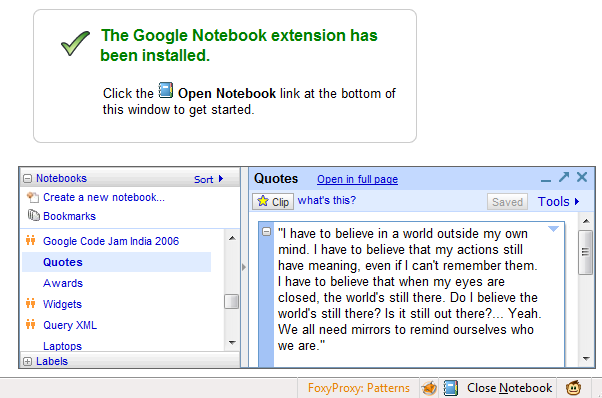
Now that Google Notebook is no longer actively developed, Google decided to hide the link to the Firefox extension and to remove the Notebook support from Google Toolbar. It's probably a wise decision, since new users can't sign up for Google Notebook and Google won't be able to make sure that the add-ons will be compatible with the future versions of Firefox and Internet Explorer.
The only alternative to the Notebook add-ons is a bookmarklet, but it's too basic and the confirmation message is annoying. Google Notebook's integration with the browser is what made the service very powerful: you could copy the text from a web page in a notebook with one click.
I don't know for how long you'll still be able to download the Firefox extension from Google, but here's the download link:
If you use a beta version of Firefox 3.5, here's a way to install the extension:
* save the extension to your computer: right-click and select "save link as". * download 7-zip, an excellent open-source software for archiving files, and install it. * right-click on the extension (google-notebook.xpi), click on "7-zip" and then on "open archive". Right-click on "install.rdf", select "Edit" and replace "3.0.*" with "4.0.*". Save the file, close Notepad and update the archive. * now you can drag the .xpi file to your browser and install the extension.
Internet Explorer users that want to download the Google Notebook add-on can try this link:
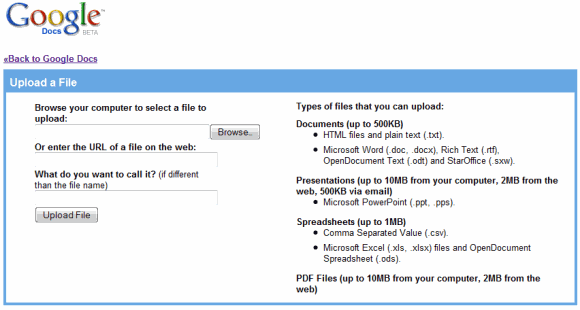
If you use Microsoft Office 2007 and save all the documents in the software's native formats, you've been wondering why it's not possible to upload .docx files in Google Docs. Of course, you could save the files in the format used in the previous versions of Microsoft Office, but things should be easier.
Now that the Office Open XML format is an international standard and it's supported by popular software like OpenOffice, Google decided to implement importing Microsoft Office 2007 files. In March, Google Spreadsheets added support for .xlsx files and now you can import .docx documents.
"To import a .docx or .xlsx file, simply click the "Upload" button in your Docs List menu, select your file, and voila! We'll upload and convert your document for use in Google Docs. This is a another great benefit of Google Docs - you don't have to worry about what format the file is in. Just upload it and we'll figure it out for you," mentions Google Docs blog.
Even if you don't have to worry about formats, you still need to take into account that not all the features available in Microsoft Office are included in Google Docs, so it's not a good idea to delete the original file from your computer.
Spell checkers aren't usually very smart: they highlight words that aren't in a dictionary and suggest a list of similar words. Even if they take into account words that aren't included in dictionaries and they deal with plurals and verb tenses, most spell checkers can't find words that are used incorrectly in a context.
Wikipedia includes as an example: "Their coming toosea if itsreel", a phrase that has 5 spelling mistakes, even though all the words can be found in the dictionary. If you enter this text in Gmail's editor and click on "Check spelling", Gmail won't find any error. Type the same text in Google's search box, and you'll get a "did you mean" message that suggests to search for "Their coming to see if its real". As you can see, Google's search box has a better spell checker than Gmail since it doesn't rely on a dictionary, it uses a huge amount of searches to determine what are the most probable sequences of words that follow a certain pattern. Unfortunately, the spell checker available at Google.com is optimized for searches, which are usually short, so you can't use it to spell check an email message or a blog post.
Google Wave, the service demoed yesterday at Google I/O, includes a context-sensitive spell checker that highlights errors as you type. Google uses the language models built for Google Translate to find words that don't belong in a certain context.
Google released a realtime gadgets API for Google Talk that's especially useful if you want to play games with your friends.
"gadgets.realtime and the APIs built on top of it allow gadget developers to write applications that communicate asynchronously with another endpoint, whether that endpoint is another instance of the application (on another machine, or in another browser, for example), the container hosting the gadget, or an application hosted in the cloud. The obvious application of these APIs is 1:1 gaming -- at its most basic a Tic-Tac-Toe game between two users. However there are many other more complex (and arguably -- depending on your thoughts about games -- more interesting) scenarios that these APIs enable; for instance, a chat application that translates text as participants type it, or a shared whiteboard, or an application that lets a couple choose the best flight for their upcoming vacation."
For now, the APIs are only available in a developer sandbox, which includes a special interface of Gmail Chat. Here's how you can play chess with one of your friends:
* Go to the sandbox and send this link to your friend: http://talkgadget.google.com/talkgadget/sandbox .
* When your friend started to use Gmail Chat's sandbox, click on "Options", select "Start application", paste the following address: http://code.google.com/apis/talk/examples/chess.xml and press Enter.
If you don't know how to play chess, try two other applications:
* a very simple rock-paper-scissors game: http://code.google.com/apis/talk/examples/rps.xml
* an automatic translation application: http://code.google.com/apis/talk/examples/interpreter.xml
Google Wave is a new communication service previewed today at Google I/O. "A wave is equal parts conversation and document, where people can communicate and work together with richly formatted text, photos, videos, maps, and more."
The service seems to combine Gmail and Google Docs into an interesting free-form workspace that could be used to write documents collaboratively, plan events, play games or discuss a recent news.
Google Wave has been designed by the founders of Where 2 Tech, a start-up acquired by Google to create a cutting-edge mapping service, which later became Google Maps.
"Back in early 2004, Google took an interest in a tiny mapping startup called Where 2 Tech, founded by my brother Jens and me. We were excited to join Google and help create what would become Google Maps. But we also started thinking about what might come next for us after maps. As always, Jens came up with the answer: communication. He pointed out that two of the most spectacular successes in digital communication, email and instant messaging, were originally designed in the '60s to imitate analog formats — email mimicked snail mail, and IM mimicked phone calls. Since then, so many different forms of communication had been invented — blogs, wikis, collaborative documents, etc. — and computers and networks had dramatically improved. So Jens proposed a new communications model that presumed all these advances as a starting point; I was immediately sold," explains Lars Rasmussen.
"In Google Wave you create a wave and add people to it. Everyone on your wave can use richly formatted text, photos, gadgets, and even feeds from other sources on the web. They can insert a reply or edit the wave directly. It's concurrent rich-text editing, where you see on your screen nearly instantly what your fellow collaborators are typing in your wave. That means Google Wave is just as well suited for quick messages as for persistent content -- it allows for both collaboration and communication. You can also use "playback" to rewind the wave to see how it evolved."
You can see some screenshots of the service and find some details about the API that could be used to extend the service and the Wave protocol that allows anyone to run a "wave" server. Google promises that Google Wave will be available later this year.
Google's services have a lot of powerful features, but they can't offer all the options requested by users. A popular way to customize Google services is using Greasemonkey scripts: some of the most popular scripts are included in Firefox extensions like Customize Google or Better Gmail. While user scripts can help you tweak Google features, they need to be installed on each browser you use and they can be easily be rendered useless after Google changes the code.
A different approach to extend Gmail's functionality was Gmail Labs, which allowed you to pick add-ons that are dynamically integrated in Gmail. Depending on the Gmail add-ons that you select, you'll run one of the many possible customized versions of Gmail. For now, only Gmail engineers add Google Labs features.
I'm sure that many Greasemonkey users would like to add upload a script to Gmail or Google Docs so that it's saved on Google's servers and it no longer requires Greasemonkey. Ideally, the script should use Google APIs instead of manipulating the DOM directly.
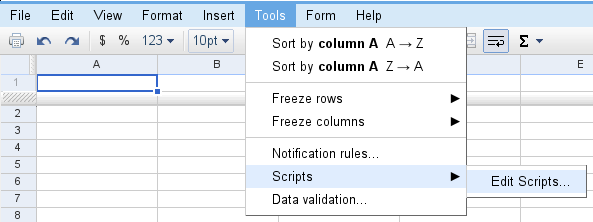
Google Scripts is answer to this problem, it's a way to extend the functionality offered by services like Google Docs, Gmail or Google Calendar.
With scripts, you can:
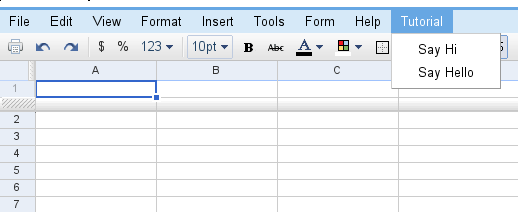
* Create your own custom spreadsheet functions * Automate repetitive tasks (e.g. process responses to Google Docs forms) * Link multiple Google products together (e.g. send emails or schedule Calendar events from a list of addresses in a Spreadsheet) * Customize existing Google products (e.g. add custom buttons or menus to run your own scripts)
The scripts help you add macros to a Google spreadsheet by writing some JavaScript code in Google's script editor. "Google Apps Script provides the ability to automate a variety spreadsheet actions, such as reading and changing values in cells and ranges, changing formats and formulas, and creating custom functions," explains Jonathan Rochelle.
But the feature goes beyond spreadsheet macros. "Users write scripts in JavaScript using libraries designed to provide a powerful interface with Google products. If you already are a JavaScript developer, a key difference is that scripts run on Google Servers instead of user browsers. As a result, direct operations on the client-side DOM are not supported, although some restricted functionality is provided. Your code executes server-side, and operates on the Google products you've coded for."
For now, Google Scripts is not publicly available, but you can apply to become a tester if you have a Google Apps account.
Google has a new OneBox that shows the latest results from Roland Garros, an important tennis tournament held in Paris. If you search for [roland garros] or [tennis], Google shows some recent results, but it's probably a better idea to search for a player's name.