Even though you can no longer upload videos to Google Video, the service hasn't been abandoned and it's still actively developed. The focus has been switched to video search and Google Video powers YouTube Search.
I still think that disabling the uploads to Google Video was a mistake: probably the most useful videos hosted by Google Video are longer than 10 minutes and couldn't be uploaded to YouTube. You can't upload Charlie Chaplin's "The Kid" to YouTube without splitting it.
To make the transition to YouTube easier, Google redesigned Google Video, removed some features that were rarely used and made the video player smaller.
Google's homepage may not seem strange nowadays, but its simplicity intrigued early Google users.
"Try www.google.com. I've been most impressed with its ability to return good, relevant hits. Another big bonus with Google is that the site is almost completely clear of bandwidth-hogging graphics and advertising. The web site has to be the fastest I've ever seen," said a Google user in January 2000.
At first, Google's homepage was simple because its founders wanted a basic front-end to test their technology. Marissa Mayer, who is in charge of Google's homepage, mentioned some interesting tidbits:
"The prime reason the Google home page is so bare is due to the fact that the founders didn't know HTML and just wanted a quick interface. In fact, it was noted that the submit button was a long time coming and hitting the RETURN key was the only way to burst Google into life. Due to the sparseness of the homepage, in early user tests they noted people just sitting looking at the screen. After a minute of nothingness, the tester intervened and asked 'What's up?' to which they replied "We are waiting for the rest of it". To solve that particular problem the Google Copyright message was inserted to act as a crude end of page marker."
Google has the strange habit of removing features and killing services only to resurrect them after a few months. A lot of people complained when Google Calendar removed the gallery of public calendars. Google's explanation was that few people used that feature and it was difficult to internationalize it.
Google Calendar's gallery isn't back yet, but you can now subscribe to sport calendars for baseball, football, soccer, rugby, hockey and basketball. How to find the new calendar directory? Click on "add" below the list of "other calendars" and select "interesting calendars".
Like Gmail, Google Calendar is now a container for iGoogle gadgets. To enable gadgets, go to Google Calendar's settings page, select "Labs", click on "Enable" next to "Add any gadget by URL" and don't forget to click on "Save". You'll see a small box that lets you enter the URL of a gadget. It's not user-friendly and Google forgot to list some samples, but you can try this Wikipedia gadget:
Google's product search engine started to show suggestions when you type a query. The suggestions are obtained by comparing your partial query with popular searches.
After typing a query or selecting one from the list of suggestions, you can use the options displayed at the bottom of the page to filter the results by price, category, brand, store and seller's rating.
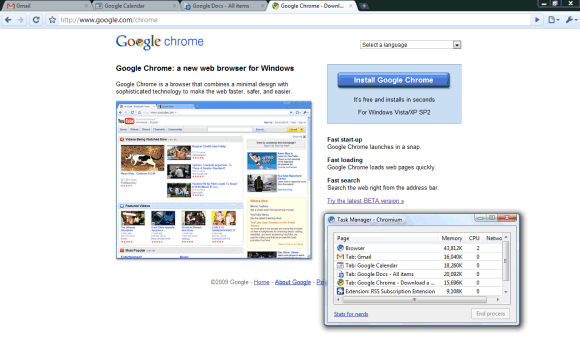
If you use Google Chrome and Google's web applications, then you're already running Google Chrome OS. Just maximize Google Chrome's window and imagine that each tab is an instance of an application. Gmail is your mail client, Google Calendar is the calendaring application, Google Docs is the office suite and the file explorer. Google Chrome's new tab page is the desktop, the dashboard that lists frequently used applications and lets you add widgets.
Chrome loads fast, is spiffy and always up-to-date, so you don't have to deal with managing updates or synchronizing data. Some of your applications store data locally and you can use them even when you don't have an Internet connection. You're running 3D applications, portable software, music players, photo editors, development environments inside your browser. Google Chrome OS is a challenge: are browsers and web applications mature enough to replace traditional software?
By the time the operating system is released, Chrome will integrate plug-ins like Native Client and o3d, while Google Docs will already become the place that gathers all the files stored in Google's services. Chrome OS won't bring anything that's not yet possible on your current operating system, it will force you to change your mindset and make the operating system irrelevant.
Google Chrome OS won't be a traditional operating system, it will just be a wrapper for the cloud.
"Speed, simplicity and security are the key aspects of Google Chrome OS. We're designing the OS to be fast and lightweight, to start up and get you onto the web in a few seconds. The user interface is minimal to stay out of your way, and most of the user experience takes place on the web. (...) The software architecture is simple — Google Chrome running within a new windowing system on top of a Linux kernel. For application developers, the web is the platform. (...) People want to get to their email instantly, without wasting time waiting for their computers to boot and browsers to start up. They want their computers to always run as fast as when they first bought them. They want their data to be accessible to them wherever they are and not have to worry about losing their computer or forgetting to back up files."
The clues about Chrome OS aren't very exciting probably because the operating system wants to negate its own existence and become invisible.
"We're aware of a problem with Google Mail affecting a majority of users. The affected users are unable to access Google Mail," mentions Google's Apps Status page. The message was posted at 0:53 pm PDT and Google promises to solve the problem in less than an hour.
Gmail's web interface can't be accessed, but you can read your messages and compose mail if you use Gmail's iGoogle gadget. Another way to connect to Gmail is using a mail client like Outlook or Mozilla Thunderbird: POP3 and IMAP come to the rescue.
Update: Gmail is back up, after more than one hour of errors and timeouts.
Update 2: Ben Treynor explains why Gmail was down for 100 minutes. "This morning (Pacific Time) we took a small fraction of Gmail's servers offline to perform routine upgrades. (...) However, as we now know, we had slightly underestimated the load which some recent changes (ironically, some designed to improve service availability) placed on the request routers — servers which direct web queries to the appropriate Gmail server for response. At about 12:30 pm Pacific a few of the request routers became overloaded and in effect told the rest of the system "stop sending us traffic, we're too slow!". This transferred the load onto the remaining request routers, causing a few more of them to also become overloaded, and within minutes nearly all of the request routers were overloaded."
After showing suggestions for web search, image search and video search, Google started to autocomplete your queries in Google News. The suggestions are related to current news, so you don't have to type too many letters to find the latest stories about Opera 10, Walt Disney or Hurricane Jimena.
The interface makes it difficult to select suggestions using a keyboard, since you have to press "Enter" twice to perform a search, but this bug will probably be fixed. Another problem is that you can't disable suggestions by visiting the preferences page and selecting "Do not provide query suggestions in the search box".
For some reason, Google decided to release a new version of the Google Docs List API before adding the features to the interface. One of the most important new features is folder sharing.
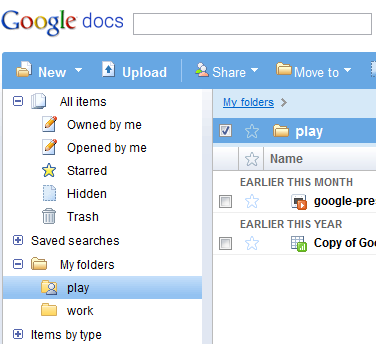
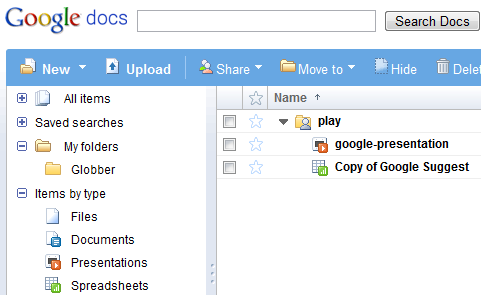
I've used a Python library to test the new version of the Google Docs API and I've managed to share a folder. As you can see, the "play" folder from the screenshot displayed below has a new icon.
Unfortunately, the shared folder didn't show up in the collaborator's Google Docs interface, but he was able to find it by visiting this hidden section.
Sharing folders is more efficient than sharing a large number of files one by one and the best thing is that folders are treated just like documents. You can share folders as "read-only", but you can also allow collaborators to add new files and to edit documents.
For now, folder sharing is only available using the Google Docs API, but it will be added to the interface very soon.
If you want to synchronize iPhone's calendar and contacts with Google Calendar and Gmail Contacts, Google recommends to use Google Sync, which "uses the Microsoft Exchange ActiveSync protocol to synchronize the data on your phone with your Google Account".
The option works well and it even supports multiple calendar, but there's an important issue: ActiveSync lets you add a single alarm and Google Calendar converts each alarm to a "pop-up notification". That means you can't receive SMS notifications or email notifications when you create events from your phone.
Fortunately, there's another way to sync iPhone's calendar with Google Calendar: CalDav. It's limited to one calendar for each account *, it doesn't support push updates, and it only works with iPhone OS 3.0, but at least you can use the default notifications from Google Calendar. If you haven't changed your default notification settings, this help page explains how to change them.
Pros -Supports Push to devices -Supported by iPhone -Supports multiple calendars within one account
Cons -Can only have one ActiveSync account set up on iPhone at one time -Can't choose calendar colour -Not currently supported by iCal (will be in Snow Leopard)
CalDAV —————————————
Pros -Supported by iPhone, iCal and other clients -Supports multiple calendars within one account (use /user on iPhone) -Allows control over calendar color, and color syncs across accounts
Cons -Doesn't push updates. Fetch only -Setting up multiple accounts is a bit clumsy compared with ActiveSync, and they appear as separate services in the iPhone settings and "choose calendar" views.
* Even if it appears that the CalDav sync is limited to your main calendar, you can add multiple calendars. The process is tedious, but it can be simplified by installing a configuration utility.
iGoogle didn't make it easy to change your themes: you had to visit a separate page, find a theme, add it and then repeat the process until you found a great theme.
Now it's easier to pick a theme: click on "Change theme from [insert current theme's name]" and you'll see a small list of themes. You can select a category, sort the themes by popularity or recency and even type a query like [puppy], [flowers] or [batman] in the search box.