An unofficial blog that watches Google's attempts to move your operating system online since 2005. Not affiliated with Google.

Send your tips to gostips@gmail.com.

December 2, 2009

Change Gmail's Default Text Style

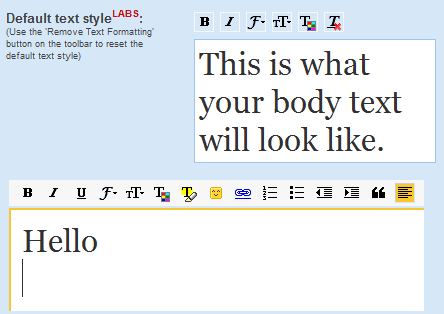
If you like to use rich formatting when you compose Gmail's messages, but the default text style is too boring, you can change it. Go to Gmail Labs, enable "Default Text Styling" and change the style from the settings page. You can select a different font face (including Comic Sans), change the color, size and style.


"If you live and breathe code, now you can set your default text style to a monospace font. If your life is purple, your email can be, too. But remember: whatever you see is what your recipients will see, so be nice to them and try not to clog the intertubes with ginormous bold italicized red script," suggests Google.

The new text styling is only used when you type some text, so the signature will use Gmail's original settings.

December 1, 2009

Optimized Google Analytics Code

A lot of web sites use Google Analytics to analyze traffic data, so the performance of Google's tracking code is very important. Google recommends to place the code just before closing the <body> tag to ensure "that the tracking code is executed as the last element of the DOM". Otherwise, the script would block the other elements from loading and visitors would have until the script is executed to see the rest of the page. Unfortunately, you can't place the script at the bottom of the page if you some advanced features like tracking events.

To improve the script's performance, Google decided to load it asynchronously. "Unlike a traditional installation, asynchronous tracking optimizes how browsers load ga.js so its impact on user experience is minimized. It also allows you to put your Analytics snippet higher in the page without delaying subsequent content from rendering."

Here's the new code for basic tracking, which uses some ideas from Steve Souders:

<script type="text/javascript">

  var _gaq = _gaq || [];
  _gaq.push(['_setAccount', 'UA-XXXXX-X']);
  _gaq.push(['_trackPageview']);

  (function() {
    var ga = document.createElement('script');
    ga.src = ('https:' == document.location.protocol ? 
'https://ssl' : 'http://www') + '.google-analytics.com/ga.js';
    ga.setAttribute('async', 'true');
    document.documentElement.firstChild.appendChild(ga);
  })();

</script>
Google Analytics Blog says that the new snippet is a beta feature and changing the code is optional.
The new tracking snippet offers the following benefits:

* Faster tracking code load times for your web pages due to improved browser execution
* Enhanced data collection and accuracy
* Elimination of tracking errors from dependencies when the JavaScript hasn't fully loaded

The Fastest Rising Google Queries in 2009

Google and other search engines publish every year a list of the most popular searches, but it's not always clear how it's compiled. This year, Google explained the methodology:

"To compile the 2009 Year-End Zeitgeist, we studied the aggregation of billions of queries people typed into Google search this year. We use data from multiple sources, including Insights for Search, Google Trends and internal data tools. We also filter out spam and repeat queries to build out lists that best reflect the spirit of the times. In some cases, we list the fastest rising queries, which means we found the most popular searches conducted in 2009 and then ranked them based on how much their popularity increased compared to 2008."

The fastest rising query was [Michael Jackson], followed by four social networks: [Facebook], [Tuenti], [Twitter], [Sanalika], a movie: [New Moon], a singer: [Lady Gaga], Microsoft Windows 7, a news site from Vietnam: [dantri.com.vn] and a free SMS service from Brazil: [torpedo gratis].

The only rising query from 2008 included in Google's 2009 list is [tuenti], a Spanish social network. If you take a look at the Google Trends chart for [tuenti], you'll notice that the site's popularity didn't grow in 2009.


Cem Sertoglu says that "Sanalika is a virtual world similar to IMVU or Popmundo. It has not made much of an impact in the Turkish internet scene so far, so I had to double check when I saw its name on the Google list."

Google Insights for Search provides another list of the fastest growing queries in 2009: twitter (+1,550%), michael jackson (+850%), facebook login (+750%), facebook.com (+300%), facebook (+250%), tuenti (+180%), youtube.com (+150%), face (+100%), yahoo mail (+80%), traductor (+50%).

Google Zeitgeist continues to be an enigma.
November 29, 2009

Google Translation Bar

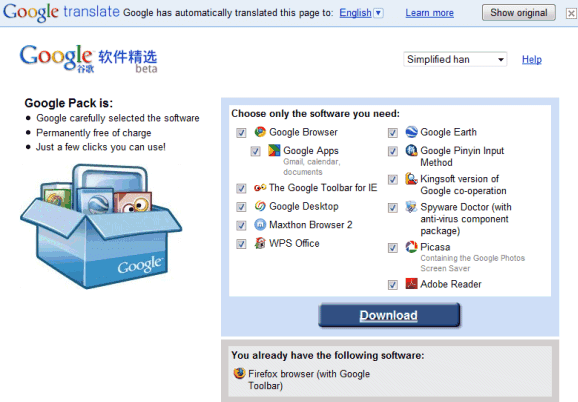
One of my favorite bookmarklets translates the current web page into English using Google Translate: you can find it here. Unfortunately, Google Translate doesn't handle properly web pages dynamically generated using JavaScript. For example, if you try to translate Google Pack's Chinese homepage, you'll notice that most of the text can't be translated.

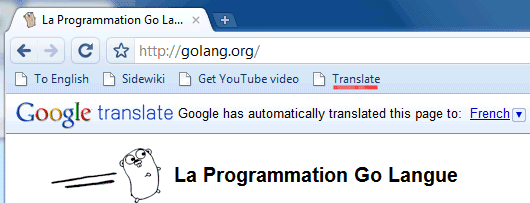
Google has already solved this problem by adding real-time translation in Google Toolbar and by offering a translation bar that can be embedded into any web page.


If you don't want to use Google Toolbar, add the translation bar by bookmarking some Javascript code:

1. Make sure the bookmarks toolbar is visible in your browser. You can enable it if you go to the "View" menu in your browser, click on "Toolbars" and check: "Links" in Internet Explorer, "Bookmarks Toolbar" in Firefox and "Personal Bar" in Opera. In Google Chrome, you can enable the bookmarks toolbar by typing Ctrl+B.

2. In Google Chrome and Firefox, drag the bookmarklet below to the bookmarks toolbar. In IE, right-click on the bookmarklet, click on "Add to Favorites" and select "Favorites Bar" or "Links" from the list of folders. In Opera, right-click on the bookmarklet, click on "Bookmark Link", then click on "Details" and check "Show on Personal Bar".


{ Thanks, Rick Shide. }

November 27, 2009

Google Calendar Sneak Preview

Google Calendar tests a new feature that lets you view your calendar and the calendars of your guests when you create a new event. "Sneak preview" can be enabled when you click on "create event".

"We're working a new feature that makes it easier to schedule events with guests. The new event page will include a calendar right next to your guest list, so you can see when people are free," explains Google.


"Sneak preview" helps you schedule events and it lets you find a better time for an event using drag and drop.

{ Thanks, Keith, Melle and Owen. }

November 26, 2009

Google Bookmarks Promoted Search Results

If you are logged in to a Google account and you promote a search result using the SearchWiki icons, the web page is automatically saved to Google Bookmarks. For some reason, Google labels the web page using your query, so you'll end up with a long list of labels.


The list of SearchWiki annotations is already available at http://www.google.com/reviews/w, but it's not searchable. Now the list of annotations is more discoverable, but it makes it more difficult to find your bookmarks.

Some users customize Google's results using SearchWiki to associate searches with their favorite web pages. Marissa Mayer said that, on average, "40% of searches on any given day are repeat searches for that user".

November 24, 2009

Show Favicons in Google Reader

If you'd like to see a favicon next to each Google Reader subscription, you can now add this feature: go to the settings page and check "Show favicons for subscriptions". Another way to enable the feature is to click on the arrow next to "Subcriptions" and select "use favicons".


The feature is disabled by default. "We realize that not everyone wants their subscription list to turn into a multi-colored extravaganza, so we've made it into a setting that you can access from your subscriptions menu," explains Mihai Parparita.

Google uses a special service for obtaining the favicons instead of loading the images directly. For example, Search Engine Land's favicon is generated like this:

http://s2.googleusercontent.com/s2/favicons?domain=searchengineland.com

Attach Files in Offline Gmail

Many Gmail interfaces lack a basic feature: adding attachments. You can't add attachments if you use Gmail's mobile app, the mobile version of Gmail, iGoogle's Gmail gadget or if you used the offline version of Gmail until today.

"Starting today, attachments work just the way you would expect them to whether you are online or offline (with the exception that when you're offline you won't be able to include inline images). Just add the attachment and send your message. If you have Offline Gmail enabled, you'll notice that all your mail now goes through the outbox, regardless of whether you're online or offline. This allows Gmail to capture all attachments, even if you suddenly get disconnected from network," mentions Gmail's blog.


Offline Gmail is still a Gmail Labs feature and it requires Google Gears. If you use Google Chrome, Gears is already installed. The nice thing about Offline Gmail is that you can read recent conversations, compose messages and view your contacts even when you don't have Internet access.


November 23, 2009

Google Chrome OS Use Cases


Google didn't do a good job at explaining the intended use of Chrome OS and many people wondered if Google's operating system is an alternative to Windows. The goal is to build "an operating system that provides a fast, simple, and more secure computing experience for people who spend most of their time on the web". Here are the initial use cases for Chrome OS:
* Computing on the couch
* Use as a lightweight, secondary work computer
* Borrowing a device for use in coffee shops and libraries
* Sharing a second computer among family members

For now, Chrome OS is not designed to be your main operating system. It's just a fast way to get online, a simplified operating system that removes unnecessary software and opens the browser in a few seconds. If Google Chrome loads almost instantly, why not build an operating system that boots fast and doesn't slow down the browser?

Even though developers can view its source code and compile it, Chrome OS won't be available for download because it requires a special hardware configuration and it's not designed for multi-boot. Chrome OS is just the platform for Chrome OS netbooks.

"We are taking out every unnecessary process, optimizing many operations and running everything possible in parallel. This means you can go from turning on the computer to surfing the web in a few seconds. Our obsession with speed goes all the way down to the metal. We are specifying reference hardware components to create the fastest experience for Google Chrome OS," explains Google.

November 19, 2009

YouTube Audio Transcription

YouTube added a feature that generates video captions. "We've combined Google's automatic speech recognition (ASR) technology with the YouTube caption system to offer automatic captions, or auto-caps for short. Auto-caps use the same voice recognition algorithms in Google Voice to automatically generate captions for video."

The feature only works for English and it's been enabled for a small number of channels that usually feature talks and interviews: UC Berkeley, Stanford, MIT, Yale, UCLA, Duke,UCTV, Columbia, PBS, National Geographic.


Another new feature is auto-timing, which lets you upload the transcription of a video and it automatically generates the time codes. "All you need to do is create a simple text file with all the words in the video and we'll use Google's ASR technology to figure out when the words are spoken and create captions for your video."

Since Google's speech recognition technology is not perfect, it would be useful to generate the captions and then to manually edit them to correct the mistakes.

Automatic captions make YouTube videos more accessible: you can watch videos with the sound off and you can translate the captions into another language using Google Translate.