An unofficial blog that watches Google's attempts to move your operating system online since 2005. Not affiliated with Google.

Send your tips to gostips@gmail.com.

September 14, 2016

New Original Message UI in Gmail

Gmail has a new interface for displaying the raw version of a message. If you click the arrow icon next to "reply" and then "show original", you'll see a list of headers like "message ID", "from", "to", "subject", "SPF", "DKIM", a link for downloading the message and then the actual text of the message. Until now, Gmail only displayed the text of the message.


The new interface also displays help center links with additional information about SPF records, DKIM signatures and the DMARC standard. All of these values are useful for identifying spoofed email messages, which forge the sender address.

{ Thanks, Dirk Zaal. }

August 26, 2016

Play Solitaire and Tic Tac Toe in Google Search

Google Search now comes with 2 games you can play right from your desktop or mobile browser: Solitaire and Tic-Tac-Toe. Just search for [solitaire] or [tic tac toe] and you can quickly start the games.

Solitaire has 2 difficulty levels: easy and hard. The game has realistic sounds and animations (you can mute sounds) and it also shows your stats, just like any other Solitaire app. Unfortunately, Google doesn't save your state, so you can't resume a game later.


Tic-Tac-Toe is much simpler and less pretty. You can choose between 3 difficulty levels (easy, medium and impossible) or pick an option that lets you play against a friend. The easy level always lets you win, the medium level lets you win sometimes, while in the impossible level you can never win.


An older game you can still play from Google Search is Pac-Man. It's actually the interactive doodle from May 21, 2010.


{ via Google Blog }

July 30, 2016

Google Album Archive

Picasa Web Albums will be discontinued on August 1st, but you can still access your photos from the new Google Album Archive. "The album archive is where we keep all the photos that have been shared or stored on Google products, like Picasa, Google+, and Blogger," informs Google.

As you probably noticed, Google Photos doesn't show photos uploaded using other Google services, so it can't fully replace Picasa Web Albums or Google+ Photos. Google Album Archive lets you see, download or delete photos from Picasa Web Albums, Google+, Blogger, Hangouts, Google Drive and Google Photos.


Album Archive doesn't have a search feature, but there are separate sections for Google services. For example, you can find all the photos uploaded to Hangouts in one place.

If you're wondering what's happening with Picasa Web Albums links, this article has some answers:

Links that will continue to work
* Links to photos and albums whose URLs use your user ID number (and not your username).
* Links to Public Galleries whose URLs use your user ID number (and not your username).

Links that will stop working
* Slideshows embedded on websites.
* Picasa Web Albums & photos embedded on websites.
* Links to photos, albums, and Public Galleries whose URLs use your username (and not your user ID number).

{ Thanks, Brandon Giesing. }

Google Image Labeler Is Back

Google Image Labeler used to be a game that helped Google categorize images and improve image search. It was launched in 2006 and discontinued in 2013. Now Image Labeler is back, but it's no longer a game.

If you go to get.google.com/crowdsource/imagelabeler/category, you'll see this message: "Ready to help Google Image Labeler? Look at a few public images to see if Google is organizing them right."


Then you can pick a category like birds, cats, dancing, concerts, food, cars, mountains, sky. If you use this URL: get.google.com/crowdsource/imagelabeler?label_str=Dogs, you can add your own category (replace "Dogs" in the address bar with something different like Rainbows, Stairs or Moon).


Google shows Creative Commons images from Flickr categorized by Google's algorithms. You only need to answer to questions like "Does this image contain dancing?".


May 20, 2016

Google Translate Autocomplete

Google Translate's site for desktop and mobile now shows suggestions and autocompletes your text, much like Google Search. This works for English, French, Italian, Spanish, German, Portuguese, but you have to manually pick the input language instead of relying on automatic detection.


The new feature helps you translate faster common phrases, words and expressions, but it's not very useful for long texts.


For example, I picked French as the input language, typed "k" and one of the suggestions was "kinésithérapeute", which means "physiotherapist".


It also works when you use the mobile site:


{ Thanks, Emanuele Bartolomucci. }

The Ever-Expanding Knowledge Graph Cards

Sometimes Google's Knowledge Graph cards use more real estate than all the other search results combined. I've searched for [from Paris with love] in the experimental mobile-like desktop interface and got a huge card with images, information about the movie, ratings, cast. Then Google displayed 10 search results and 3 other cards with John Travolta movies, Luc Besson movies and action movies, followed by another list of related searches.


Somehow, the list of search results felt like a placeholder for future Knowledge Graph enhancements. Here's the entire page:

Google Tests Card-Style Search Interface for Desktop

Google experiments with a desktop search UI that looks more like the mobile interface. The experiment uses the same white cards on a gray background for both search results and ads.


When the card-style layout was launched for the mobile site back in 2013, Google mentioned that the new look was "cleaner and simpler, optimized for touch, with results clustered on cards so you can focus on the answers you're looking for".

Google Works Better With Chrome

When you open google.com in Firefox, Safari or any other browser than Chrome, you'll sometimes see an ad for Chrome. Usually, Google's promotional messages suggested you should try Chrome because it's fast, but now Google has a new ad: "Google works better with Chrome". Clicking "Yes, get Chrome now" sends you to the regular Chrome homepage, which promotes Chrome as "one browser for your laptop, phone and tablet" since "Chrome brings your open tabs, bookmarks and recent searches from your computer to your phone or tablet, and vice versa".

Chrome has many features that integrate Google services (translation, spell checking, reverse image search, Safe Browsing, Cloud Print) and many Google features only work in Chrome (voice search, offline Google Drive, Google Play Music uploading).

Maybe Google should link to a page that explains why "Google works better with Chrome", since it's not exactly obvious. A Twitter user says that "if you can't get a 1 field 2 button form & list of results working cross-browser, you're doing it wrong", while another one finds that "'@google works better with Chrome' sounds like a bug report. Can you just fix it please?". F. Nonnenmacher thinks that "Microsoft was sued for less than that".

May 19, 2016

Android Instant Apps

Back when the desktop was king, Google used to be all about the Web and the browser. As mobile devices got more popular, browsers were no longer the most important application for many users. Specialized apps for music, video, photos, messaging, maps were much more popular because they were better suited for mobile.

Google pushed the boundaries of the mobile web with Chrome, but a few years ago it started to move on. New services like Inbox no longer have mobile web apps, Google Play Music no longer works from a mobile browser, the Google Docs mobile app no longer lets you edit documents etc. Google started to index mobile apps and link to the apps directly from Google Search. More and more sites push users to install their mobile apps, some of them display limited content and force users to install the apps to read the entire content (example: TripAdvisor).


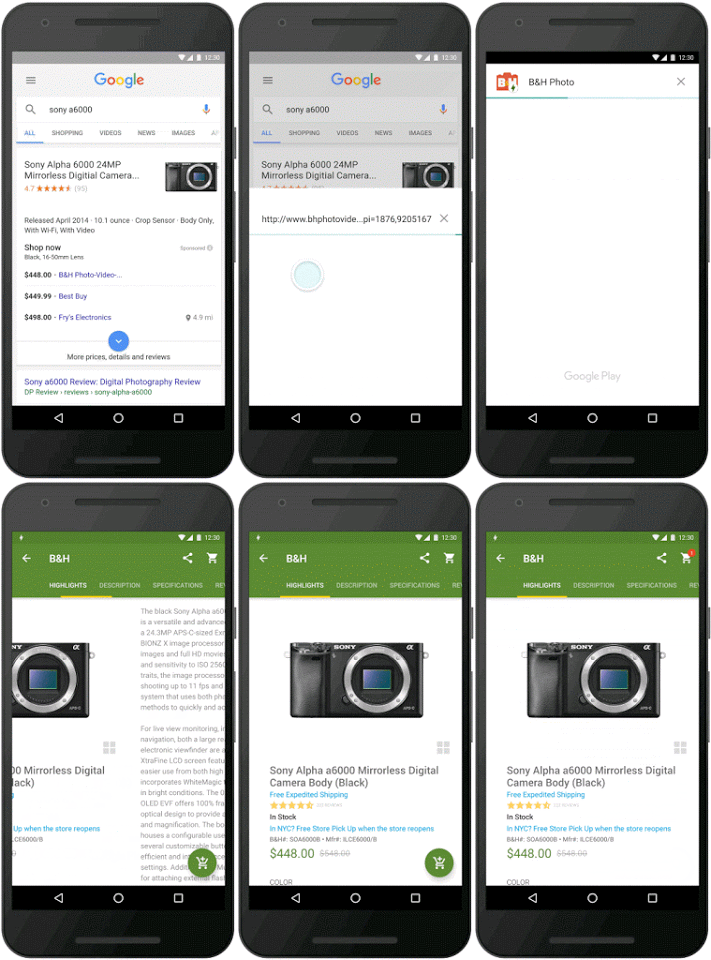
Now Google announces a new Android feature that will make apps even more powerful. Android Instant Apps will let you launch apps without even installing them: your device will only download the required modules for displaying the content.

"With Instant Apps, a tap on a URL can open right in an Android app, even if the user doesn't have that app installed. As a developer, you won't need to build a new, separate app. (...) You modularize your app, and Google Play downloads only the parts that are needed, on the fly. And when you do upgrade, your app will be available to more than a billion users on Android devices going back to Jelly Bean," informs Google.


Right now, Google works with a small number of developers from BuzzFeed, B&H Photo, Medium, Hotel Tonight, Zumper and Disney to refine the experience. Instant Apps will be available later this year as part of a Google Play Services update.

Instant Apps will be limited to the content you want to display (a Medium article, a B&H camera), but you'll be able to install the full app if you like. It's like launching a personalized trial version of the app.

While the new feature is impressive and has many potential uses, I think it will make the mobile web even less important. If Apple launches a similar feature, developers will start to close their mobile sites and the mobile web will disappear. That's quite dangerous, since it will limit the mobile OS choice to Android and iOS. It's much easier to create a site than an app and many apps are completely unnecessary, not to mention that web apps use open standards, while mobile apps use proprietary APIs and have to rely on closed app stores. The open web ecosystem made Google what it is today.

Google Assistant

Sundar Pichai, Google's CEO, mentioned in this year's Founders' Letter that "the next big step will be for the very concept of the 'device' to fade away. Over time, the computer itself — whatever its form factor — will be an intelligent assistant helping you through your day. We will move from mobile first to an AI first world."

Right now, Google has an assistant, but it's not that conversational. You can find it in the Google Now cards and the voice search feature. It's there for answering quick questions, but it's not that good for having meaningful conversations.

This is about to change, now that Google will launch its answer to Amazon's Echo device later this year. It's called Google Home and it's a "voice-activated product that brings the Google assistant to any room in your house. It lets you enjoy entertainment, manage everyday tasks, and get answers from Google — all using conversational speech. With a simple voice command, you can ask Google Home to play a song, set a timer for the oven, check your flight, or turn on your lights".


Google Home is always listening for the "OK Google" hotword, much like the Google app from your phone. It's also a WiFi speaker with Google Cast support, so you can tell it to play music on other speakers or group it with other speakers. Google Home can even send video to your TV if you use a Chromecast or you have an Android TV.

Google Assistant is not only available in Google Home: it will also be added to the new Allo messaging app and to the Google Search app. "The assistant is conversational — an ongoing two-way dialogue between you and Google that understands your world and helps you get things done. It makes it easy to buy movie tickets while on the go, to find that perfect restaurant for your family to grab a quick bite before the movie starts, and then help you navigate to the theater."


Google starts to build its own ecosystem of devices that work together: smart routers, smart speakers, smart TVs, smartwatches, home automation devices, car dashboard integration. As people use more smart devices, the Google experience is about to change and Google Assistant will become the main "interface" for interacting with Google.


{ via Google Blog }