An unofficial blog that watches Google's attempts to move your operating system online since 2005. Not affiliated with Google.

Send your tips to gostips@gmail.com.

April 13, 2006

Google Office-In-A-Box Corporate Model


EWeek talks about Google culture and the relation between the success of Google business and the office-in-a-box look and feel of Google Headquarters.

Can technology be used to maintain a corporation's particular work and office culture? Google Vice President of Engineering Douglas Merrill thinks so.

He recently suggested there's indeed a connection between the kind of technology a company stocks its offices with and the company's look and feel to employees.

"We live out loud, and we protect that culture," Merrill said during a recent address to IT execs in Phoenix.

Google's in this mindset to try to capture lightning in a bottle, Merrill said. The company wants offices filled with high-energy, charismatic people disassembling robots, playing with their pets, shooting pool, playing ping pong, or eating lunch at its five-star cafeteria. And it wants everybody talking about the next great idea.


Some say Googler's lifestyle isn't that cheerful, but their products reflect their optimism and good humour.

Related:
Inside Google Campus
Best definition for Google
Google: Ten golden rules

PageRank Overlay: Webmaster Eyes

Webmaster Eyes is a site that offers you the chance to visualize PageRank values for every link in a webpage. It's interesting to know what kind of sites someone links to, although PageRank isn't an absolute criterion for the quality of a site.

Webmaster Eyes overlays a site with small bars that indicate PageRank, in a similar way with Google Analytics' site overlay. If you click on a green bar, you'll navigate to the link next to the PageRank bar.


It's useful to use Webmaster Eyes with search results, sitemaps (to see PageRank distribution on internal pages) or not-very-familiar sites to see popular articles or blog posts.

To make it easier to access the site, bookmark this link (it's a simple bookmarklet that works in Explorer, Firefox, Opera).

Another way to use Webmaster Eyes is to install Google Toolbar 4 (Internet Explorer only). After that, go to webmastereyes.com, right-click on the search bar and select "Create Custom Search" from the menu. From now on, enter the URLs in the Google search box instead of the address bar and click the button you've just created. If you already visit a site, copy the address from the address bar to Google Toolbar search box and click Webmaster Eyes button. Note that the URL must start with [http://].

Related:
Check link popularity
Google sandbox and TrustRank algorithm
The future of search

April 12, 2006

Google Calendar Launched

Wouldn't it be great to be able to keep track of all the events in your life, coordinate schedules with friends and family, and find new things to do -- all with one online calendar? We thought so, too.

* Seeing the big picture
With Google Calendar, you can see your friends' and family's schedules right next to your own; quickly add events mentioned in Gmail conversations or saved in other calendar applications; and add other interesting events that you find online.

* Sharing events and calendars
You decide who can see your calendar and which details they can view. Planning an event? You can create invitations, send reminders and keep track of RSVPs right inside Google Calendar. Organizations can promote events, too.

* Staying on schedule
You can set up automatic event reminders, including SMS notifications, and instantly bring up anything on your calendar with the built-in search tool.


That's how Google Calendar / Google CL2 says welcome after so many months of waiting.


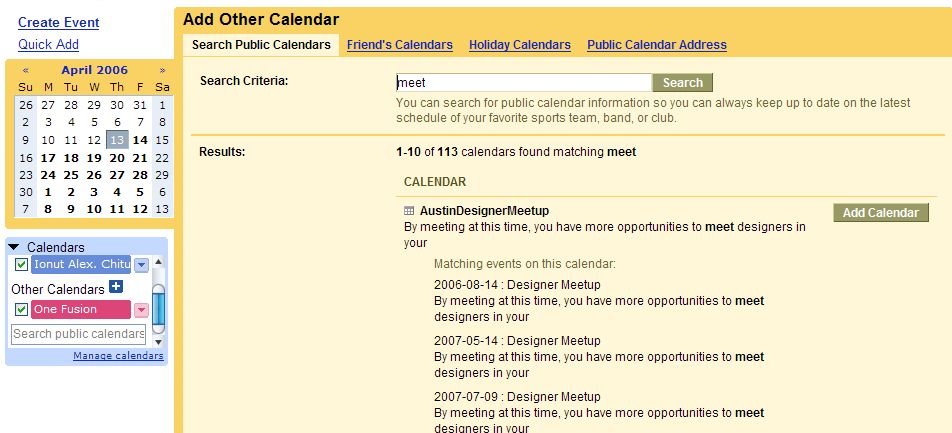
The service is integrated with Gmail, so you can switch between Gmail and Google Calendar and add events from Gmail, with Google Maps, so you identify a location. You can search your calendar, public calendars, your friend calendars. You can choose to be notified of an event by email, SMS, or by phone call. Google Calendar can import event information in iCal or CSV (Outlook) format.


Overall, Google Calendar doesn't feel impressive and has a catch: all the events you create on a public calendar are public by default. On a normal calendar, all the events you create are visible only to the persons you've shared your calendar with. So make sure you understand what public / private means.

Easter Egg: Search for [Google Calendar Tips] on public calendars and add the first calendar from Google Calendar Team. It has many good tips & tricks.

Update: you don't need to have Gmail to use Google Calendar, you just need to have a Google Account.

Live.com = Vista Homepage

Niall Kennedy, that will join Microsoft's Windows Live division, found out what will be Internet Explorer 7's homepage.

Live.com is the new default home page for users of the Internet Explorer 7 and the Windows Vista operating system. Live.com will be the first feed syndication experience for hundreds of millions of users who would love to add more content to their page, connect with friends, and take control of the flow of information in ways geeks have for years.

So the new major competitor for google.com will be live.com. Microsoft will try to boost its search market share, bring RSS feeds to mainstream and market everything as Windows Live. Including desktop software.

Related:
Windows Live is a big bet
Windows Live Toolbar Review
Windows Live Messenger Review

Topics That Don't Pay Well In Google AdSense

What niche domains have few competitors for AdSense ads or low-paying ads? Among others:

* files upload
* forums
* children games
* music lyrics
* poetry
* cooking
* comic books
* greeting cards

From WebmasterWorld.

The reverse of the medal:
Highest paying AdSense keywords

Google Experiment: Extended Snippets, Thumbnails, Search Box

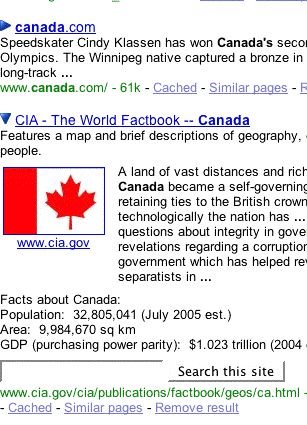
Dave Winer discovered a new Google interface experiment: every search result has a small arrow on the left. If you click on that arrow, you get more information from that site: relevant images, an extended snippet, facts and a search box that allows you to restrict your search to that site.

This experiment proves that Google tries to deliver the answer for user's query, so the user doesn't have to visit the site to find the answer. Eventually, when search engines will become really smart, they'll be able to provide a page compiled from many sources that tries to respond to a query. You'll visit the sources only if you need more information, and that's not going to happen often.

Related:
Yahoo Instant Search
Check the new Google design
New Yahoo homepage

The Fastest Online Calculator and Convertor

Yahoo Instant Search is a feature launched by Yahoo last year, in September. Instant Search uses Ajax to deliver instant answers to your queries, so it's optimized for searches that usually trigger Google's Onebox, like: unit conversions, math calculations, weather, local time or simple questions.

Yahoo's Instant Search is not that smart as Google Calculator, but it's definitely worth trying if you don't like to press the Search button over and over.

Some queries to try:
* time in Paris
* weather in Boston
* convert 100 pounds to yen
* convert 5 kilograms to pounds
* sin(pi/3)

Errata: the title should have been "The Fastest Online Calculator and Converter".

Get Word Definitions From Google Fast


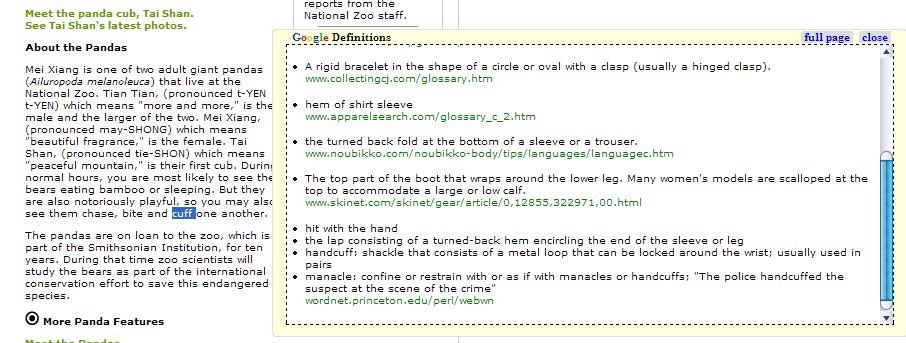
Inline Google Definitions is a great Firefox extension you can use to find the meaning of a word from an article you are reading. Instead of opening a new tab, searching Google for the word and then returning to the article, you can now view the definitions next to the page in an inline iframe.

The extension uses Google search and the define operator. If you go to Google and enter [define:artificial intelligence], you will find many definitions for this concept, as well as related phrases. Another great thing is that the define operator works for many languages, including French, Italian, Spanish, German.

Install Inline Google Definitions extension.

April 11, 2006

62% Of Search Engine Users Look Only At The First Page Of Results

A study by iProspect / Jupiter Research found that 62 percent of search users click on a link within the first results' page, up from 60 percent in 2004 and 48 percent four years ago. Additionally, 90 percent of the searchers click on a link within the first three pages, up from 87 percent two years ago and 81 percent in 2002.

82 percent of the people that perform a search and don't find what they're looking for enter more words to better target their query, up from 68 percent in 2002.

From Search Engine Watch.

Google Develops Like Stem Cells

BusinessWeek has an interesting view on Google brand:
What naysayers don't understand is that the DNA of the Google brand is unlike anything ever seen in the modern market landscape. Google is actually the first company with a brand that is built entirely of stem cells: able to grow and develop into whatever form it sees fit. In the future, many a company will learn the hard way that Google's mission statement, "to organize the world's information and make it universally accessible and useful," is the anthem behind Google becoming a jack-of-all-trades... and master of all.
But can Google can extend in so many directions (communications, marketplace, entertainment, local search, hardware) without losing its core values? Shouldn't they focus on what they know best, that is search? Of course, Google treats most of the products they launch as experiments: some succeed, some fail. They have a good platform for testing interesting projects and have many bright engineers. But many times brand extension means dilution.

Explanation

Stem cells = Cells that can differentiate into many different cell types when subjected to the right biochemical signals. Stem cells are a promising new therapeutic approach to treating CNS disorder. The most versatile stem cells, called pluripotent stem cells, are present in the first days after an egg is fertilized by sperm. Researchers believe they can coax stem cells to become whatever tissues patients need. Stem cells come from embryos, bone marrow and umbilical chords.