An unofficial blog that watches Google's attempts to move your operating system online since 2005. Not affiliated with Google.

Send your tips to gostips@gmail.com.

November 12, 2007

Android's SDK Now Available


Android, Google's mobile platform, is finally open to the developers. Now you can download the SDK and start to develop great applications in Java. Google launched a competition that offers $10 million awards for the most interesting apps (the biggest prize is quite significant: $275,000).

Note that "the Android SDK is being offered to the developer community on an Early Look basis. (...) Once the SDK reaches a more finished form, Google intends to release most of the components under the Apache v2.0 open source license."

Here are some of the most important features of the Android platform:

* Application framework enabling reuse and replacement of components

* Dalvik virtual machine optimized for mobile devices

* Integrated browser based on the open source WebKit engine

* Optimized graphics powered by a custom 2D graphics library; 3D graphics based on the OpenGL ES 1.0 specification (hardware acceleration optional)

* SQLite for structured data storage

* Media support for common audio, video, and still image formats (MPEG4, H.264, MP3, AAC, AMR, JPG, PNG, GIF)

* GSM Telephony (hardware dependent)

* Bluetooth, EDGE, 3G, and WiFi (hardware dependent)

* Camera, GPS, compass, and accelerometer (hardware dependent)

* Rich development environment including a device emulator, tools for debugging, memory and performance profiling, and a plugin for the Eclipse IDE

This demo shows Android on two different phones and you can see all kinds of applications from the built-in browser to Google Maps and a 3D game like Quake. According to Google, "Android will ship with a set of core applications including an email client, SMS program, calendar, maps, browser, contacts".


Some screenshots from the SDK's emulator: the iPhone-like browser, the always-connected phone using XMPP, a small application for managing contacts and a local search in Google Maps.


Related:
Android's website
Videos about Android
Mobile Google Notebook

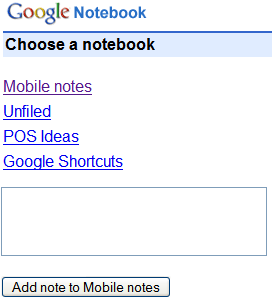
Google Notebook was one of the few Google apps that we're not available from a mobile phone. Now you can go to http://google.com/notebook/m and find a HTML version of Google Notebook optimized for mobile phones. There's also a new notebook "Mobile notes" where you can add notes directly from the homepage.

The "Unfiled" notebook is a great way to access your bookmarks, but you can't add a new one from the mobile interface. Other limitations: there's no search option, you can't edit notes, add labels or change the settings.


{ via Blogoscoped Forum }

Google Reader to Update Feeds Faster?

One of the many weak points in Google Reader was that the feeds weren't updated very frequently. In fact, Google checked to see if there's any new item in a feed every 3 hours if a had a single subscriber, and every hour (or more often) for the rest of the feeds.

A more efficient way to update feeds is to use a ping mechanism. A lot of blog authoring tools send pings to specialized services every time someone creates a new post. Google Blog Search has a ping service, "a way to inform Google Blog Search of weblog updates. These updates are then published and shared with other search engines to allow them to discover the changes to your weblogs. In addition, Google Blog Search will add submitted weblogs to the list of blogs it needs to crawl and index."

I noticed that Google Reader's last update time is identical to the one from Blog Search. Apparently, Google Reader started to use the pings from Blog Search, so the updates will be much faster and you'll actually get the latest news right after they are posted.

(the Search Engine Land story was published at 8:49am ET, that's 3:49pm in my time zone. I should mention that Bloglines didn't have the new post not even at 4:28pm, my local time.)

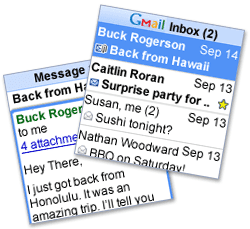
Gmail Mobile App and Google Apps Accounts


It's strange to see that Gmail's mobile app still doesn't work with Google Apps accounts. The only option offered by Google is for Blackberry users: "if you currently use the Gmail for mobile application on your Blackberry, you'll need to download the mobile application for Google Apps as well. These are two different applications. A red M icon will appear for Gmail and a blue M icon will appear for Mail by Google (Google Apps)."

An interesting comment from a Lifehacker post offered a way to login with a Google Apps account in Gmail's mobile application, by downloading two old versions on your mobile phone:
* Browse to gmail.com/app/v1.0.0/en/gmail-g.jar [or: http://tinyurl.com/yxnuqx] and download the version 1.0 client

* Enter your login information (your username should be your full Google Apps email address, i.e. me@mydomain.net)

* You will get an error after the client tries to pull up the inbox. Just exit out of the application.

* Now go and download v1.1.1 by browsing to: gmail.com/app/v1.1.1/L1/gmail-g.jar [or: http://tinyurl.com/2ge979]

* After it installs select 'Keep existing data' on your phone when prompted

* Now when you start up gmail it will use the saved login credentials from the previous install and work just dandy.

I couldn't make this work, but others confirmed that this trick works (for example, in some Nokia and Windows Mobile phones). The latest version of Gmail Mobile is 1.5, so the two versions mentioned above aren't very recent.

November 11, 2007

Related Queries in Google Image Search

Googlified spotted a new feature in Google's image search engine that suggests refinements for your query. In the screenshot below, a search for [army] returned Google's suggestion to "also try: [us army]".


I was able to see the new option by adding &gl=us to a search URL, so it's likely that Google still tests it. The suggestions for image search are different than the ones usually displayed in a list of related searches at the bottom of a search results page. People usually want to find Nike's logo and only search for [Nike], want to see Greece's map and only search for [Greece] or only enter [1984] to find the cover of George Orwell's famous book, so a hint to try to a more precise query is helpful.

The feature is already available at Yahoo Image Search, where you'll also find a box of recommended searches at the bottom of the page: "others who searched for ... also searched for". Live Search shows a list of related people when you search for a famous person, like Natalie Portman.

The top queries in an image search engine are usually celebrity names. What other things do you try to find using these specialized search engines and what improvements would you like to see in the future?

Related:
Tips for Google Image Search

November 10, 2007

Translation Widgets for Your Site

Both Microsoft and Google added widgets for translating your web page into another language. The feature was already available at BabelFish, but the site makes a major faux-pas by using flags to represent languages.


Microsoft's widget (the second one from the screenshot) uses a translation system from Systran and offers 25 language pairs. The widget seems to work only in Internet Explorer and it consists of a dropdown that includes the message "Translate this page" in the available languages.

Google's widget uses a machine translation system developed by Google, that's available for 29 language pairs. The widget works in most browsers and it's actually a Google gadget loaded in an iframe. What I don't like about this widget is that Google cares so much about its branding that it includes a logo for "Google Translate", a link to information about embeddable gadgets and an option to "get this gadget". Microsoft doesn't add any branding to the widget.

Even if it's not flawless, Google's translation system is more scalable and we should see more languages added in the future. And maybe there are better options than adding a translation widget to your page: a mechanism built in your browser that automatically translates all the web pages to your native language or to a language you know.

{ Thank you, Dan. }

November 9, 2007

Biases and Restrictions for Google Search

Google uses many signals to rank search results and, in some cases, it filters some of them based on your location, device or preferences. Here are some ways to disable these filters or to create custom filters.

1. Google automatically expands some queries and also includes results that contain different morphological forms or related words. If you search for [av], Google will highlight antivirus and anti-virus. To prevent this, add + in front of the word: [+av]. This is also useful if a certain keyword is very important and must be included in each search result.

2. Google filters duplicate search results, so if you want to find a better estimation for the number of search results add &filter=0 at the end of Google's URL. This parameter disables the following two filters:
* Duplicate Content — If multiple documents contain the same information, then only the most relevant document of that set is included in your search results.

* Host Crowding — If there are many search results from the same site, Google may not show all the results from that site or may show the results lower in the ranking than they otherwise would have been.

3. Here are two useful URLs for Google's homepage:

* http://www.google.com/webhp - if Google redirects you to the mobile version, but you want the standard homepage, this URL bypasses the detection

* http://www.google.com/ncr - if Google redirects you to a localized version, based on your IP address or your browser's settings, you can go to the global version using this URL (or by clicking on "Google.com in English").

4. To introduce a local bias, add the gl parameter to Google's search results URL. For example, http://www.google.com/search?q=roma&gl=it shows the results for [Roma], but gives better rankings to pages related to Italy.

5. If you don't like Google's personalized results you can log out from your Google account, disable the Web History service or turn off the personalization bias by adding &pws=0 to Google's URL. Note that the parameter is not persistent and it only works for the current search.

6. To restrict your search to the high-quality (?) web sites included in the Open Directory Project, you can append &cat=gwd/Top to Google's URL or perform your search at Google Directory.

7. Find the right custom search engine for your query and enter your query there. A good custom search engine restricts the search space to a number of authoritative sites from a domain.

8. Use the site: operator to restrict your search to a TLD (like .edu), domain, subdomain or even a pattern. For example, to restrict your search to YouTube pages that contain videos, try: [site:youtube.com/watch/v?=].

9. Search only the web pages and sites linked from a page using Google Co-op's on-the-fly feature. Use the "try it out" option.

10. A version of Google which identifies and prioritizes "search results that are more easily usable by blind and visually impaired users" is Accessible Web Search.

Other filters are available in the advanced search page: restrict the search results to pages written in a language, from a certain country, to non-adult sites, or to pages licensed using a flavor of Creative Commons.

November 8, 2007

YouTube's Bulk Uploader

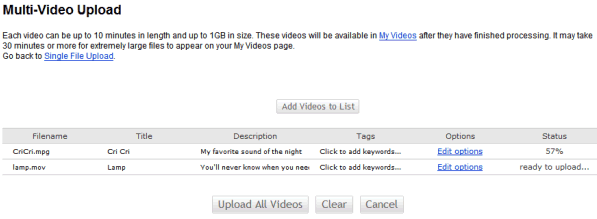
YouTube launched a multi-video uploader that lets you upload videos that are up to 10 minutes in length and up to 1GB in size. You need to install a software (Windows-only, for now), but you'll upload videos from your browser.

The advantages are that you can upload bigger files, you can select more than one video (even all the videos from a folder) and it's allowed to leave the page while the videos are uploaded. The disadvantages: YouTube installs an application that runs in the background and automatically launches at startup. Youtubeuploader.exe uses a lot of memory even when you're not uploading videos to YouTube and also launches Google Updater.


Google Video has a similar tool, but it doesn't work from a browser and you can't enter the metadata before uploading your videos. On the other hand, Google Video doesn't mention any limits for your videos.

A blog post from March 2006 explains why YouTube decided to limit uploads to short videos. "We've gotten a fair amount of emails lately about the new 10 minute limit we've implemented for video uploads. For those of you not familiar with this change, we've always had a 100MB file limit for uploads. We also recently implemented a 10 minute length limit. This change won't impact the vast majority of our users. We know that over 99% of videos uploaded are already under 10 mins, and we also know that most of our users only watch videos that are under about 3 minutes in length. (...) We poked around the system a bit and found that these longer videos were more likely to be copyrighted videos from tv shows and movies than the shorter videos posted."

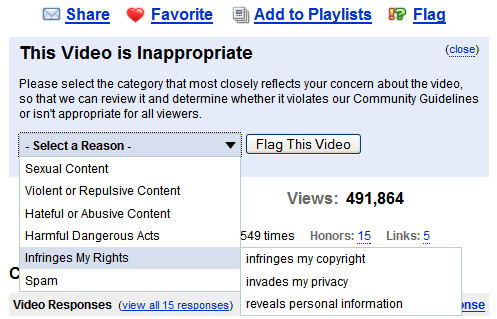
On a related note, YouTube introduced more categories from which you can select when flagging videos. "When users flag a video, it is reviewed by real-life humans at YouTube who check to see if the video should be removed, age-restricted or left alone," explains YouTube. I think it's hard to decide when a video infringes copyright or YouTube's policies, but it could be an interesting exercise to launch a new YouTube section that contains flagged videos, where "trusted" users could vote if the videos deserve to be removed.

Screenshots of Google Talk's Integration with AIM in Gmail

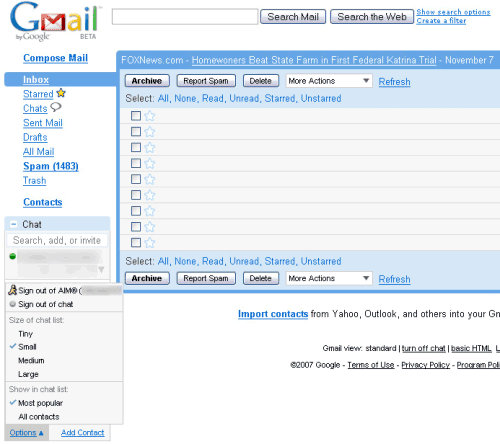
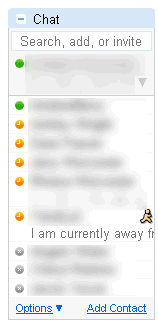
OK, maybe my speculation about the integration between Google Talk and other IM networks didn't have a strong foundation, but at least we know that Google Talk and AIM will interoperate in the near future. Here are some screenshots from a newer version of Gmail, still in testing (Gmail is one of the interfaces that can be used to access Google Talk):


Two years ago, when Google bought 5% of AOL, the agreement included "enabling Google Talk and AIM instant messaging users to communicate with each other, provided certain conditions are met".

{ Thanks. }

November 7, 2007

Gmail API for Greasemonkey

Gmail's new version broke many plug-ins and Greasemonkey scripts, so Google decided to come up with a long-term solution: an API for Greasemonkey.
Greasemonkey is an integral part of the web experience for many experienced users. Google acknowledges that some people are going to change their own experience of our web applications regardless of what we do. Resistance, as they say, is futile. It would also be somewhat hypocritical. After all, a Google employee wrote Greasemonkey in the first place [my note: Aaron Boodman], another wrote these scripts to add functionality to Gmail [my note: Mihai Parparita], and a third wrote two books on the subject (and these docs) [my note: Mark Pilgrim].

Instead, we would like to provide a little help to make such scripts more robust. Instead of finding elements by XPath or DOM traversal, this API provides accessor methods for getting common screen elements. Instead of forcing you to monkey-patch (ahem) our internal functions, this API provides callbacks to call your functions when specific events occur.

This API is experimental. New features and code changes may still cause Greasemonkey scripts to break.

The first Greasemonkey script that uses this API is Mihai Parparita's Macro, which brings additional keyboard shortcuts to Gmail, and the rest of his already famous scripts should also be ported to Gmail's new codebase. The API is not meant to expose messages, contacts or settings, it's more like a convenient way to customize Gmail's interface and functionality without relying too much on the implementation's details.